Plankwork

Add-ons

The parts of Plankwork that not every company needs, so they sit outside the plan. You add one when your work calls for it.

Service Desk

Support your customers next to their project.

Customers who rely on what you deliver have questions and problems of their own, and expect an answer in the time your contract promises. With the Service Desk they file requests in their own portal, your support team works those requests from one queue, and each request is timed against what you promised.

One real request from our demo company shows how it goes: Acme Mobile reports that the Pay button on its checkout does nothing on some iPhones. Every picture is a real screen.

The Service Desk in the manual →SLA plans and calendars in the manual →See pricing →

Marcus Reid at Acme Mobile

The customer files it in their own portal.

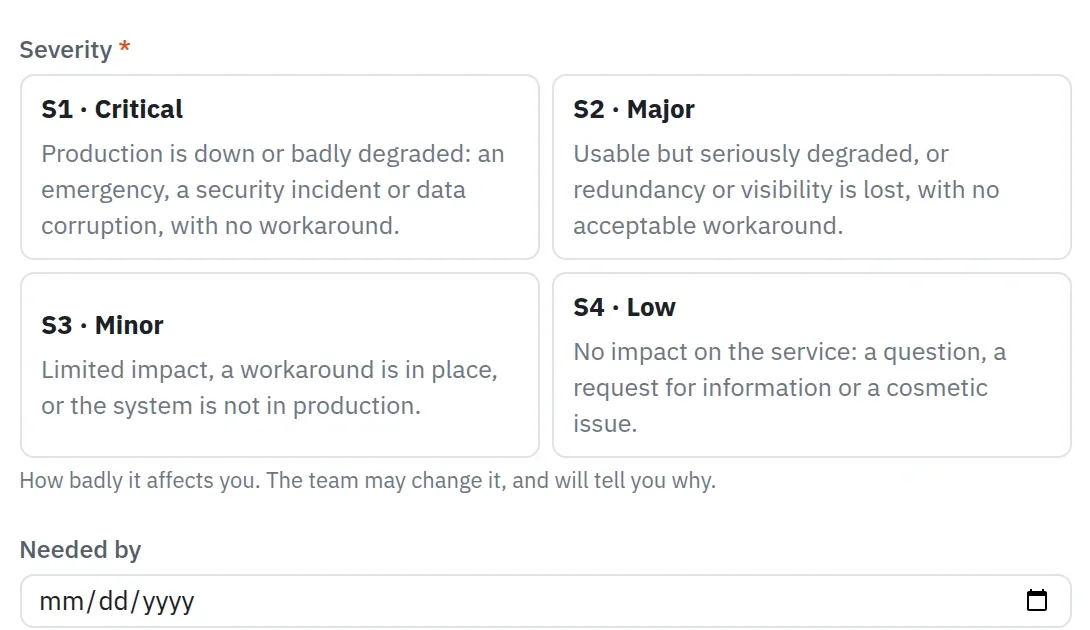
Since iOS 18 came out, the Pay button on Acme's checkout does nothing on some phones. Marcus signs in to Acme's portal and files a request on the project: what kind of request it is, what is wrong, how badly it affects them and, if it matters, by when they need it. Each kind of request asks its own questions, and each severity says what it means, in the words you wrote.

From then on the request's page answers without anyone having to ask: its status and what that means, who holds it, and which service levels have been met. An email goes out at each step to whoever follows the request. Sarah Miller, Acme's lead, sees every request from Acme, not only their own. When the team resolves a request, the customer confirms it or says it is not fixed, which reopens it.
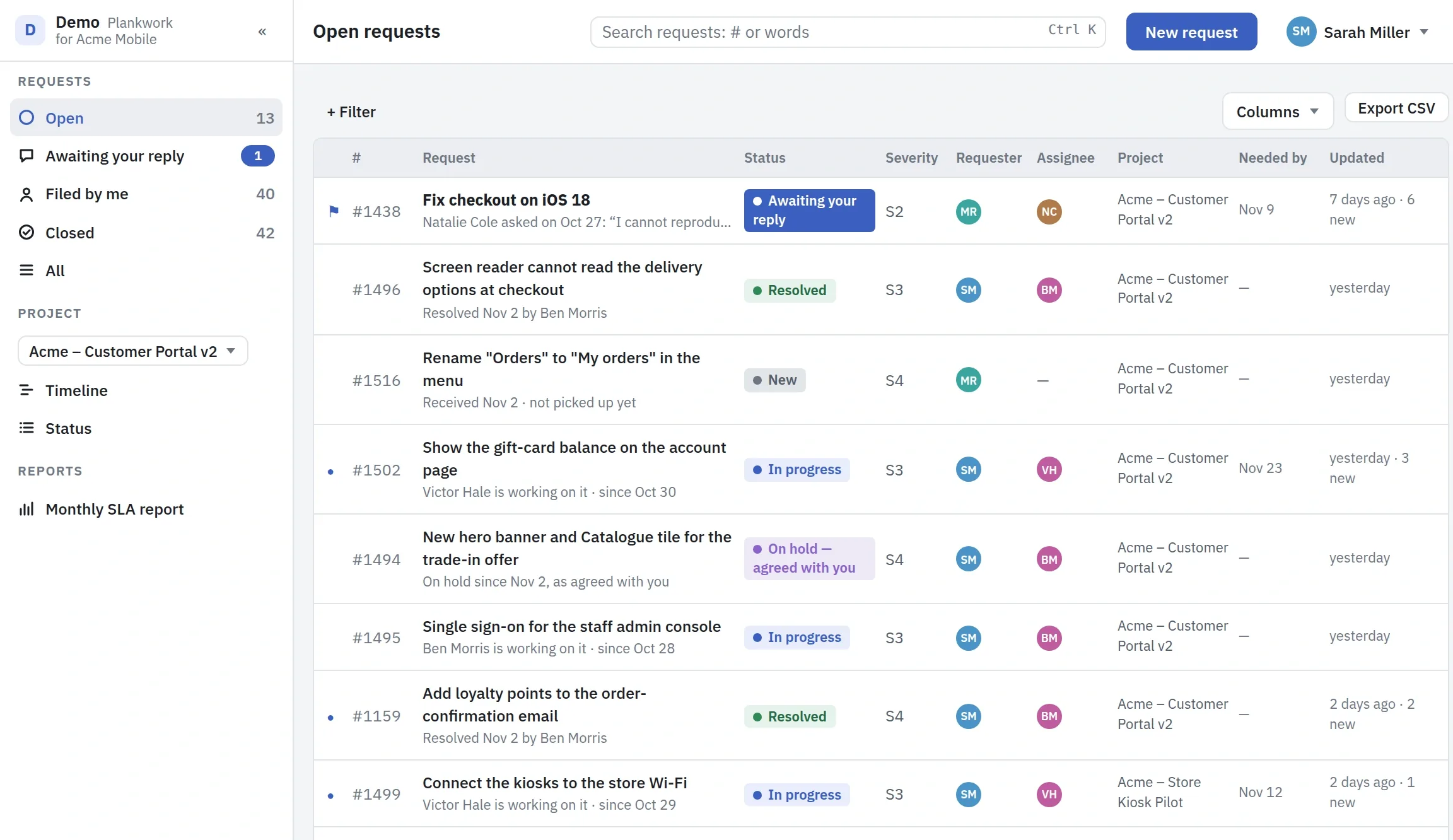
The customer's portal: Acme's open requests with status and severity, the one awaiting a reply first, and a line under each on what happens next
Part of the new request form: four severities, each with its definition, and an optional needed-by date
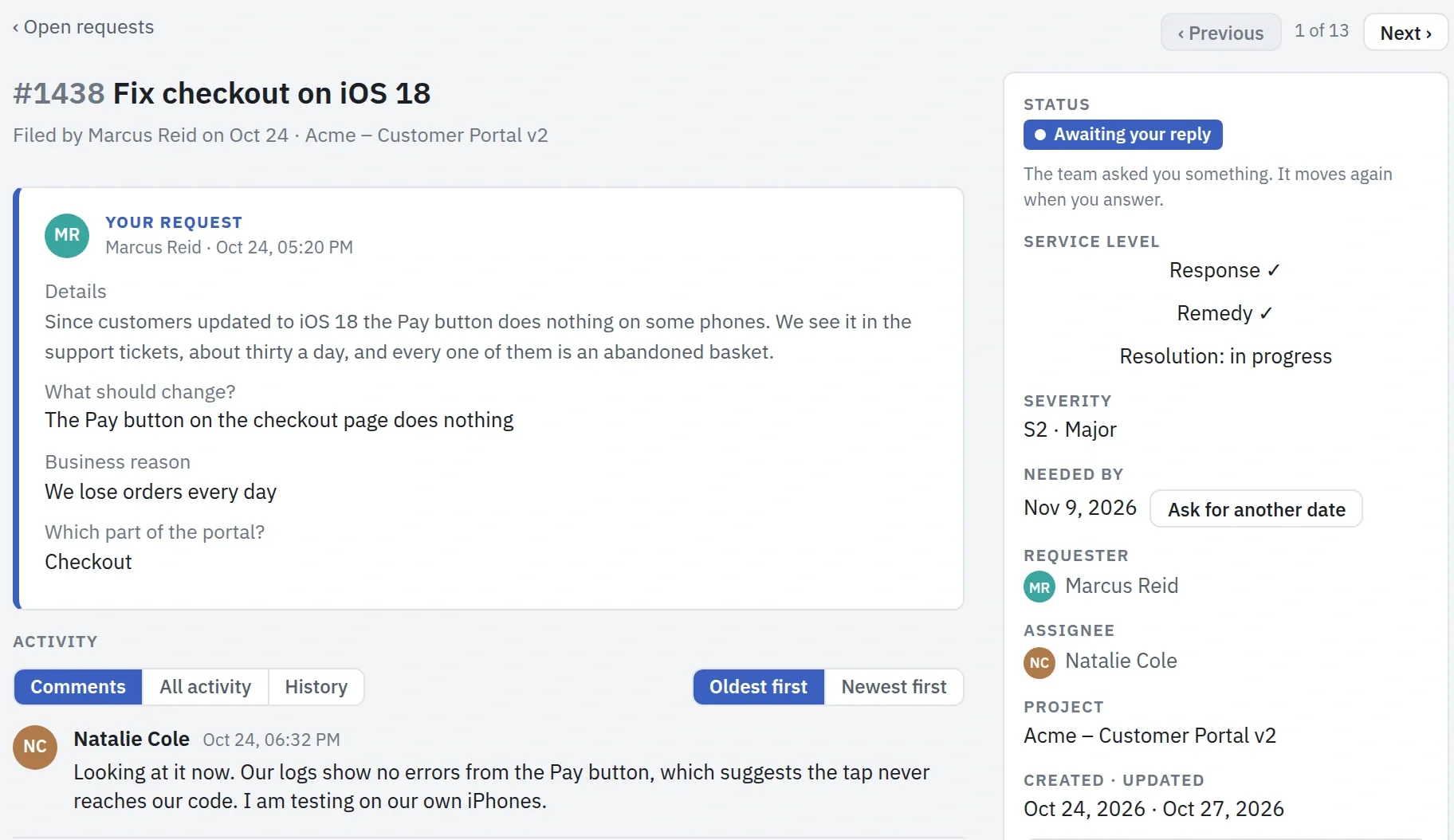
A request as the customer reads it: what was sent, the status Awaiting your reply, the response and remedy targets met, and the team's first reply

Victor Hale and Natalie Cole, on the Service Desk team

Your team works it from one queue.

The new request goes to Victor, the project's triage owner, who sees it in Now and assigns it to Natalie. The queues sort the team's requests by what needs doing next: not yet taken, mine, at risk, breached, waiting on the customer, on hold. Choose a project and they narrow to it. The project's board has a link to its requests, which also says how many have breached or are at risk.

Natalie answers on the request's page, where each reply says what kind it is. A question marks the request as waiting on the customer and pauses its clock. A workaround meets the remedy target, so the customer has something to work with before the fix. An internal note stays with the team, and the customer never sees it.

When a request needs project work, the team makes a task from it on the project's board or links one already there, and the request shows the task's status. Time logged on a request counts in the project's hours and cost. The Service Desk team needs no access to the board and gets none by joining, so it can be a support line that never sees the project, or a project manager who does both. Making or linking a task takes access to the board; without it, a team member sees a linked task's number, title and status.

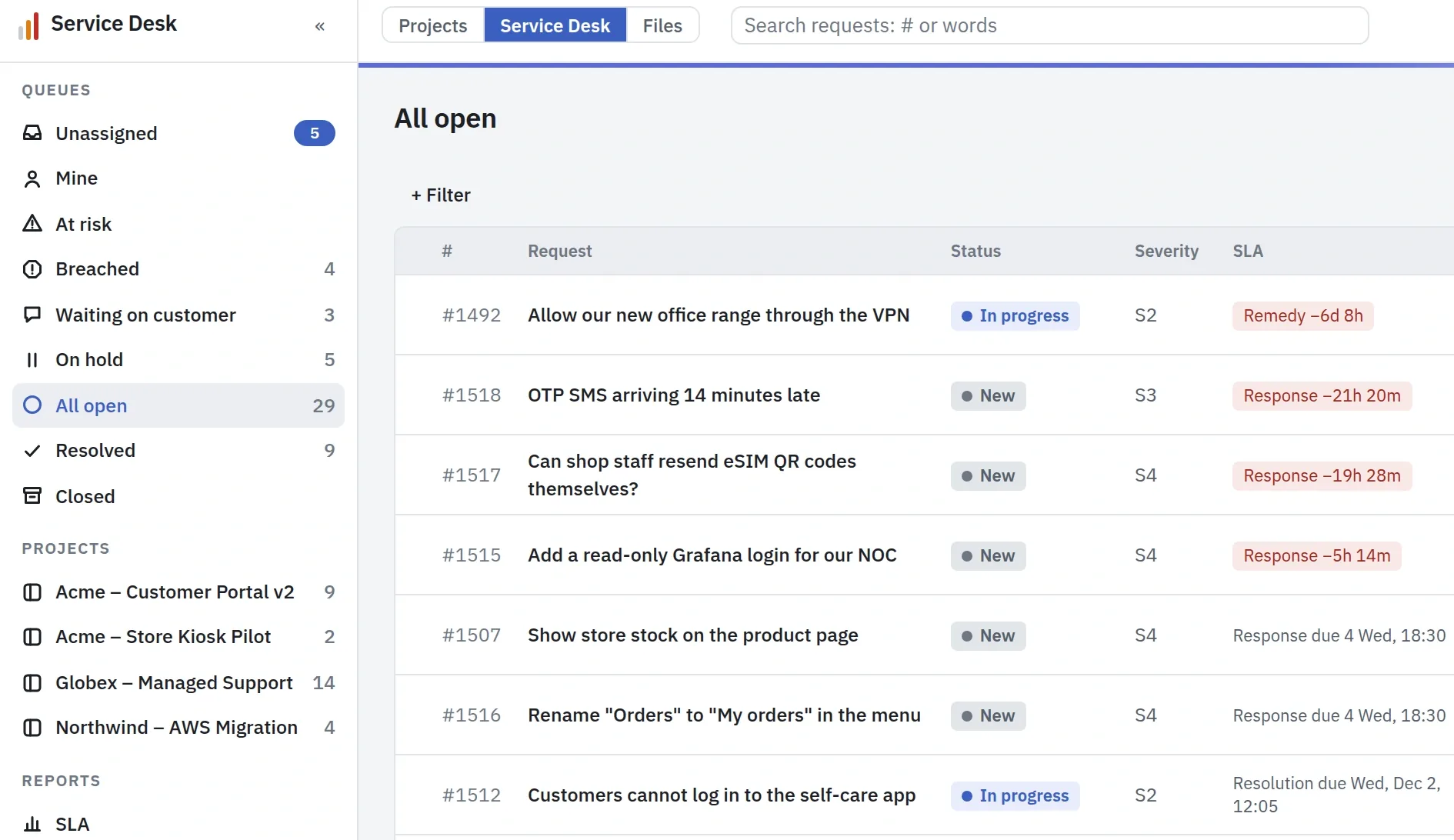
The Service Desk queue with its queues and projects in the menu: open requests with their status and severity, and SLA clocks, the ones past their target in red
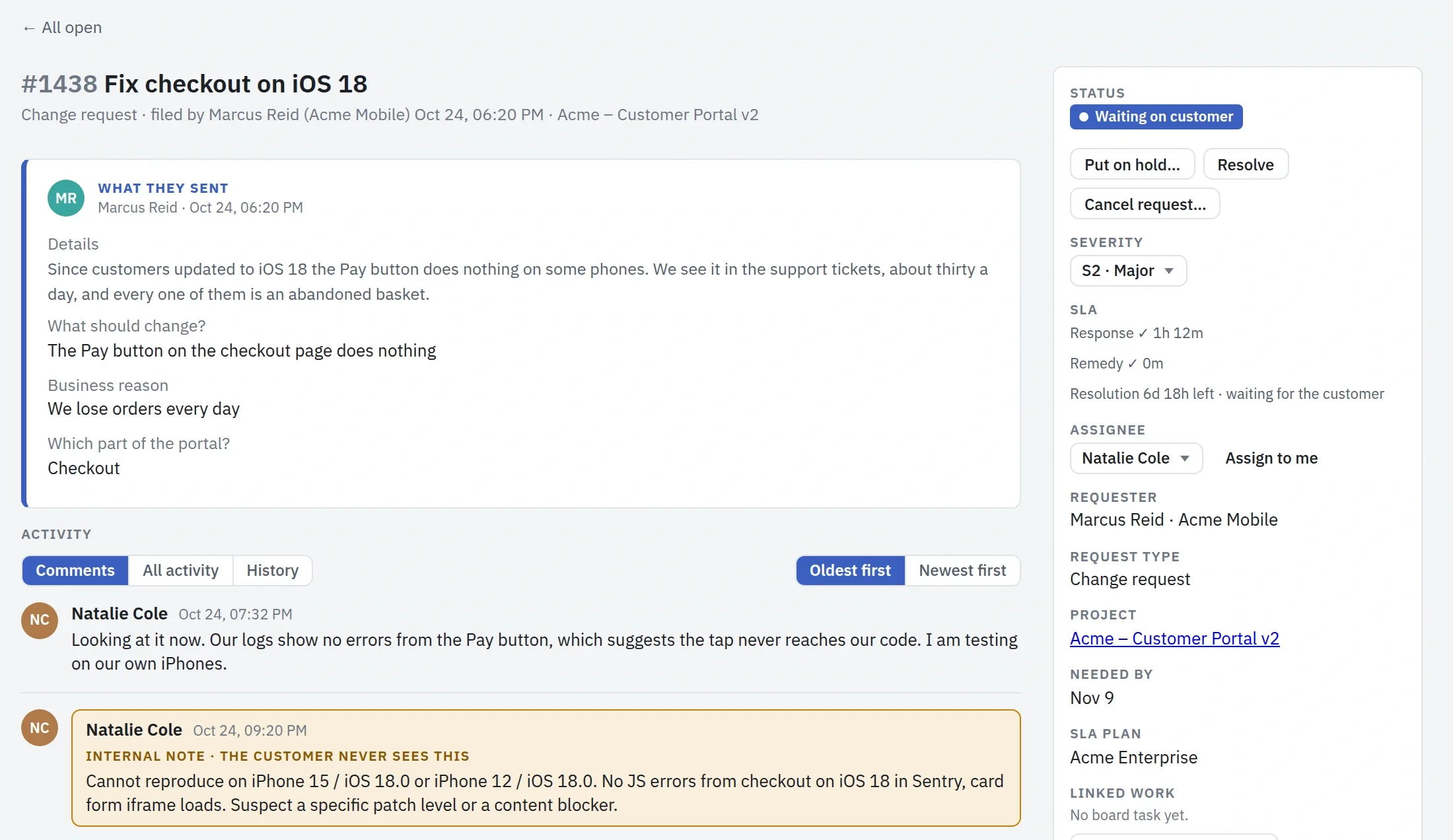
A request on the team's side: what the customer sent, a reply, an internal note the customer never sees, and a panel with status, severity, three SLA clocks and the assignee
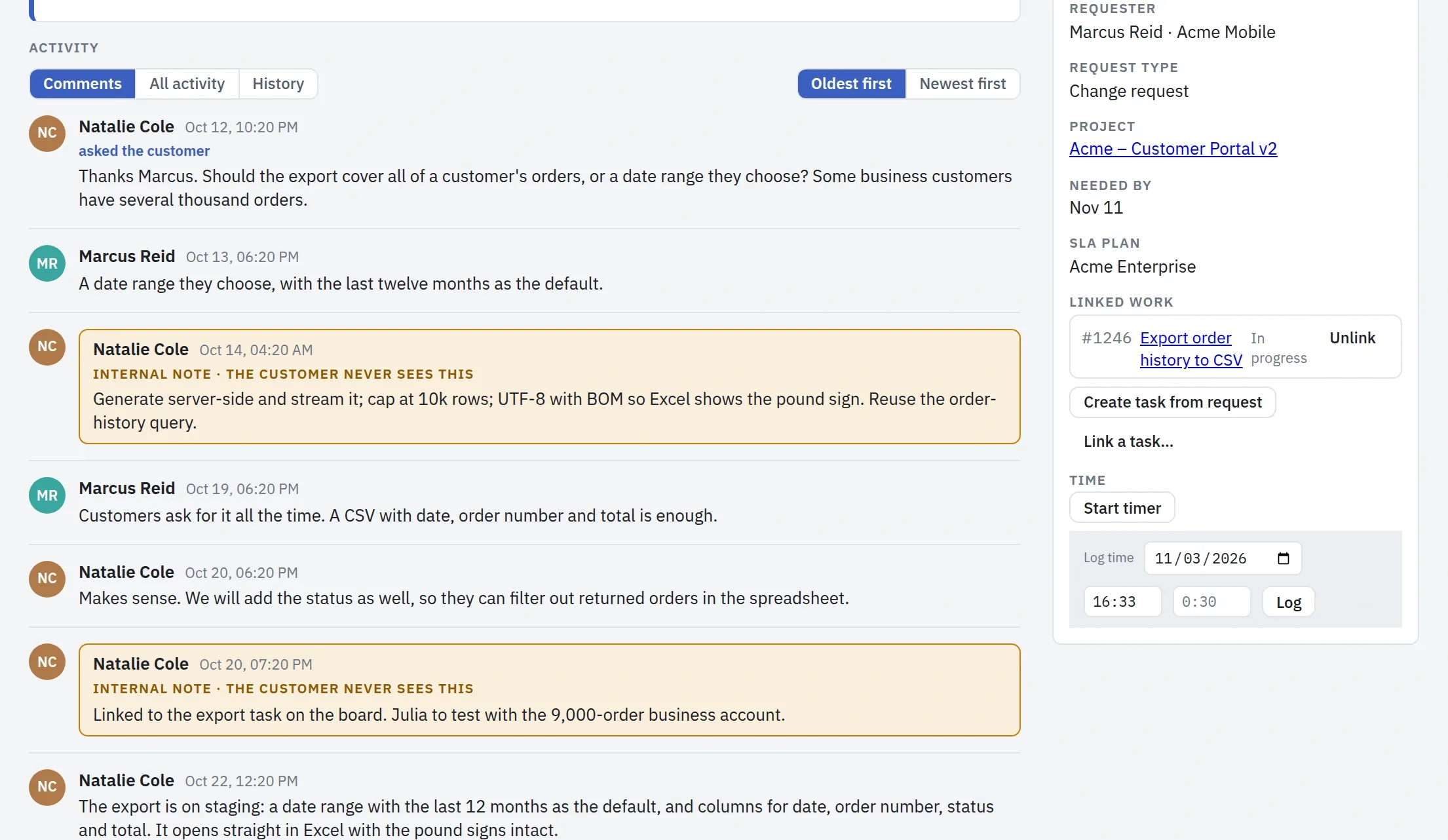
A request's conversation with an internal note, beside its panel: the linked board task with its status, the buttons to create or link a task, and the timer and time log

Diana Carter, an Owner

What you promised is written down once.

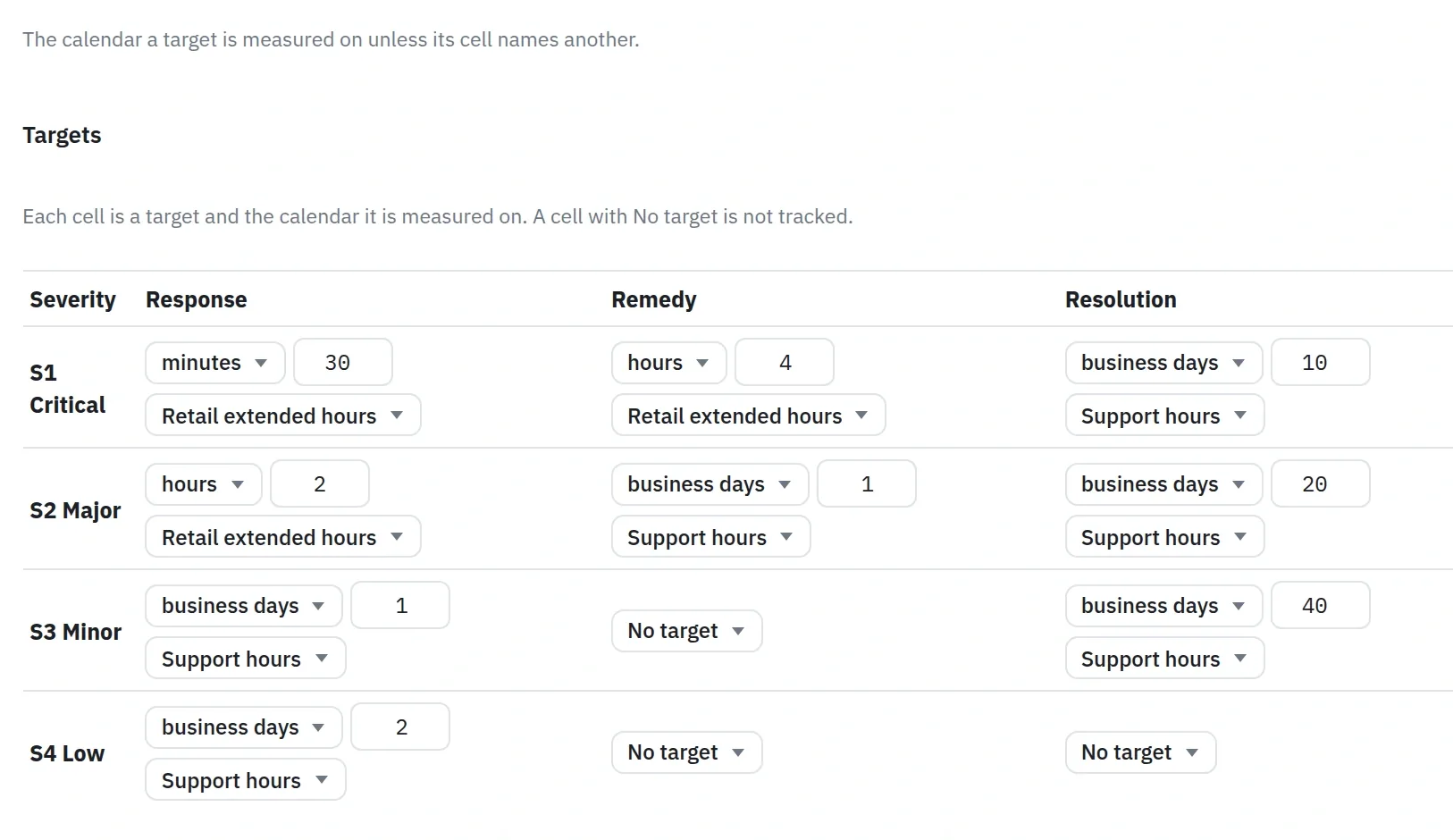
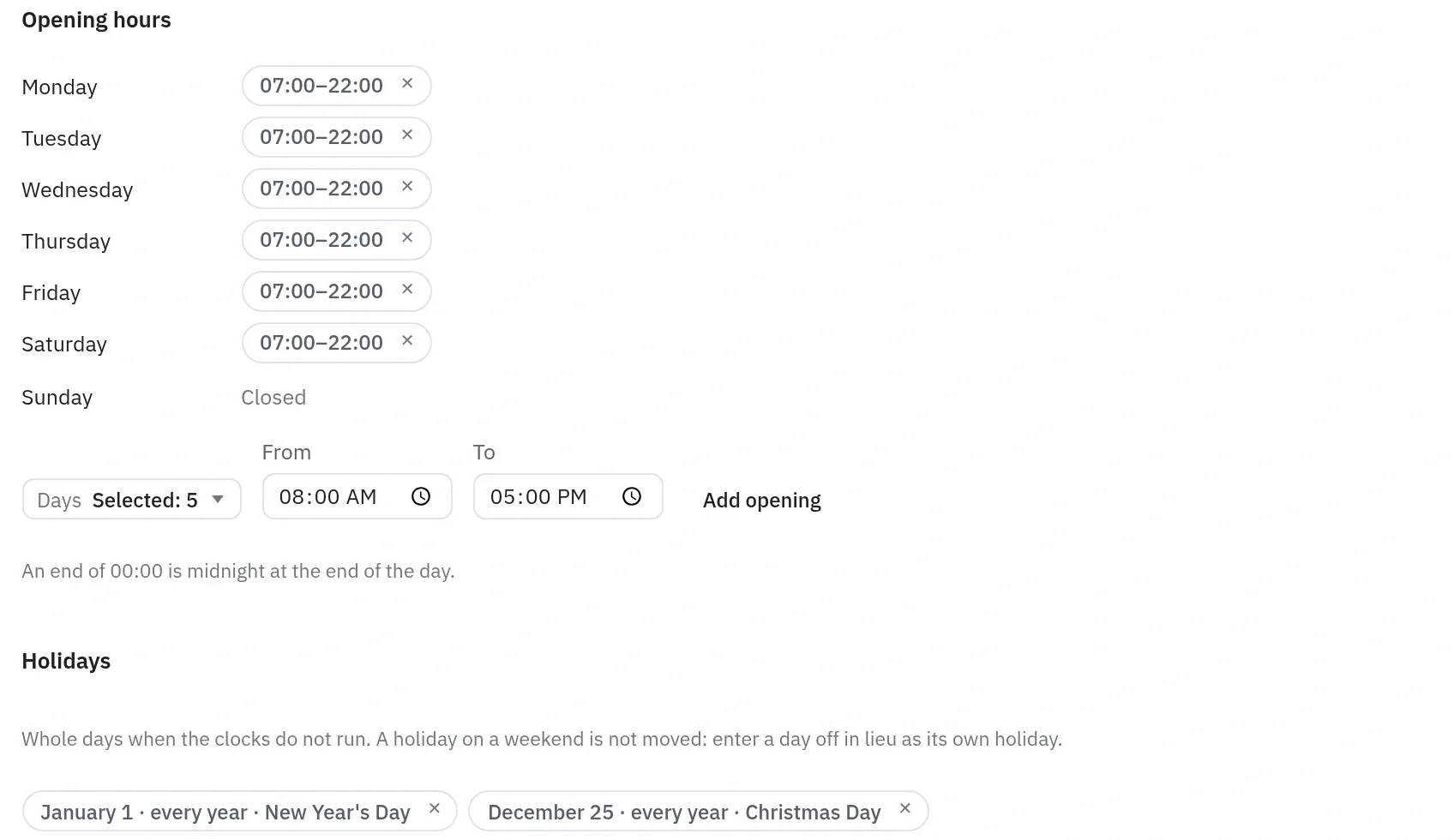
An SLA plan writes a support contract down: a response, a remedy and a resolution target for each severity, in minutes, hours, business days or calendar days. A calendar says when the clocks run, as opening hours in one time zone, minus holidays, and one target can run on a different calendar from the rest. An Owner starts a plan from a template or from nothing, and can change every figure.

The clocks pause while the team waits for the customer or holds a request by agreement. When a clock has used a set share of its target, 75 % unless the plan says otherwise, the request goes to At risk and comes to Now for whoever holds it. Past the target, it also comes to the triage owner. Changing a plan keeps its earlier version, so each request is timed against the version in force when it was filed.

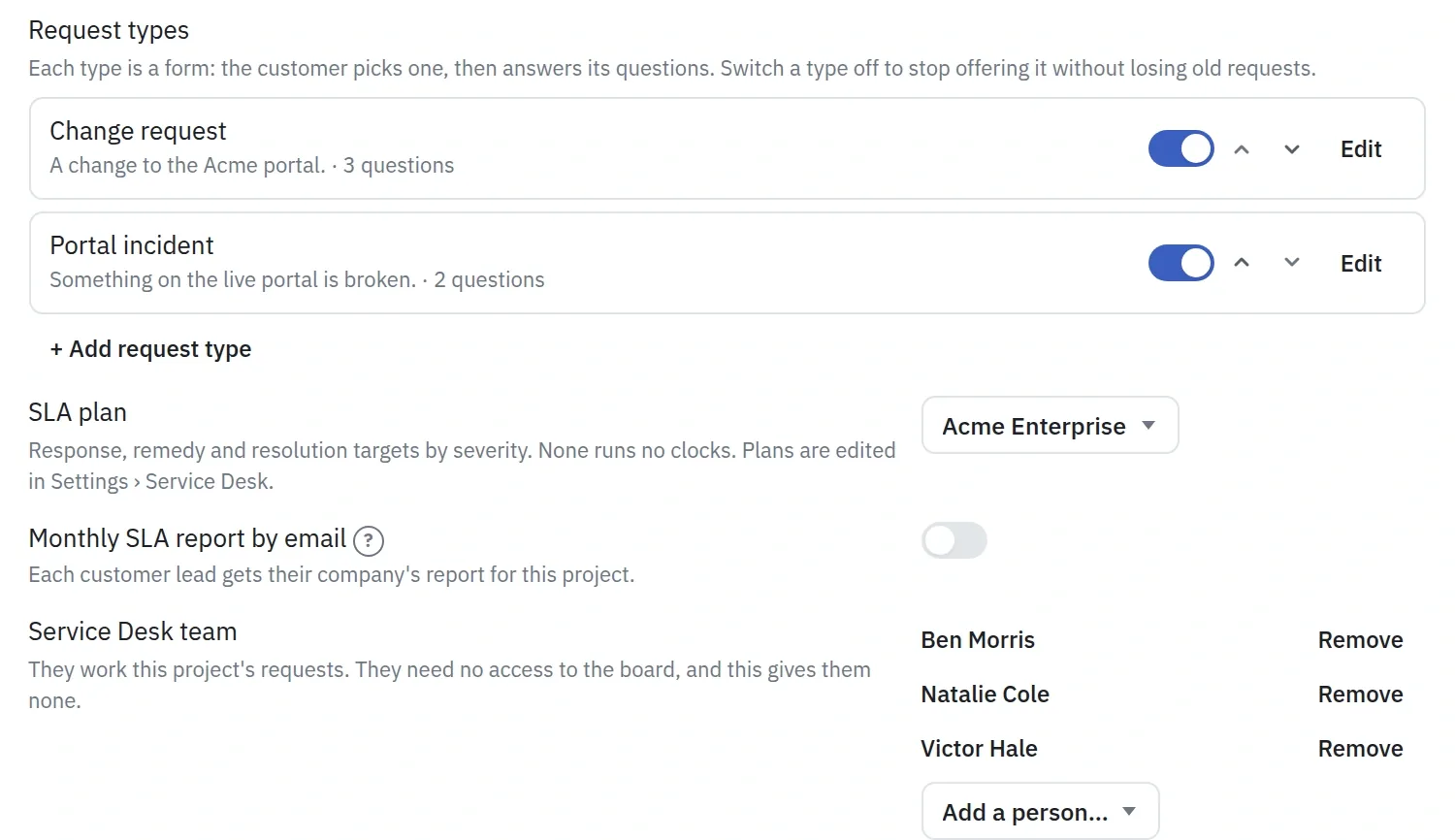
The Service Desk is turned on project by project: who at the customer may file, which kinds of request they choose from, which plan applies, who works the requests and who picks up the new ones.

An SLA plan: response, remedy and resolution targets for severities S1 to S4, each with its unit, amount and calendar
A calendar: opening hours from 07:00 to 22:00, Monday to Saturday, closed on Sunday, and two holidays
Part of a project's Service Desk settings: two request types, the SLA plan, the monthly report switch, and the team of three, with the note that they need no access to the board

Diana Carter and Sarah Miller

The report comes from the requests themselves.

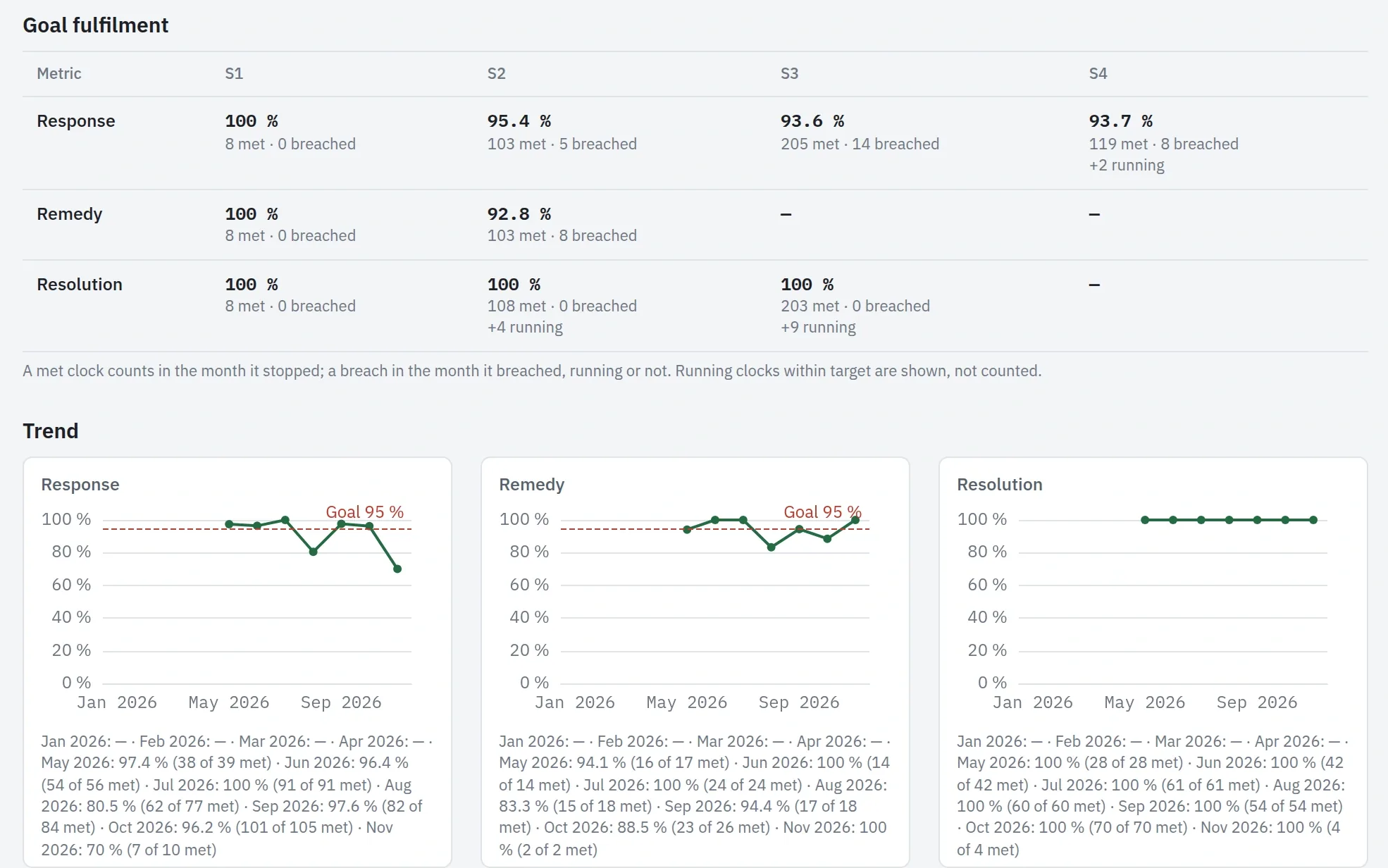
The SLA report shows how often each target was met, per severity and against the plan's goal, month by month, and lists the requests that breached with their timelines. It also shows how long each step took, including the time spent waiting on the customer or a supplier. It compares requests and severities, never people, and it exports to CSV, Excel and PDF. A closed month never changes.

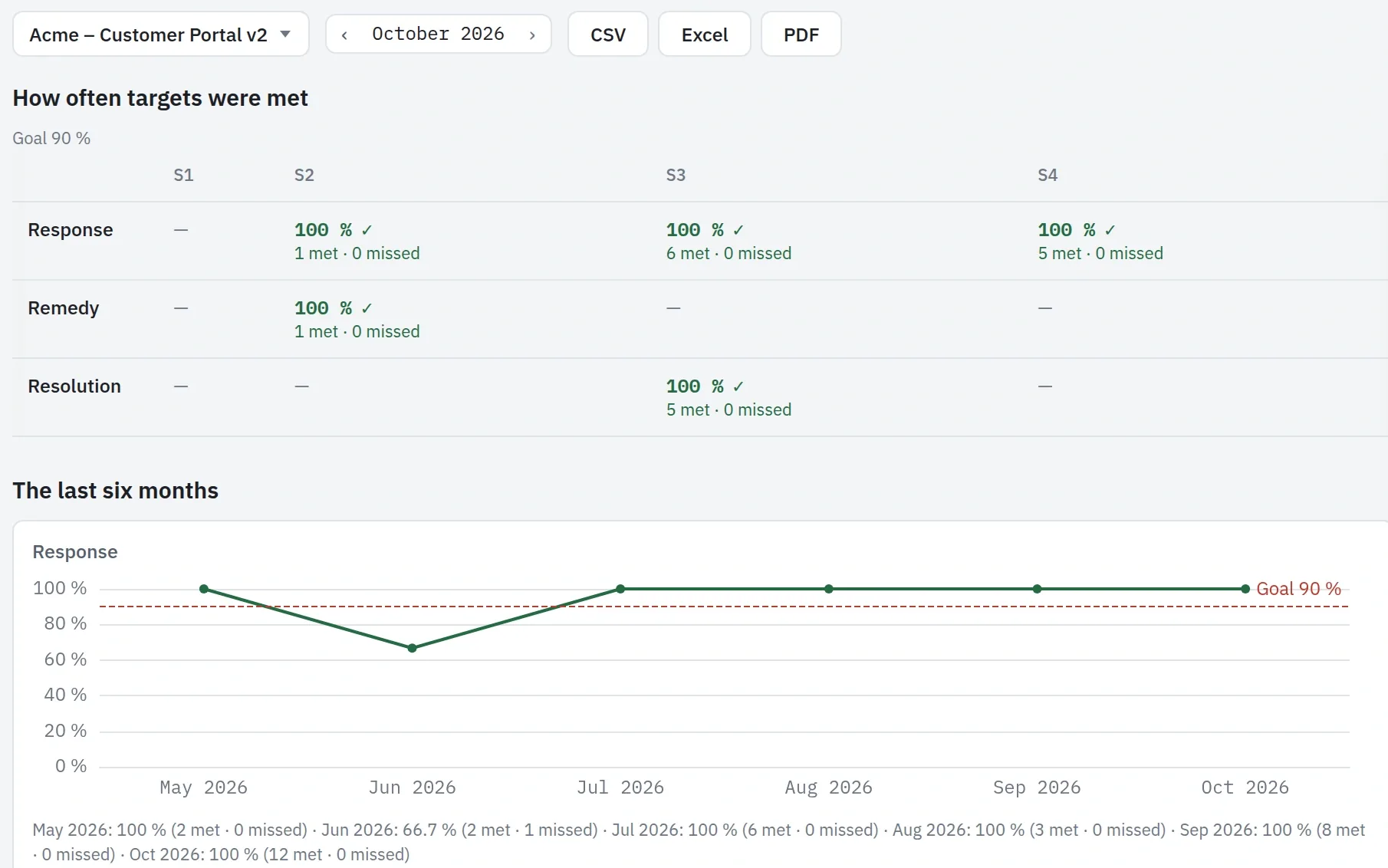
Your customer's lead reads the same facts in the portal: for each complete month and project, how often the targets were met and what was missed, with no person's name and no internal note. An Owner can also have it emailed on the first working day of the next month.

The SLA report: how often the response, remedy and resolution targets were met per severity, and each target month by month against its goal
The customer's monthly SLA report for October: how often the targets were met per severity, and the response target over the last six months against a goal of 90 %

See pricing →