The AI is yours. Plankwork is where it works.
Plankwork includes no model and resells none. It gives your AI two doors. The integrated Board Chat runs on a model you choose: on your own server with open source software, or through an inference provider. OpenRouter.ai, for example, offers the models behind Claude, ChatGPT, DeepSeek and others. This door handles most everyday actions directly in the application, and it is the easiest way. MCP connects the assistant or coding agent you already use: Claude, Claude Code, OpenCode, Pi, DeepSeek Harness and others. It gives them Plankwork's well-defined tools, to combine for your own use cases. Nothing else in Plankwork depends on either.
Your model, your assistant, your choice.
Plankwork adds no AI charge and no usage meter. What you pay for AI stays between you and the company you chose. Each name below links to its project or service.
Which setup fits you
Keep it on your own hardware
Run an open model on your own server. llama.cpp, its derivatives such as Ollama or LM Studio, and vLLM are supported out of the box. Board Chat and the suggestions then use your server, and their requests go to no AI company. The server needs an HTTPS address that Plankwork can reach. Protect it with a key.
Start with no server
Use an inference provider such as OpenRouter.ai. One key reaches hundreds of models, among them the ones behind Claude, ChatGPT and DeepSeek. You pay OpenRouter for what you use. Pick a model that supports tool calling. A cheap one is enough for most chores. What the model reads goes to OpenRouter and the company running the model.
Use a provider you already pay
Board Chat needs an API that takes OpenAI-compatible requests, with tool calling. An Owner enters the address, the model name and the key. The Claude API has its own setting, and runs every AI feature except Board Chat. Your contract and your bill stay with that provider.
Mix two models
An Owner can add a faster model for light work, such as suggestions and tidying text. It has its own address and key. So a small model on llama.cpp can do the light work, and Claude through OpenRouter can run Board Chat.
Connect your assistant or agent through MCP
Claude connects on the web and on the desktop, on a plan that allows custom connectors. Claude Code and the open source OpenCode and Pi are coding agents for the terminal, with the same address and sign-in. The open source DeepSeek Harness connects through an MCP plugin that supports OAuth. A developer reads and updates tasks from where they code. OpenCode can run on your local model or through OpenRouter. Any tool that supports remote MCP with OAuth can connect.
Use no AI at all
Board Chat and the suggestions stay off until an Owner turns AI on. An Owner can also turn AI clients off. With both closed, the boards, plans and reports work just as before.
The same assistant reaches Jira, GitLab and your other systems through its own connectors. Plankwork does not need to.
Through MCP, Plankwork receives only what your assistant puts in each request, never the conversation itself.
A model of your own for the everyday chores.
Board Chat is the chat panel beside the board, the plan, the risks and the reports. The model behind it is not part of Plankwork. It takes API access, not a chat plan: your own llama.cpp server, or Claude through OpenRouter.ai. An API key is billed apart from a Claude or ChatGPT plan. Plankwork sends the model the request, the conversation so far, and what it reads from the boards the person can open.
Most of what a project manager asks is routine. A small model can do it, because Plankwork gives it ready-made tools: create a task, edit it, move it. A large change takes no longer to ask for than a small one.
It never changes anything by itself. Each request comes back as a card, with one line per change. Nothing happens until someone selects Apply. A line that cannot be undone says so first, and one Undo takes back the rest. By default it changes only the board you are looking at.
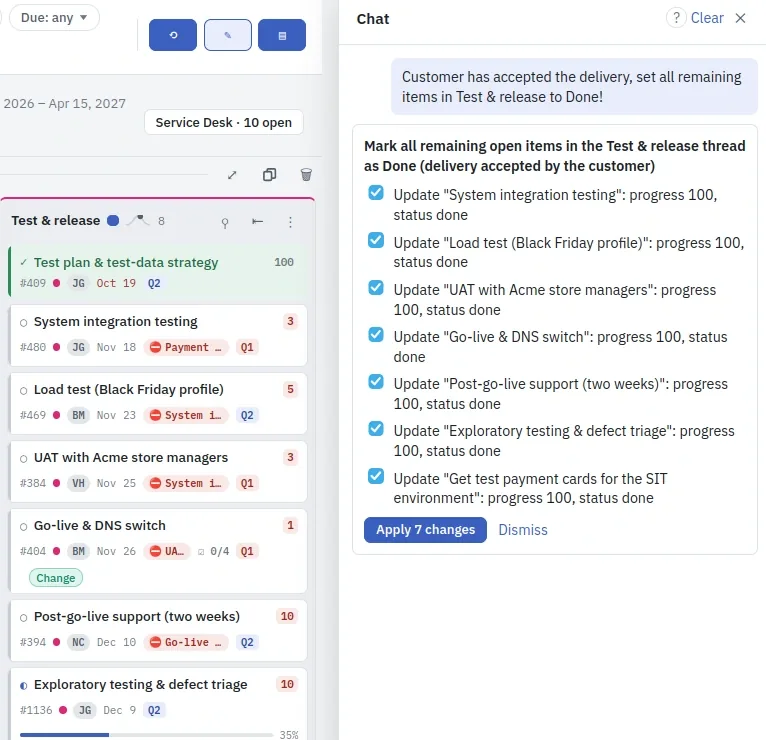
What people hand to it
- "Push the venue task three days, and everything waiting on it"
- "Move everything in Phase 2 four weeks out"
- "Give all of Anna's tasks to Ben"
- "Make the status report repeat every Monday"
- "Delegate this to Michael, back by Friday: I need the vendor numbers"
- "Copy the Onboarding thread from Acme into this board"
- "What have I delegated, and what's late?"
- "Accept the suggested quadrants in Marketing"
Where else your model helps
Quadrant suggestions
Suggests whether a task with no quadrant yet is urgent and important. The suggestion and its reason show as a badge on the task.
Tidying text
Tidies a task's title, description or resolution when you ask. If you edit the text in the meantime, your edit wins. The change can be undone.
Report summaries
Writes an executive summary for a progress report. You can edit it before you export. A scheduled report email sends it as written.
Risk drafts
Turns text you paste, such as meeting notes, into a draft risk. You set the likelihood and the impact.
Plan proposals
Proposes the dependencies between tasks and a size for each. You keep only the rows you want.
Importing a file
Proposes which column of a CSV file is the title, the owner or the date. You review a preview before anything is imported.
It also proposes follow-up tasks and mitigation titles. It summarises risks and the portfolio when asked, and suggests which task a note belongs to. Role fit, a weekly comparison of each person's finished work with their role, is off by default.
The assistant you already use, at full scale. Always your decision.
MCP is the open standard AI assistants use to work with other software, and Plankwork has an MCP connector built in. A person adds one address to their assistant, such as Claude or OpenCode, signs in to Plankwork once and approves the connection. From then on the assistant reads their boards, answers questions about them and makes changes, as that person and within that person's permissions.
It works through 31 tools: 20 that only read and 11 that make changes. Between them they cover tasks, threads and dates, delegation, risks, goals, notes, files, time, and Resources and Finance: much the same ground as Board Chat, under the same permission checks.
Going this far is always a person's own decision. Nobody connects an assistant on someone else's behalf. There is no Plankwork card on this door: a change runs when the assistant calls the tool, so the confirmation is your assistant's own approval prompt, and a copy previews first by default. The connection can be revoked in Settings at any time, which cuts the assistant off on its next request, and changing your password disconnects every assistant at once.
An Owner can also turn AI clients off for the whole organisation. Every connected assistant is then refused at its next request, and nobody can connect a new one. The connections are kept, so they work again when the Owner turns it back on.
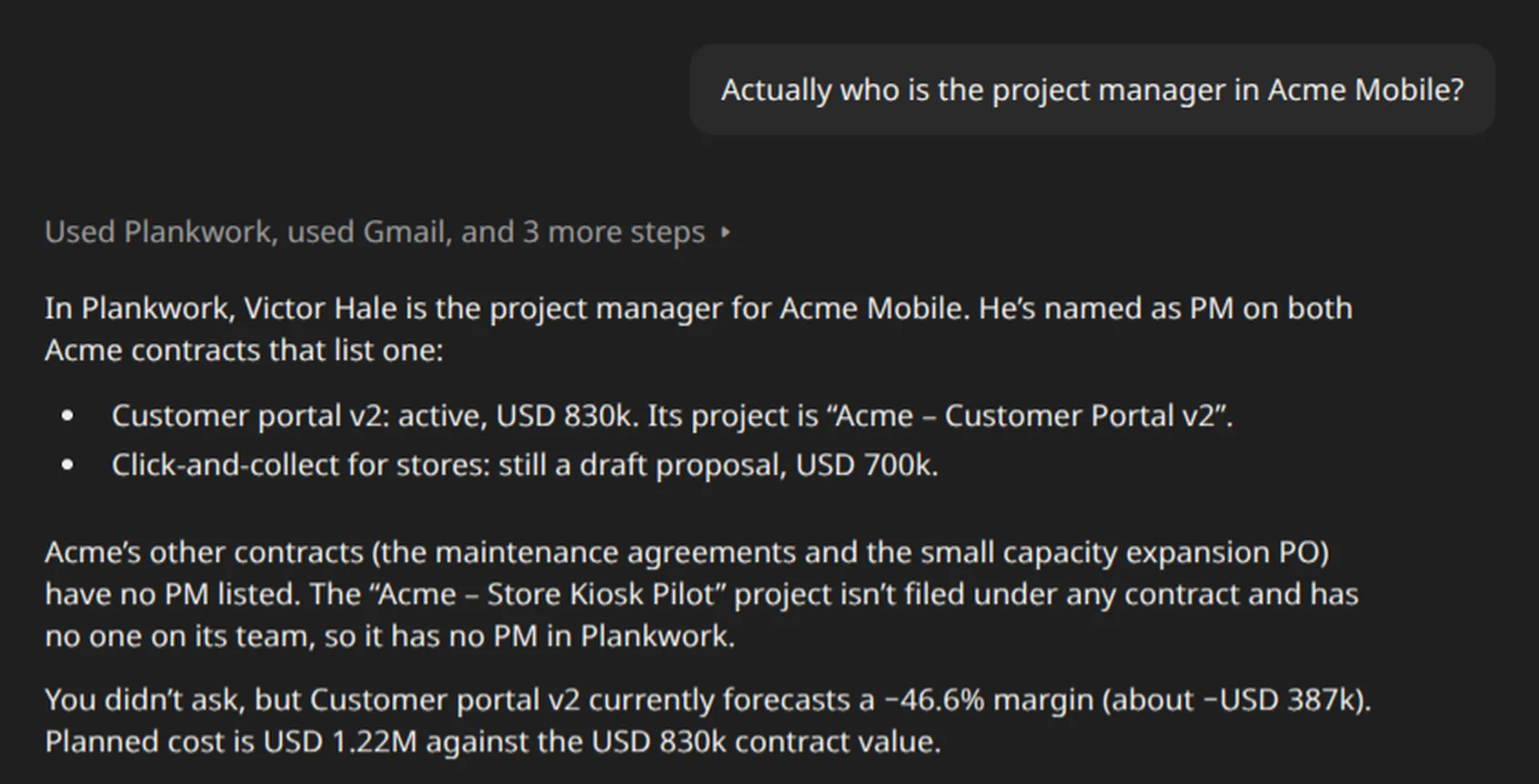
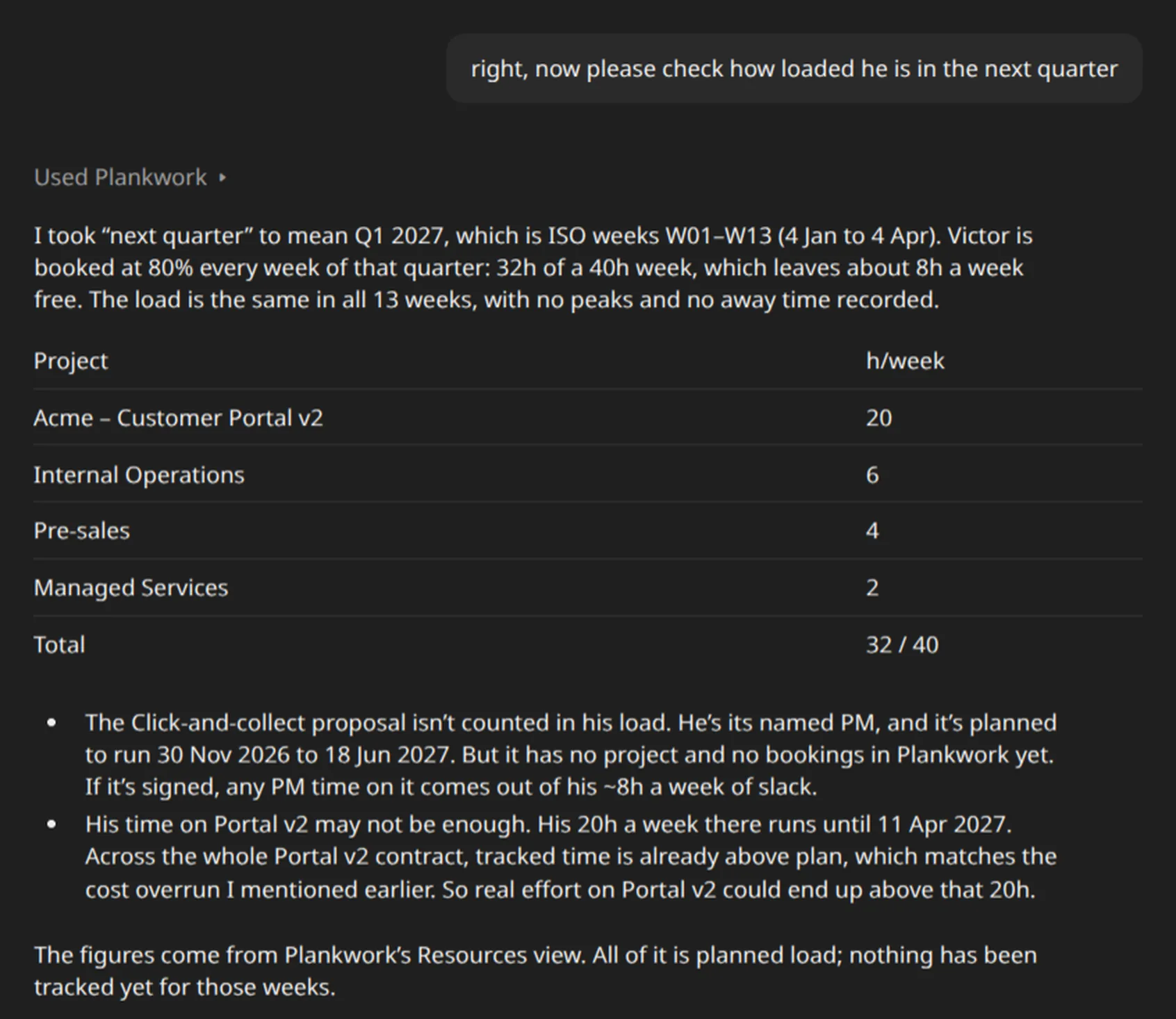
Where that conversation went
The two questions above had a reason: a new project for Globex needs someone to run its first phase. The same conversation goes on to put Victor on the project and give it a plan to start from.
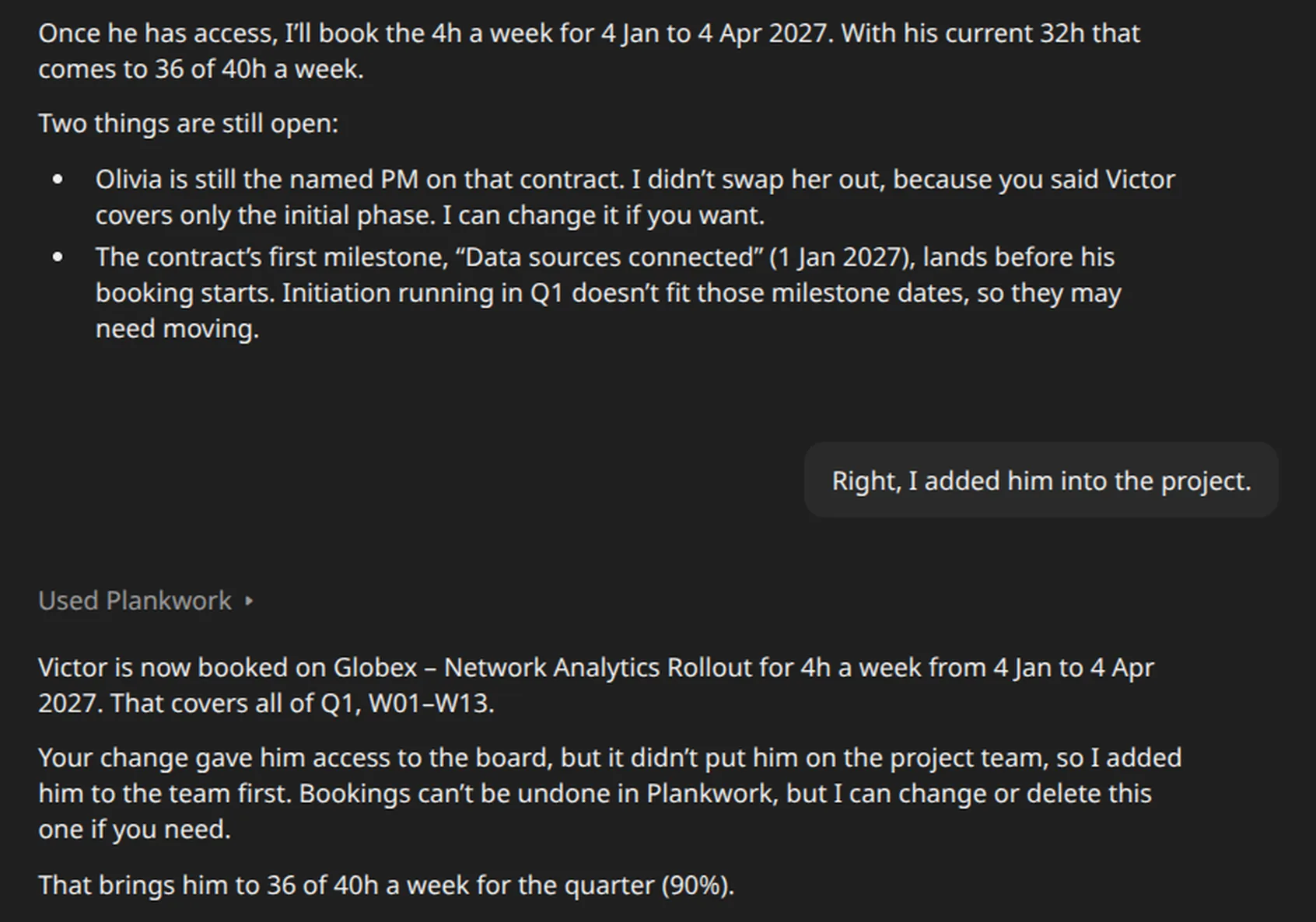
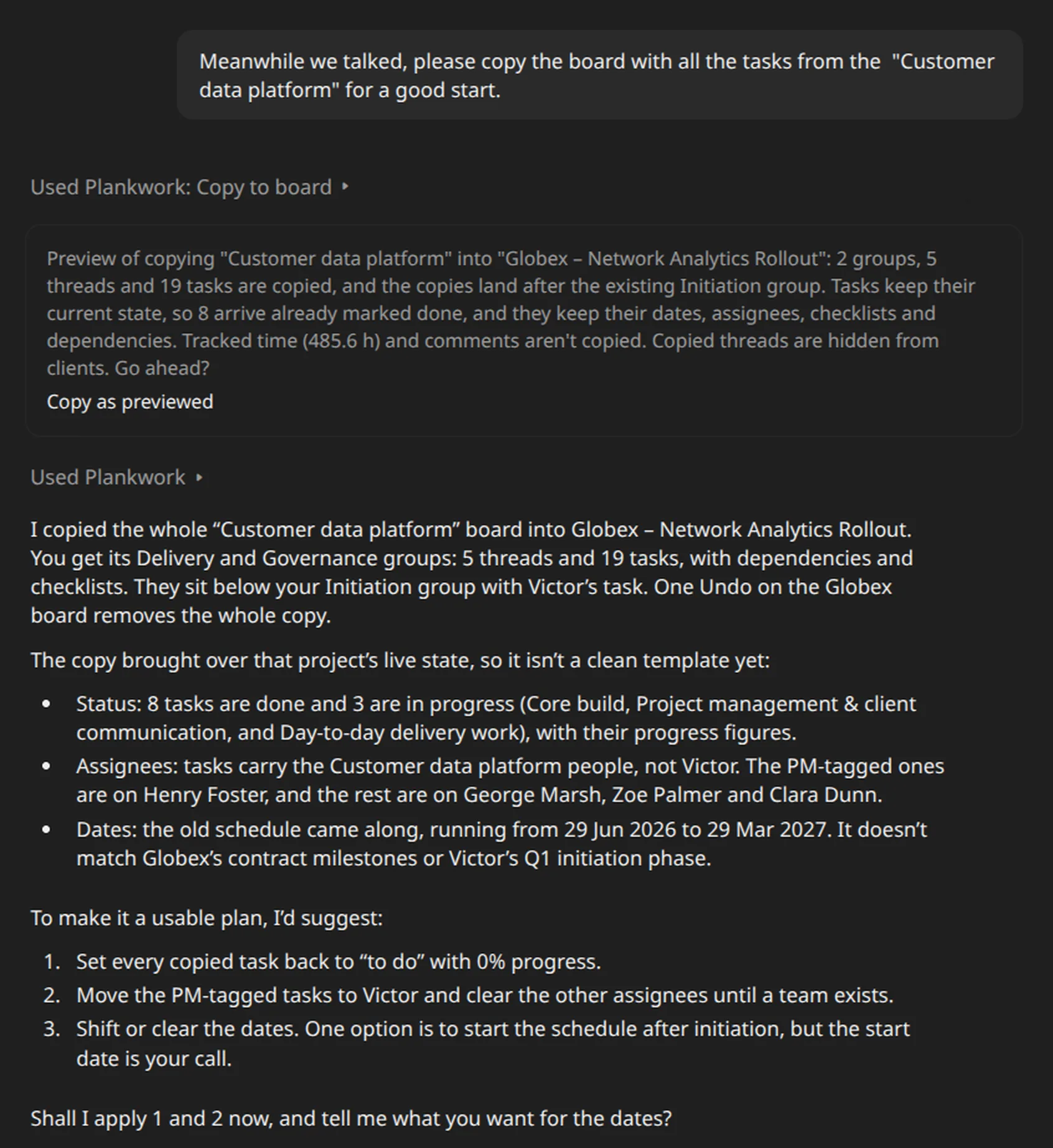
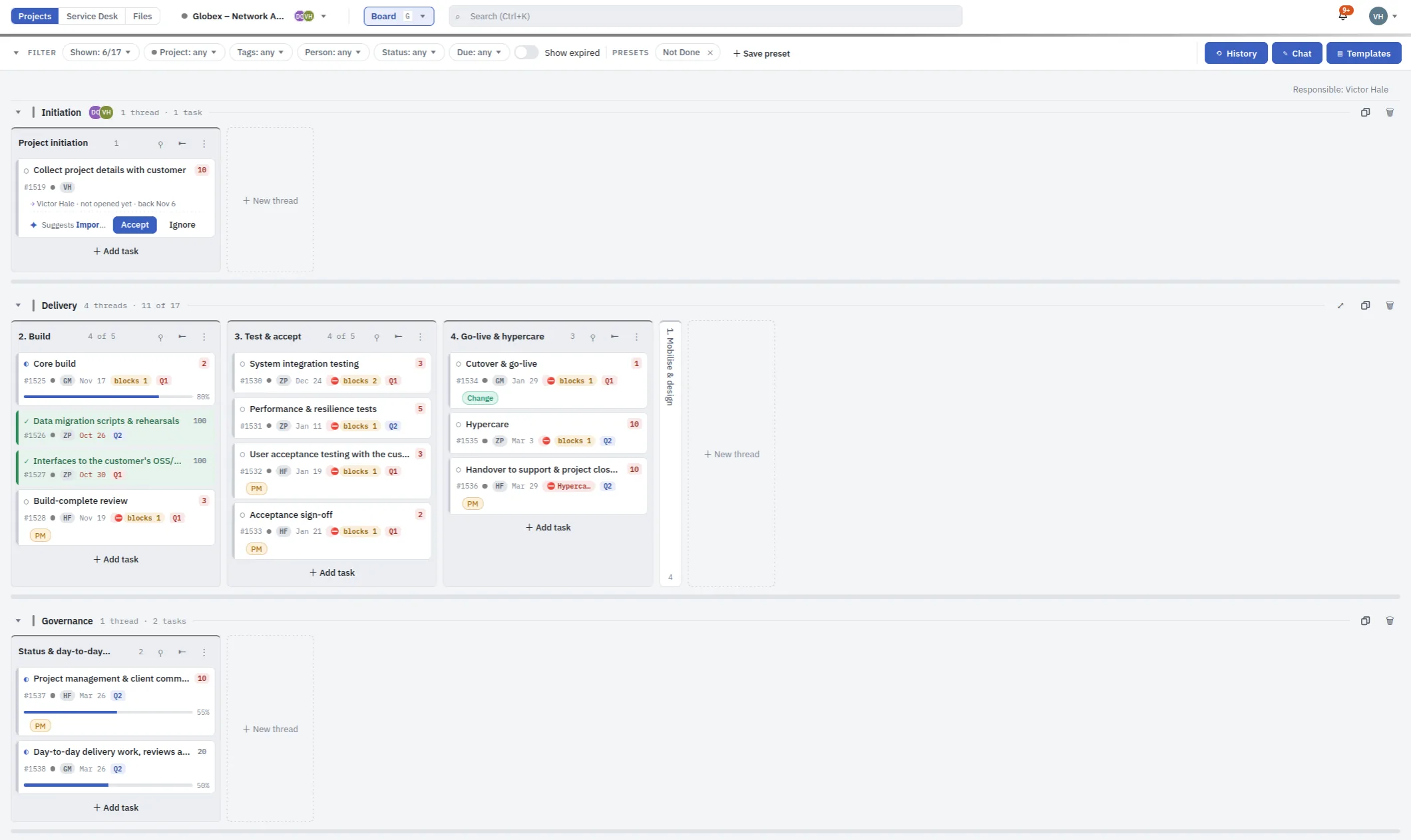
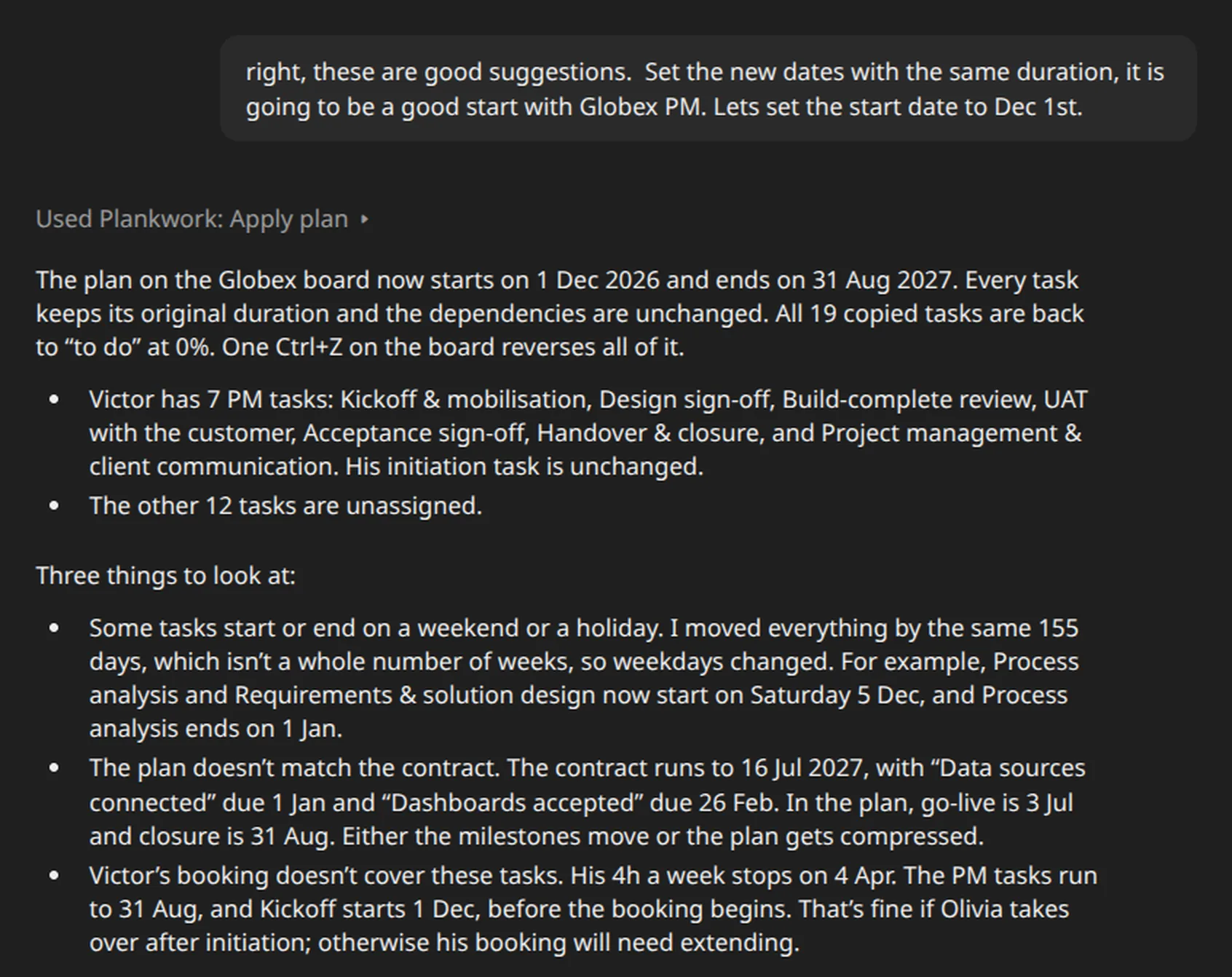
What it did, and what it left to people
- A person gave Victor access to the project. An assistant cannot, whoever asks.
- The copy was previewed before it ran, and one undo takes back the copy or the plan changes. The booking cannot be undone, and the assistant said so.
- The warnings came unasked: a contract forecast at a loss, a plan that does not match its contract, a booking that stops too soon. What to do about them stayed with the person asking.
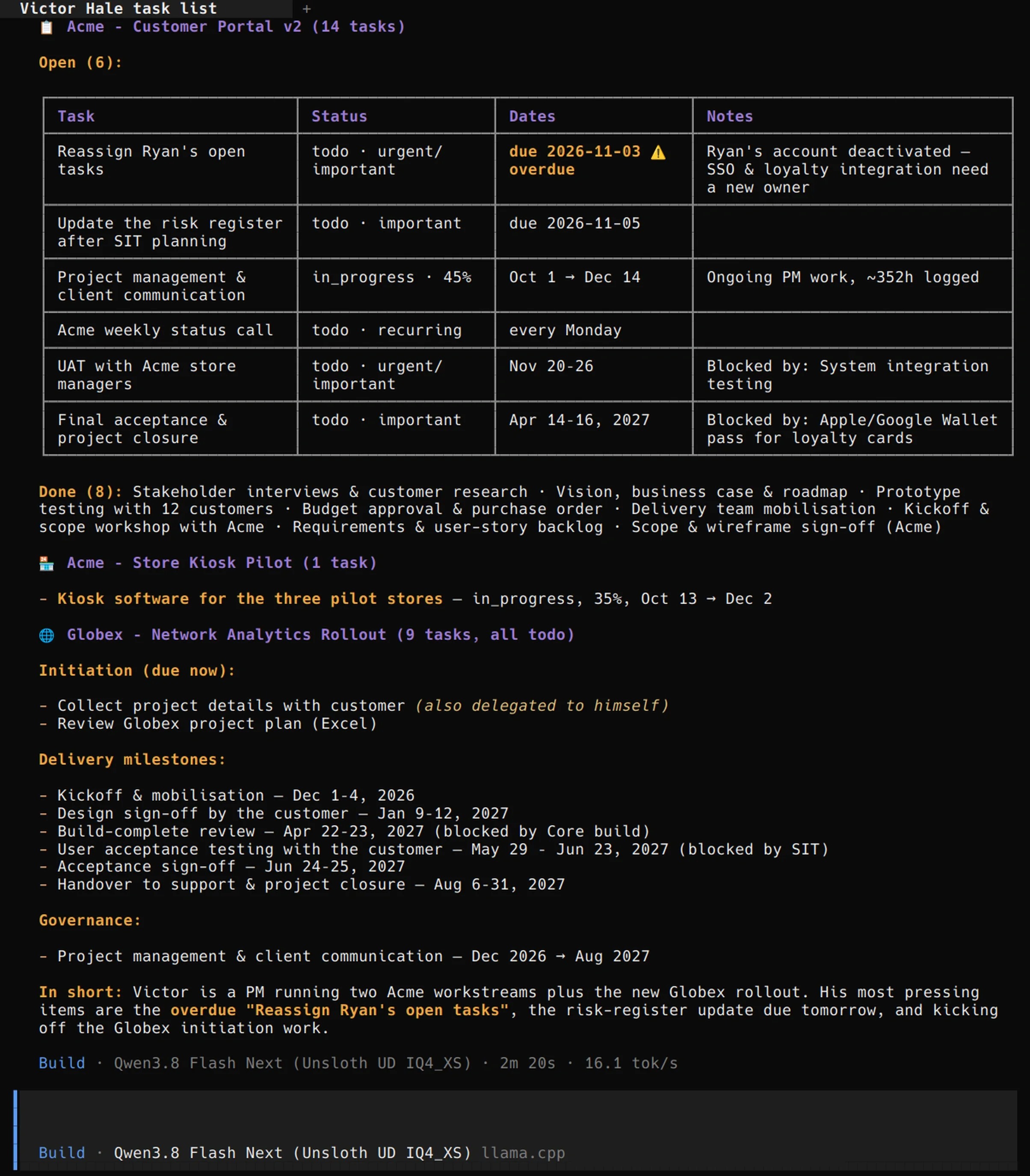
A second example: OpenCode
The conversation above, in Claude, is one example of how software that supports MCP can use Plankwork's tools. This is a second example, in OpenCode: an open source coding agent for the terminal, here on an open model running on a local llama.cpp server. It connects through the same address and sign-in, and it works on the same projects.
This example only reads, but write operations are equally well supported, so the security of MCP, in addition to Plankwork's permissions, rests largely on how the software you connect is configured.
"mcp": {
  "servers": {
    "plankwork": {
      "type": "remote",
      "url": "https://app.plankwork.com/mcp"
    }
  }
},
"permissions": [
  { "action": "plankwork_*", "resource": "*", "effect": "ask" },
  { "action": "plankwork_get_*", "resource": "*", "effect": "allow" },
  { "action": "plankwork_list_*", "resource": "*", "effect": "allow" },
  { "action": "plankwork_search_*", "resource": "*", "effect": "allow" },
  { "action": "plankwork_count_*", "resource": "*", "effect": "allow" },
  { "action": "plankwork_get_upload_link", "resource": "*", "effect": "ask" }
]
This is the Plankwork part of the OpenCode configuration used here, version 2.2.5. The last matching rule wins: every Plankwork tool asks first, the read tools run freely, and the upload link asks again, because it hands out a link for uploading files. A tool added later asks too, unless its name starts with one of those read prefixes. The file holds no password or token.
Two things undo this. Running OpenCode with --auto approves these changes without asking. And a rule has to write the tool's name with an underscore, as here: with a dot, as a session displays it, the rule does nothing.
Plankwork as your assistant's inbox
One way of working that runs today. The instructions and the outcome both live on the project, and the assistant does the work in between.
Write it down
Put the instructions on a Plankwork task, as you would for a colleague, and tag the task: say, "assistant".
Hand it over
Tell your assistant, such as Claude Code or OpenCode: "Do the tasks tagged assistant on the Acme board." It reads the board, finds the tagged tasks and reads the instructions on each.
It works where the work is
Through its own Jira and GitLab connectors, it does what each task asks: opens the ticket, answers the issue, reviews the merge request.
It records the outcome
It links each task to the ticket or merge request it worked on, and marks the task done. The project keeps the record, and the next person finds it there.
Plankwork asks assistants to keep comments for people's own words, so its own account of the work comes back to you in the conversation. In every system it touches, the assistant works with your permissions, and each change it makes in Plankwork is marked as made by an assistant.
Rules that hold, whichever AI you use.
Plankwork checks these itself, on every request. They do not rely on a model behaving well, so they hold for any model and any assistant, from your own llama.cpp server to Claude.
Nothing changes from a chat alone
Board Chat puts every change on a card. If the board has changed so that a line no longer fits, nothing is applied. At either door, if one change in a request is invalid, nothing is applied.
No more than the person
Every read and every change passes the same checks as the person's own clicks: their boards, their permission profile, and Owner-only stays Owner-only. A board they cannot open does not exist for the AI.
The Owner decides
Only an Owner sets the model, its address and its key, or opens and closes a door. Other members see the AI settings and cannot change them.
Access and customers are off limits
Giving anyone access to a board or a project is refused, even when an Owner asks. Client accounts are refused at both doors, so no AI acts in a customer's name.
Every change is signed
Activity marks each change an AI makes with its door, and with the model when it is known. That is your organisation's own model, or the one an assistant such as OpenCode reports, labelled as reported.
Suggestions, not decisions
A quadrant suggestion never sets the quadrant. A risk draft with a score is thrown away. A plan proposal never sees or carries a date. Summaries are written from figures Plankwork computes first, and when nothing moved, no model is asked.
What the AI can and cannot do →Connecting an assistant through MCP →