Plankwork

How a promise to a customer gets kept.

Diana Carter signed the deal with Acme Mobile. To keep them as a customer, she promised three things: a new customer portal live before Black Friday, serious incidents caught within five minutes, and an ISO 27001 certificate. This is how her company keeps that promise in Plankwork, step by step, with every feature it uses on the way. The people and projects come from our demo company, and every picture is a real screen.

Step 1 · Victor Hale, project manager

The project starts.

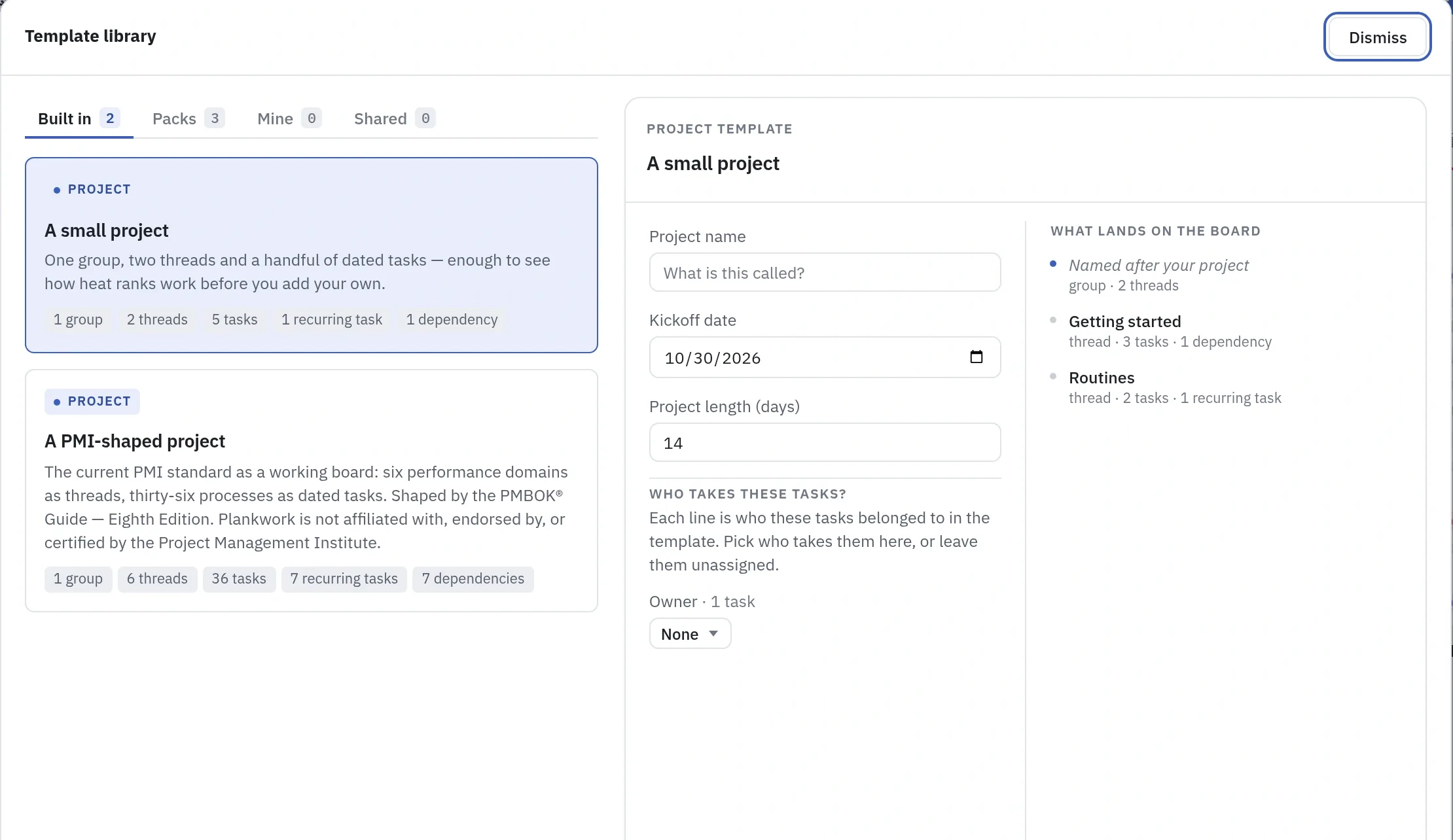
Victor runs the new Acme portal. He creates its board from a template, so the phases are there on the first day: discovery, build, test and release. In the project details he writes down what the project is for, names who is responsible and adds his team: Natalie and Ben to build it, Julia to test it, and two analysts for the first weeks.

The backlog Acme sent arrives as a spreadsheet and comes in as tasks. Victor asks Board Chat, the AI assistant in Plankwork, to draft the first phase, checks what it proposes and confirms it. The signed scope document goes on the kick-off task, where everyone will look for it. This is the one time the work has to be brought in: from here on it lives in Plankwork, and nobody types it again anywhere else.

The project also gets its own Service Desk on the first day, so Acme has one place to send questions and requests from the start. We come back to it in step 6.
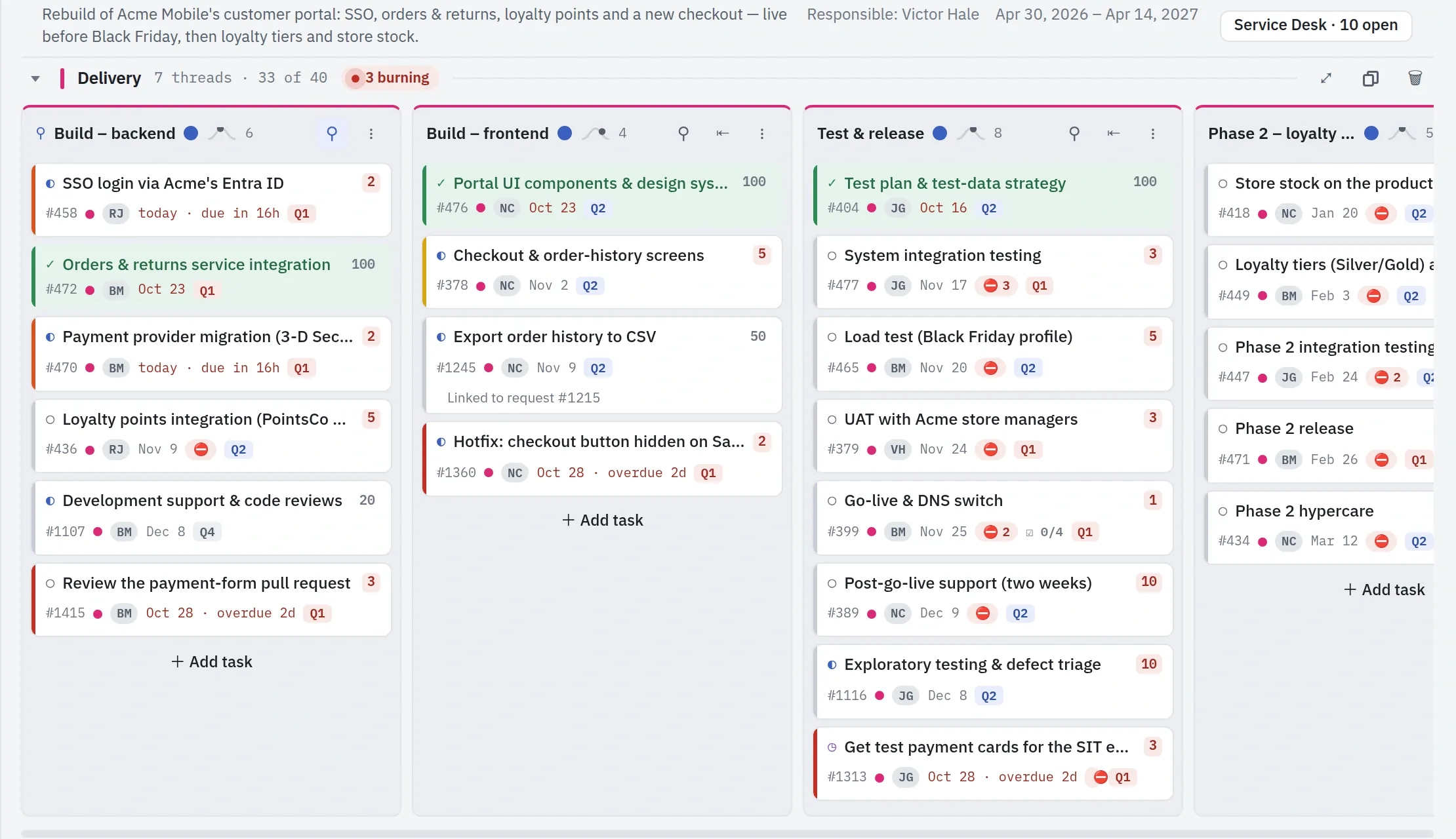
The Acme portal's board: the Delivery group with its threads for build, test and release, each with its tasks, owners and dates
The Template library: built-in project templates, and the form that applies one to a new board
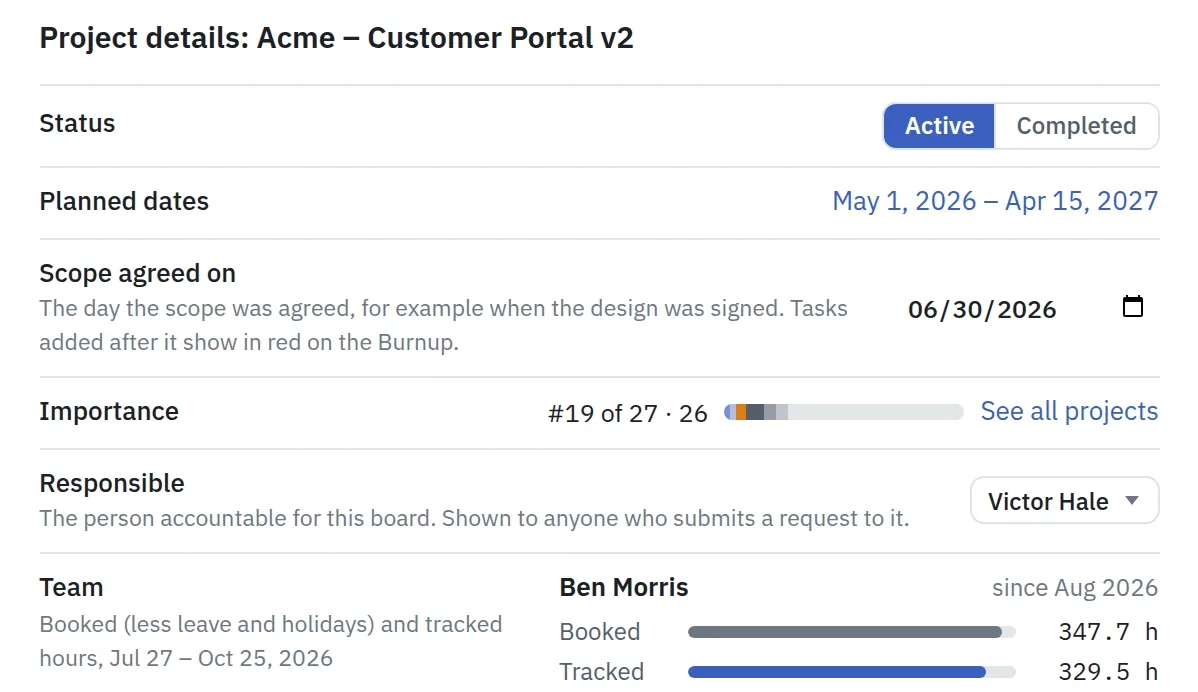
The top of the project details window for Acme – Customer Portal v2: its status, planned dates, the date the scope was agreed, its importance rank and Victor Hale as the person responsible.

Next, Victor plans the way to Black Friday.

Step 2 · Victor Hale, project manager

The plan to Black Friday.

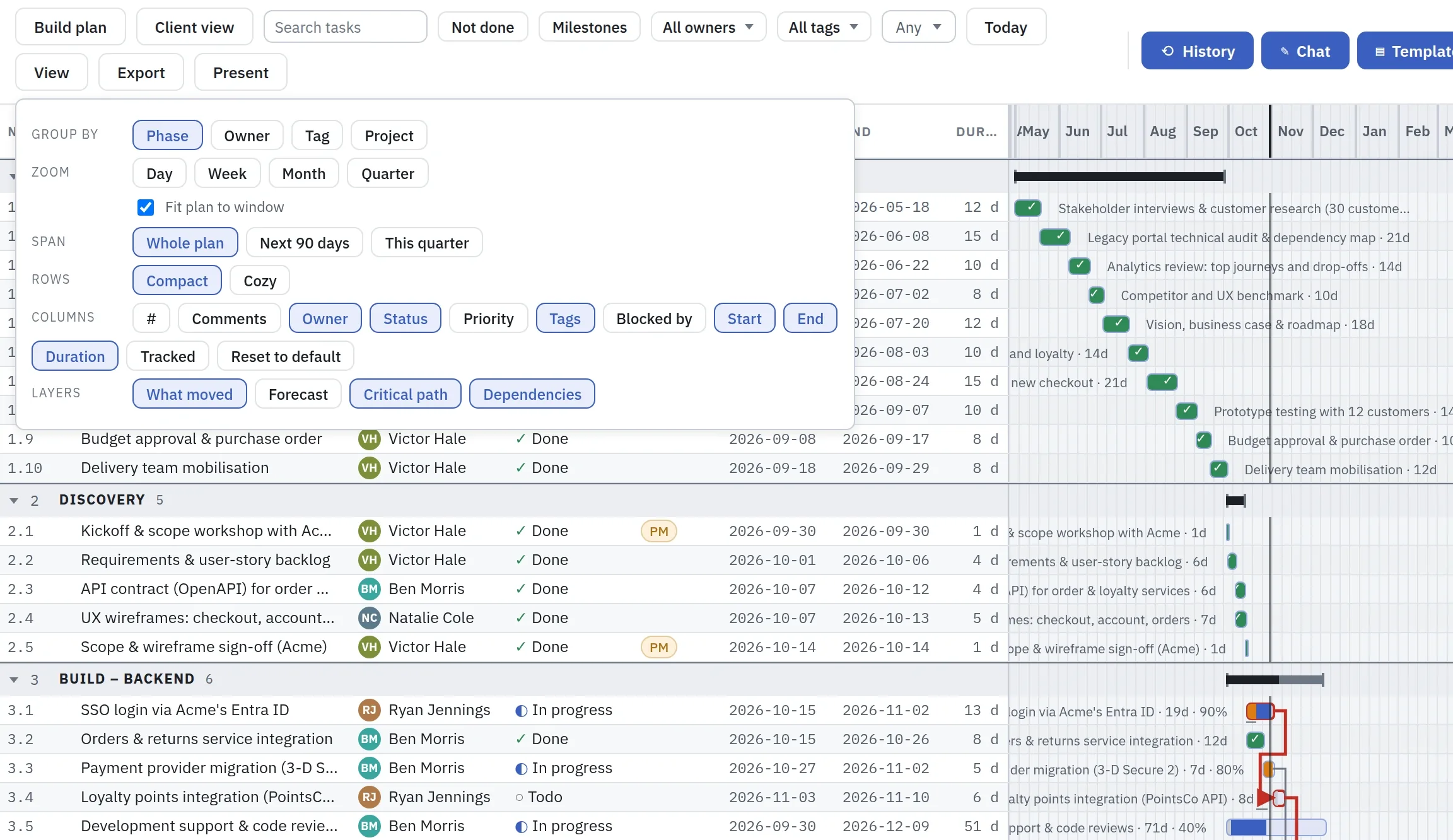
The tasks are already in, so Victor does not build the plan from scratch: he fine-tunes it. He sets the dates up to go-live (build, system testing, the Black Friday load test, the store managers' acceptance and go-live itself) and links what has to finish before what can start. Plankwork draws the critical path in red.

He can do this by hand on the plan, ask Board Chat, or ask the AI assistant he already uses, if it supports MCP. Whichever he picks, the changes land on the same plan, and an AI assistant can do only what Victor himself is allowed to.

On the day Acme agrees the plan, he saves it as the baseline and records that the scope is agreed. From then on every slip shows against the baseline, every task added later shows as added after the agreement, and the forecast follows the work, not anyone's hopes.

The plan of Acme – Customer Portal v2 grouped by phase, with the View menu open: group by, zoom, span, rows, columns and layers, with What moved, Critical path and Dependencies switched on. Beside it, the task bars with the critical path in red.
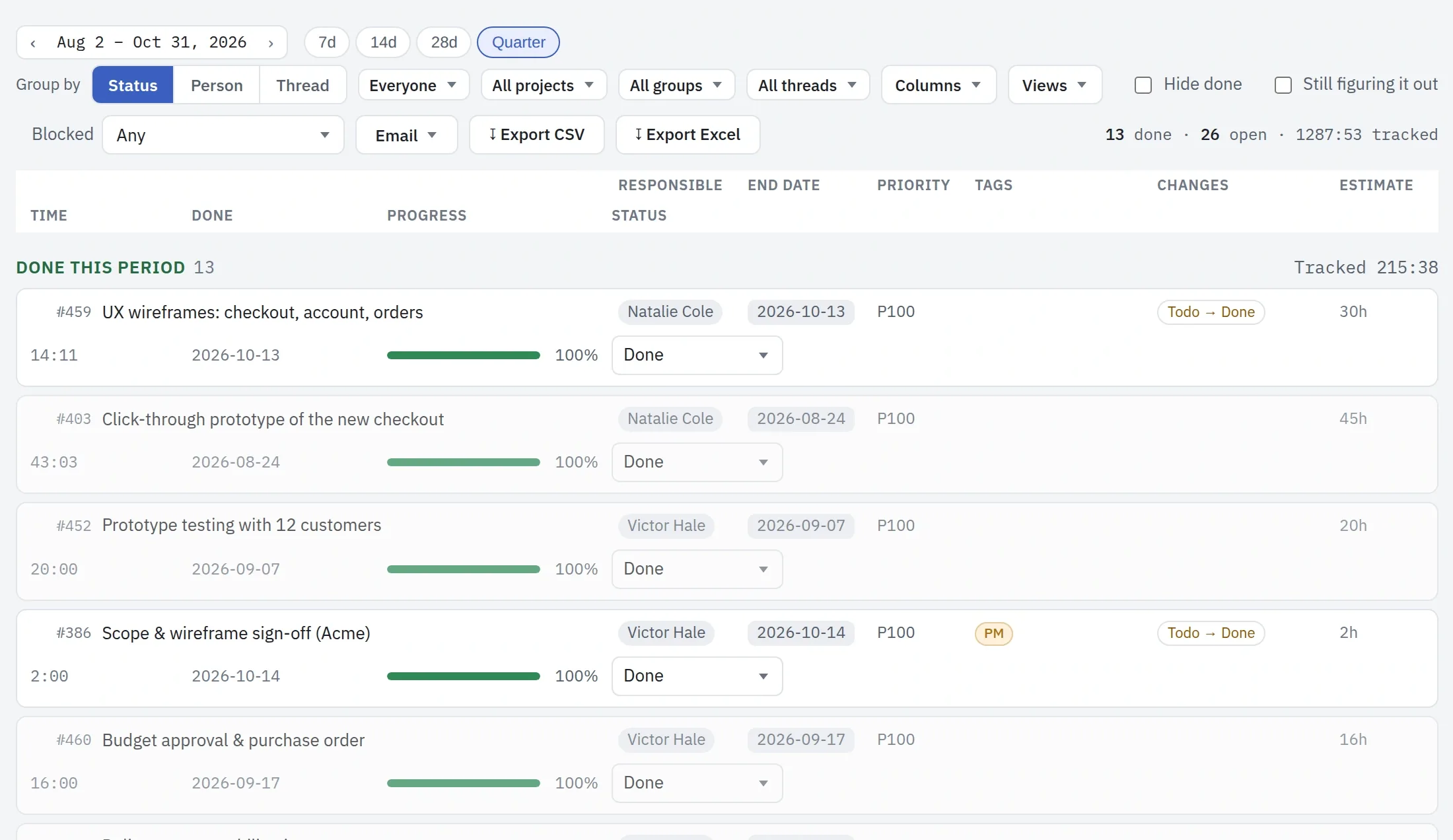
The Status view of Acme – Customer Portal v2 for the quarter from August 2 to October 31, 2026, grouped by status: the tasks done this period, each with its owner, end date, priority, changes, estimate, tracked time, done date and progress.

Next, Victor names what could stop it.

Step 3 · Victor Hale, project manager

What could stop it.

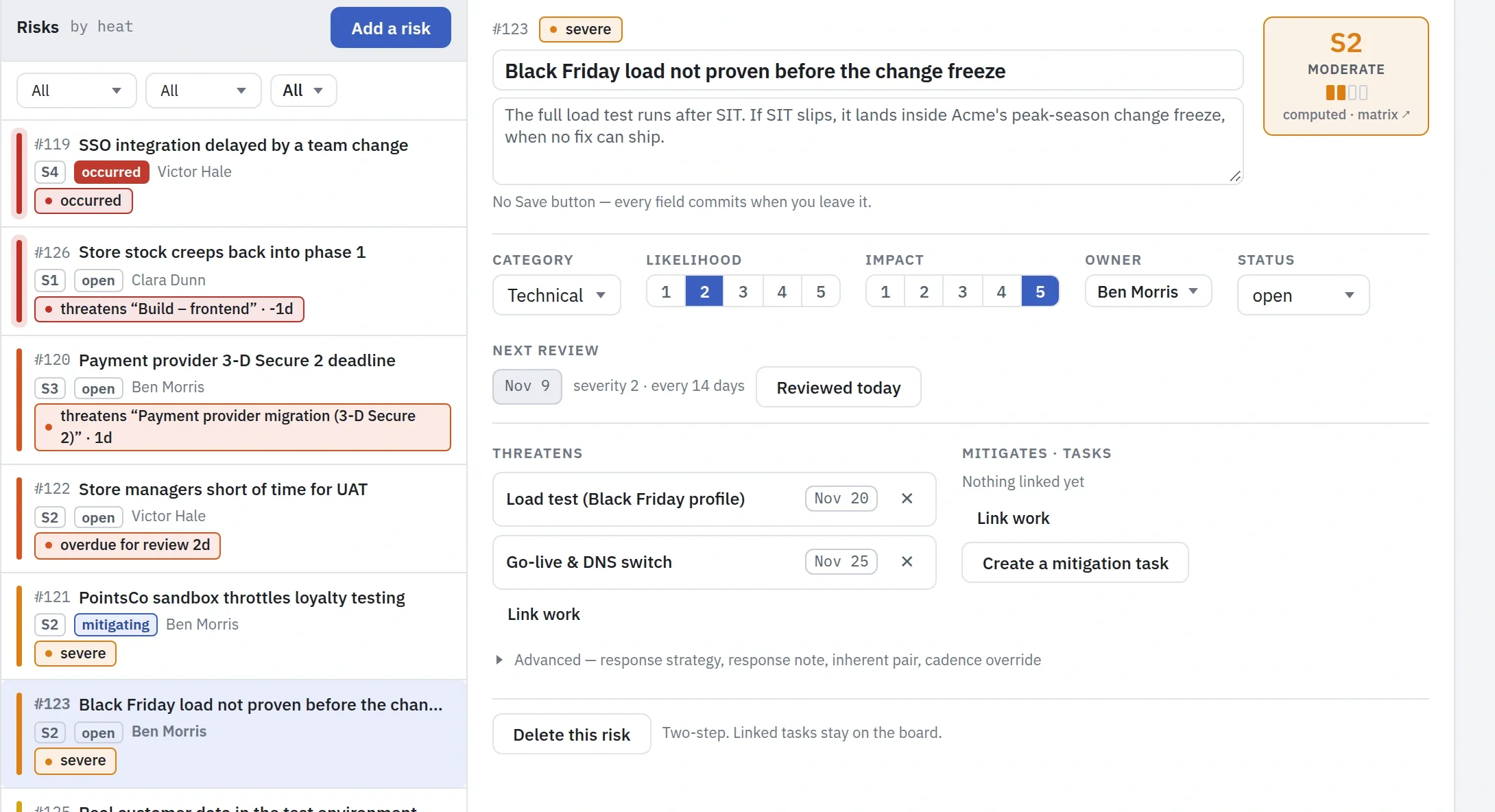
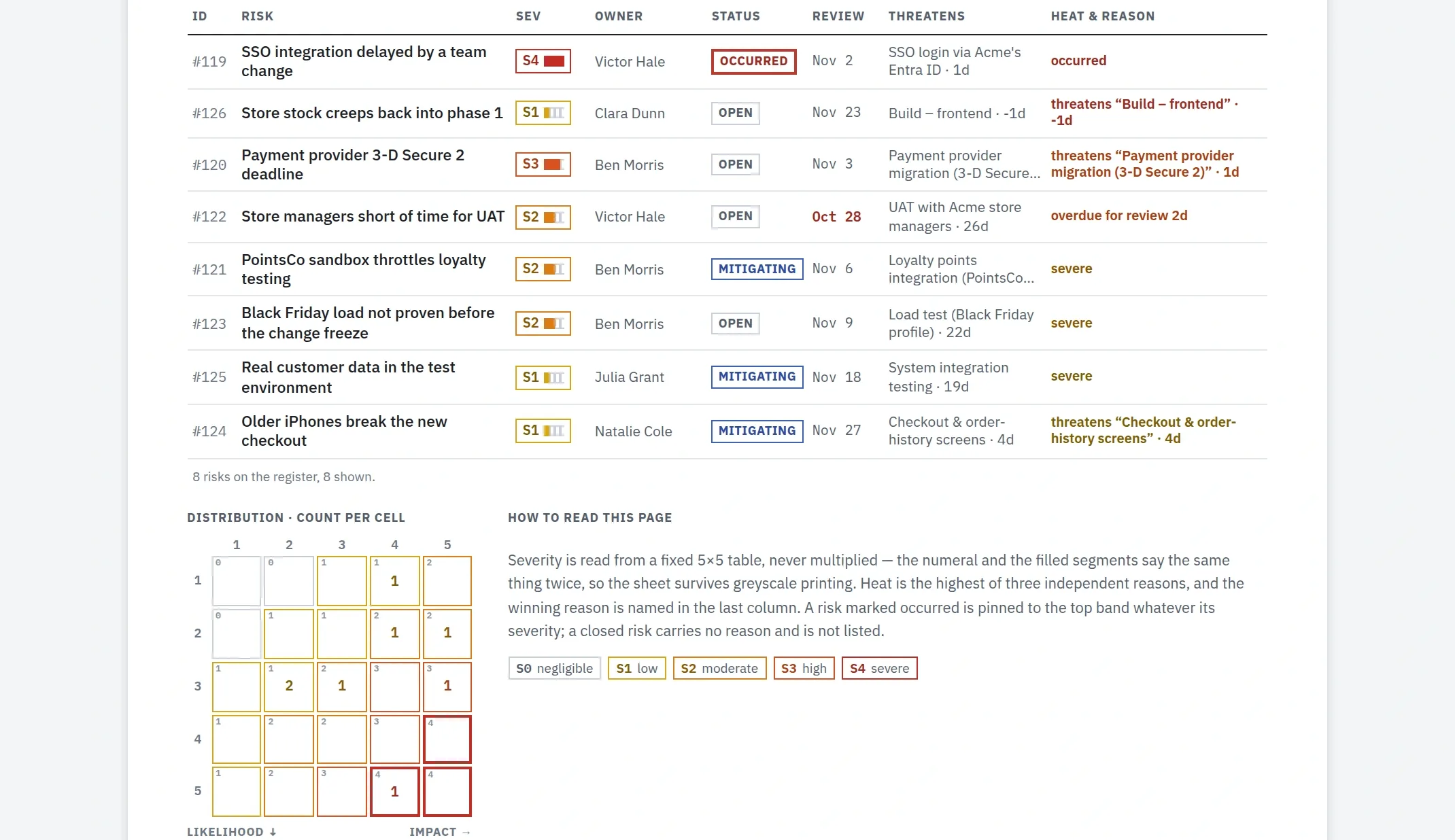
Victor writes down what could stop the portal going live in time. The one that matters most for Black Friday is simple: if system testing slips, the load test lands inside Acme's change freeze, when no fix can ship. He gives that risk to Ben, links it to the load test and the go-live it threatens, and plans a load test of the orders service during the build to make it smaller.

Every risk has a review date. When a review is due it appears in its owner's Now, so the list of risks does not go stale between steering meetings.

The project's risks by heat, with the Black Friday load risk open: its owner, likelihood, impact and the two tasks it threatens
The risk report: every risk with its owner, status, review and the work it threatens, and the likelihood and impact matrix

Next, Victor books the people.

Step 4 · Victor Hale, project manager

The people on it.

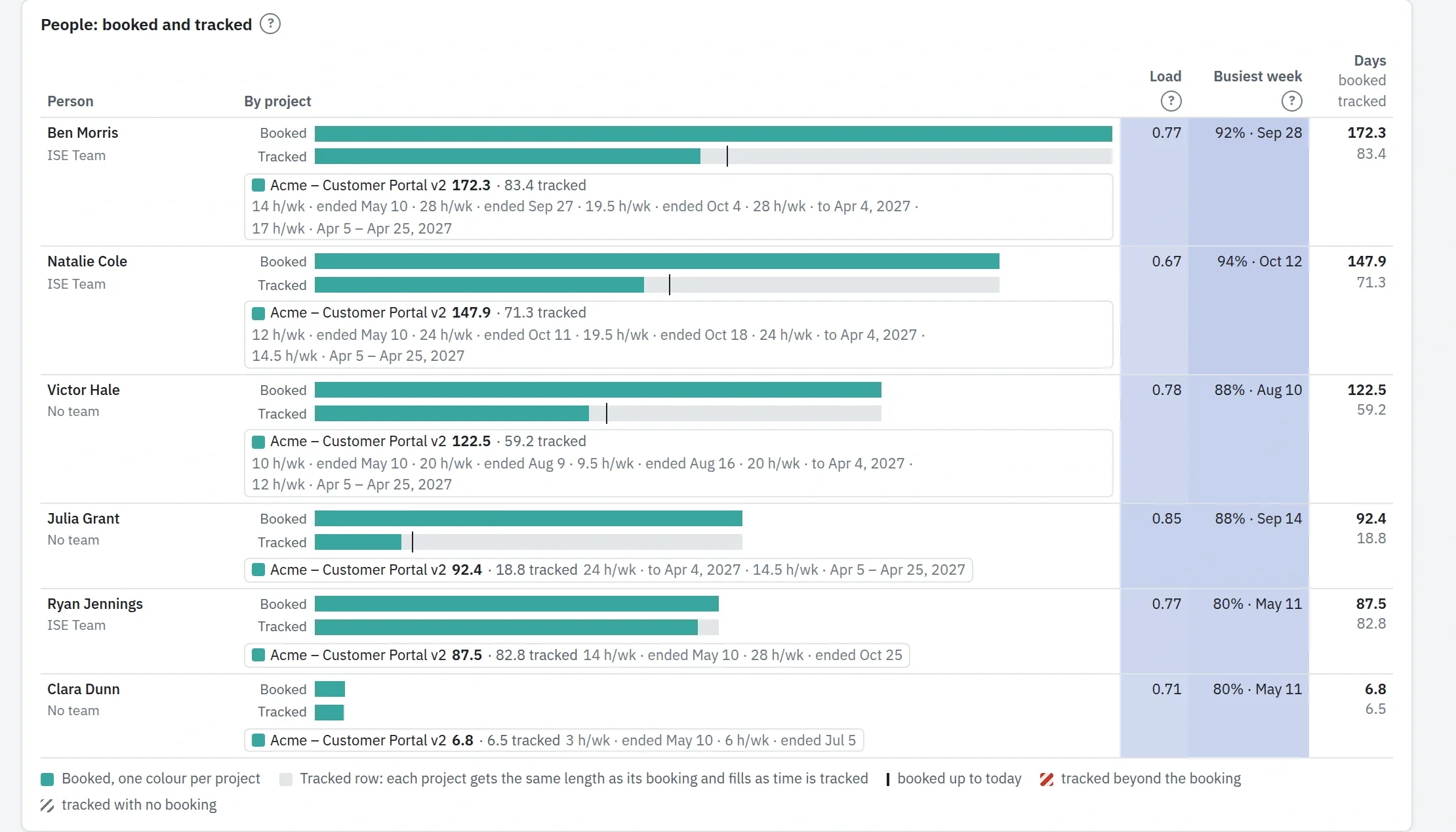
Victor books his team on the project week by week, in days, and the same bookings show in money when finance asks. Every week he sees what each person was booked for against the time they actually tracked, so a project that takes more than planned shows early.

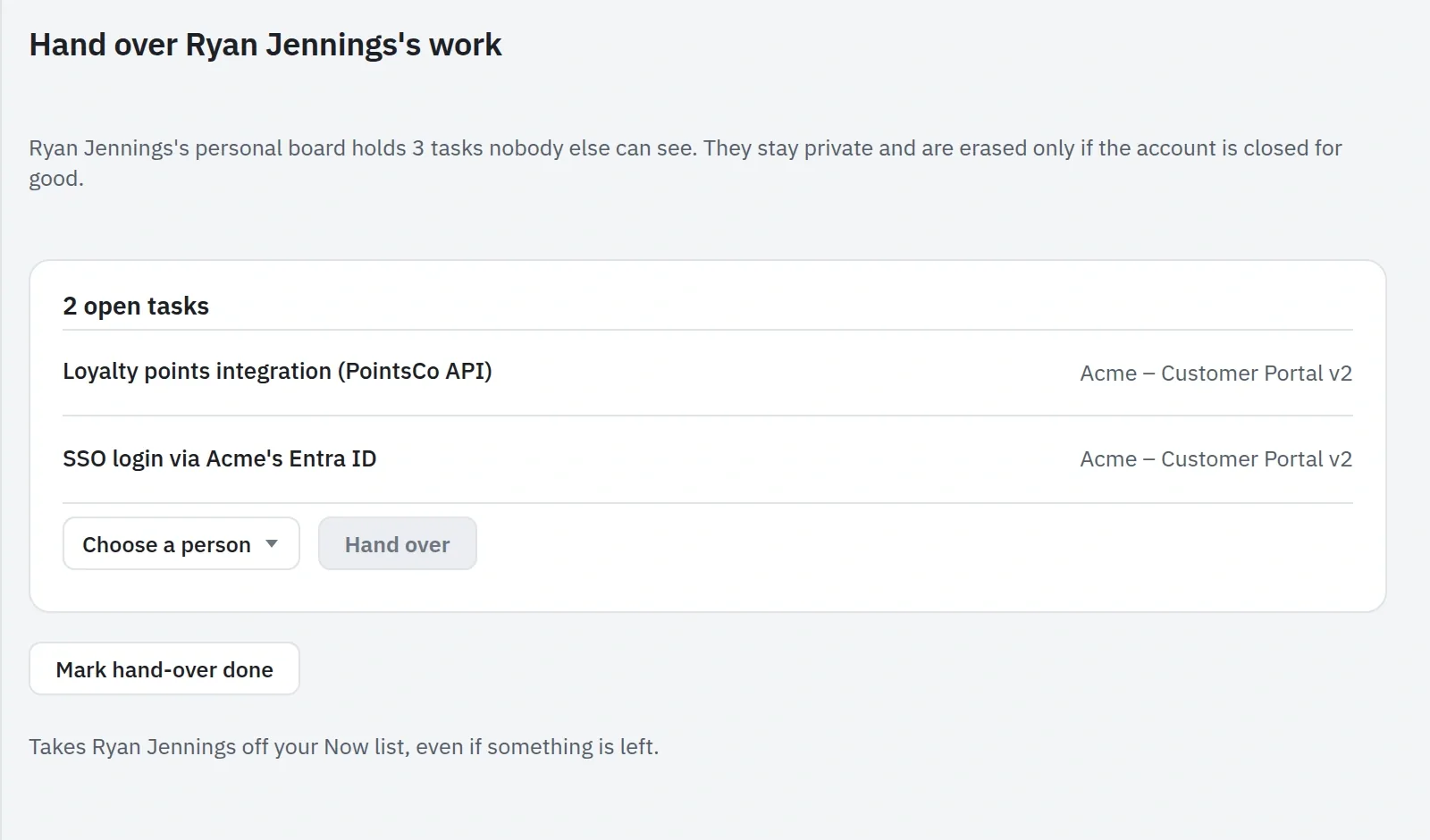
Then Ryan, who was building single sign-on, leaves the company. His open tasks would go quiet on a board nobody watches. Victor hands them over from Ryan's row in one step, and the days single sign-on has slipped show on the plan, not at testing. The team itself is kept in the project details, so after Ryan leaves, the team stays managed and consistent.

Booked and tracked: for each person on the project, the days booked against the days tracked so far
The hand-over of Ryan Jennings's work: his two open tasks, each waiting for a new owner
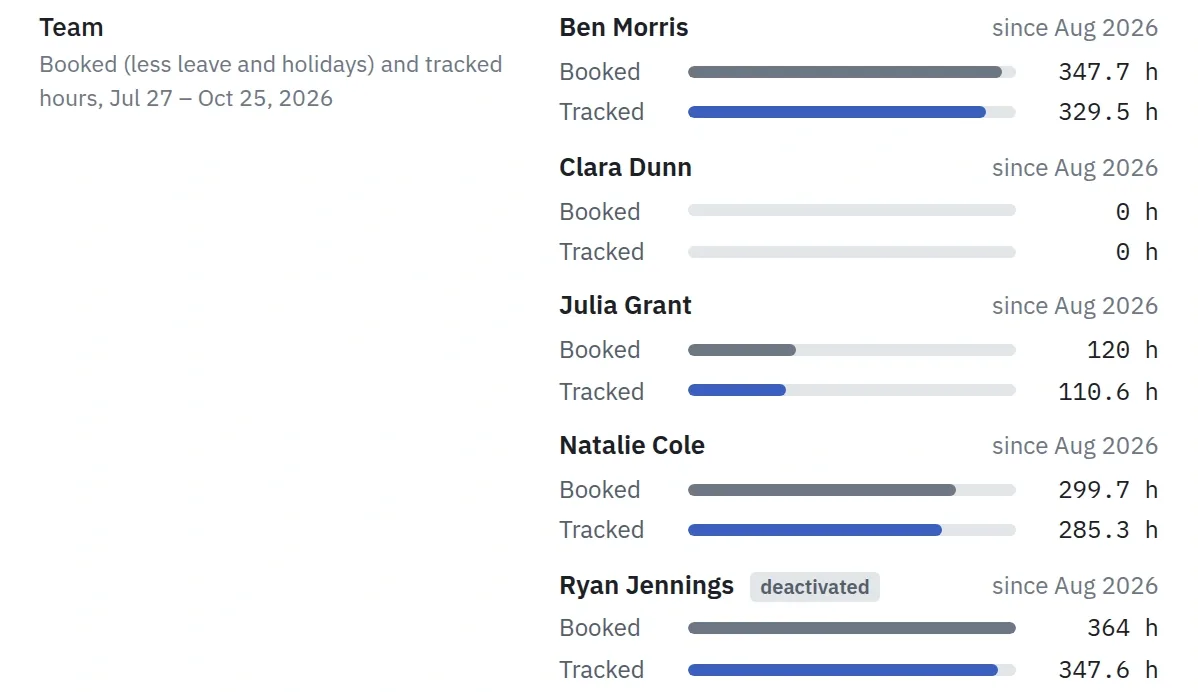
The Team row of the Acme – Customer Portal v2 project details: its members with the hours booked and the hours tracked from July 27 to October 25, 2026, Ryan Jennings among them, marked deactivated.

Next, the everyday work.

Step 5 · Victor and the team

Every day, without chasing anyone.

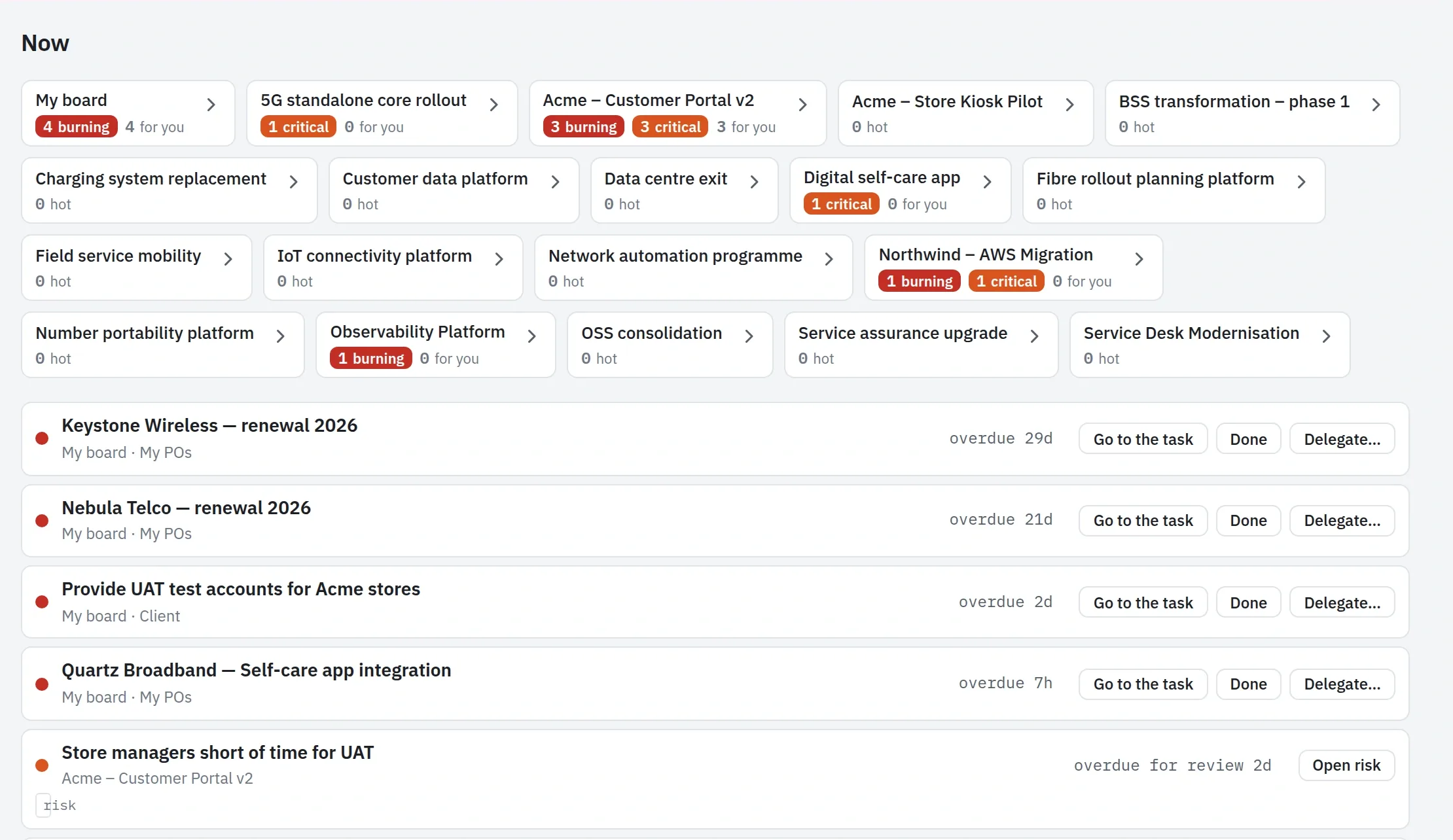
Nobody asks for a status update. A task warms up as its date comes closer and turns red when it is late, and the card says why. Each person starts the day from Now: one queue across every project, with the reason on every row.

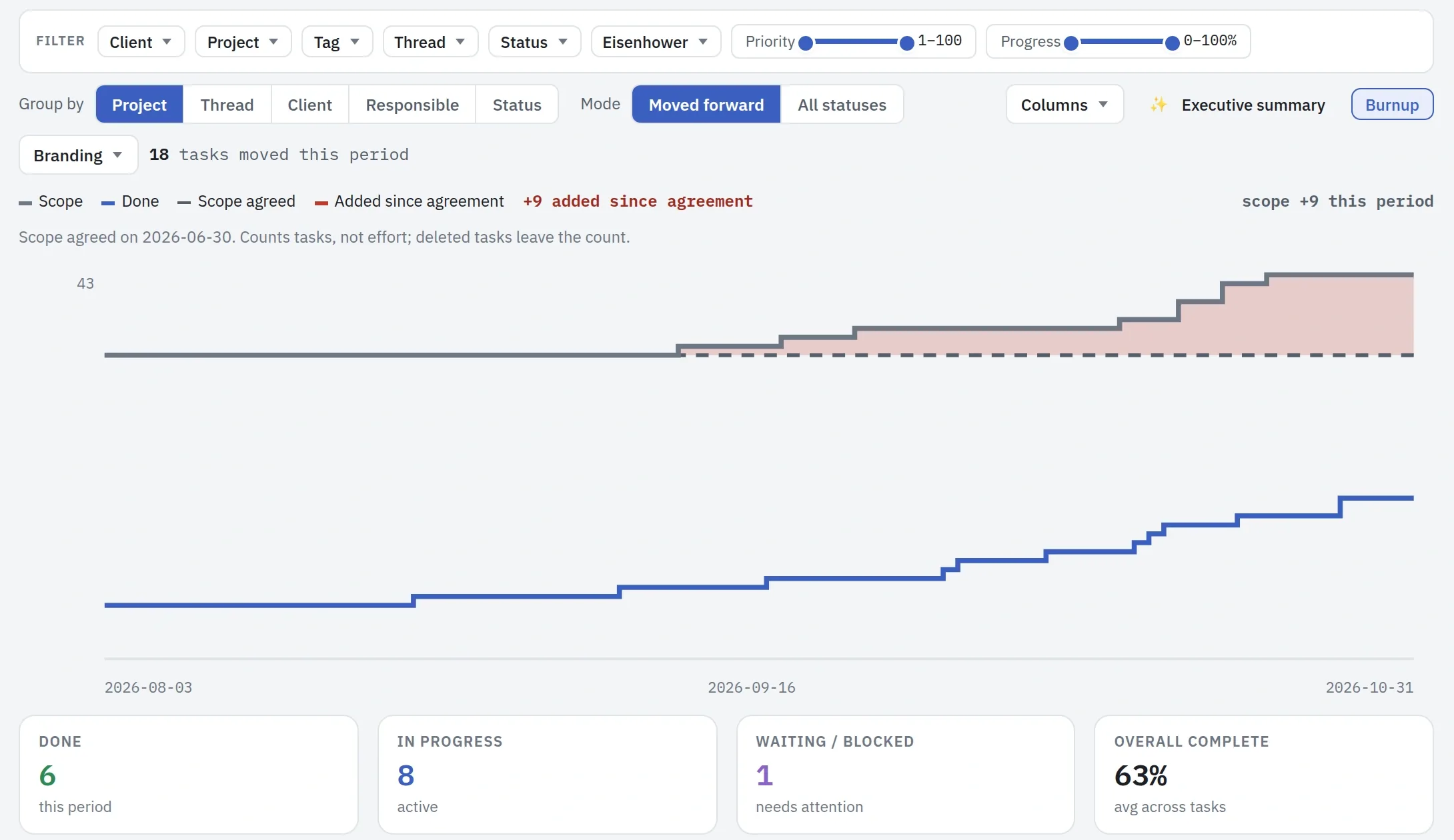
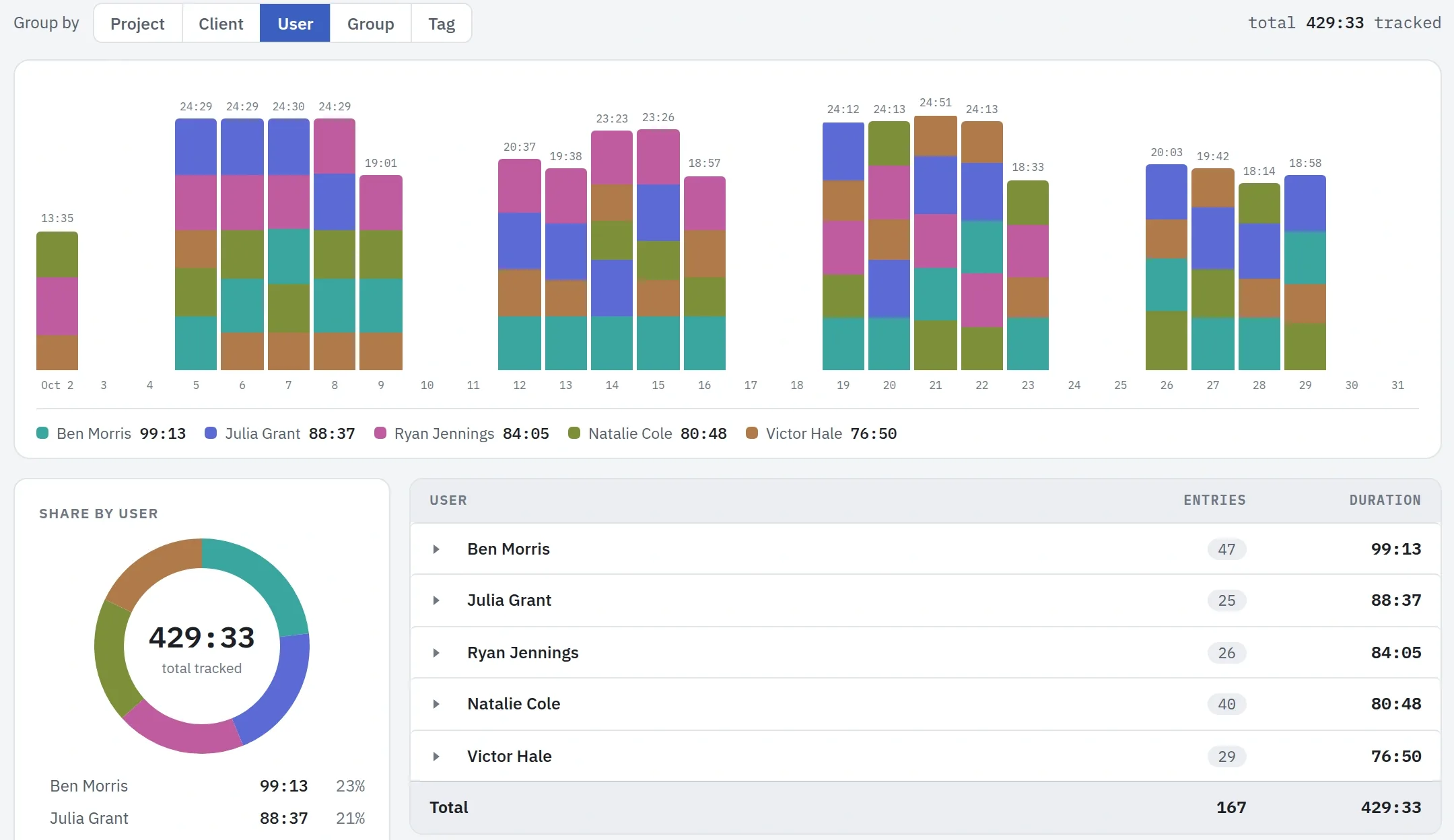
When Victor needs something from someone, he delegates it with a follow-up date, and Plankwork suggests who has the right role and the time. People track their time on the task itself, with a timer or by the week, so the hours in the reports are the hours that went into the work. Victor looks at both every day: the project's progress against the scope Acme agreed, and the hours each person put in.

Victor's Now: his projects with their burning tasks, then the queue of what needs him, each row with its reason
The progress report of Acme – Customer Portal v2 for the last 90 days with the Burnup: the scope and done lines, the scope agreed on June 30 as a dashed line with the tasks added since then shaded red, and four tiles for done, in progress, waiting and overall complete.
The Time report filtered to Acme – Customer Portal v2 and grouped by user: stacked bars of the hours tracked each day in October 2026, each person's share in a ring, and a table of entries and hours per person.

Next, the customer.

Step 6 · Sarah Miller at Acme, and Victor's Service Desk

The customer sees it too.

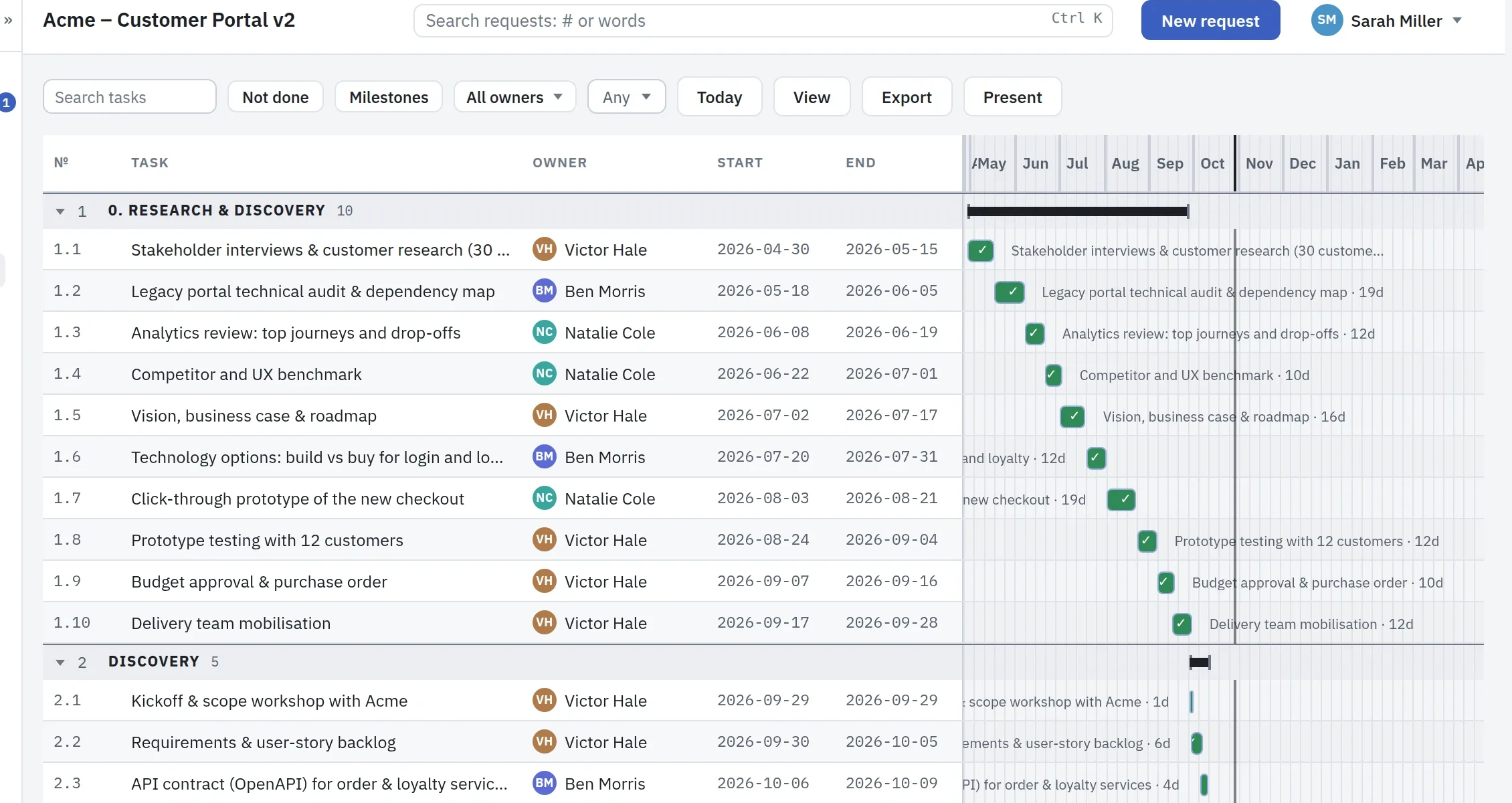
Sarah, Acme's lead on the project, signs in to her own portal. She sees the plan as a timeline and the project's status without asking for either, and only what Victor has chosen to share.

When something breaks, she files a request there. It lands in the project's Service Desk, where Victor picks up new requests and his team works them, with internal notes Sarah never sees. The clocks run on Acme's own SLA plan, and once a month Sarah gets the report on which targets were met.

Sarah's portal: the Acme plan as a timeline, with the tasks Acme can see and a button to file a new request
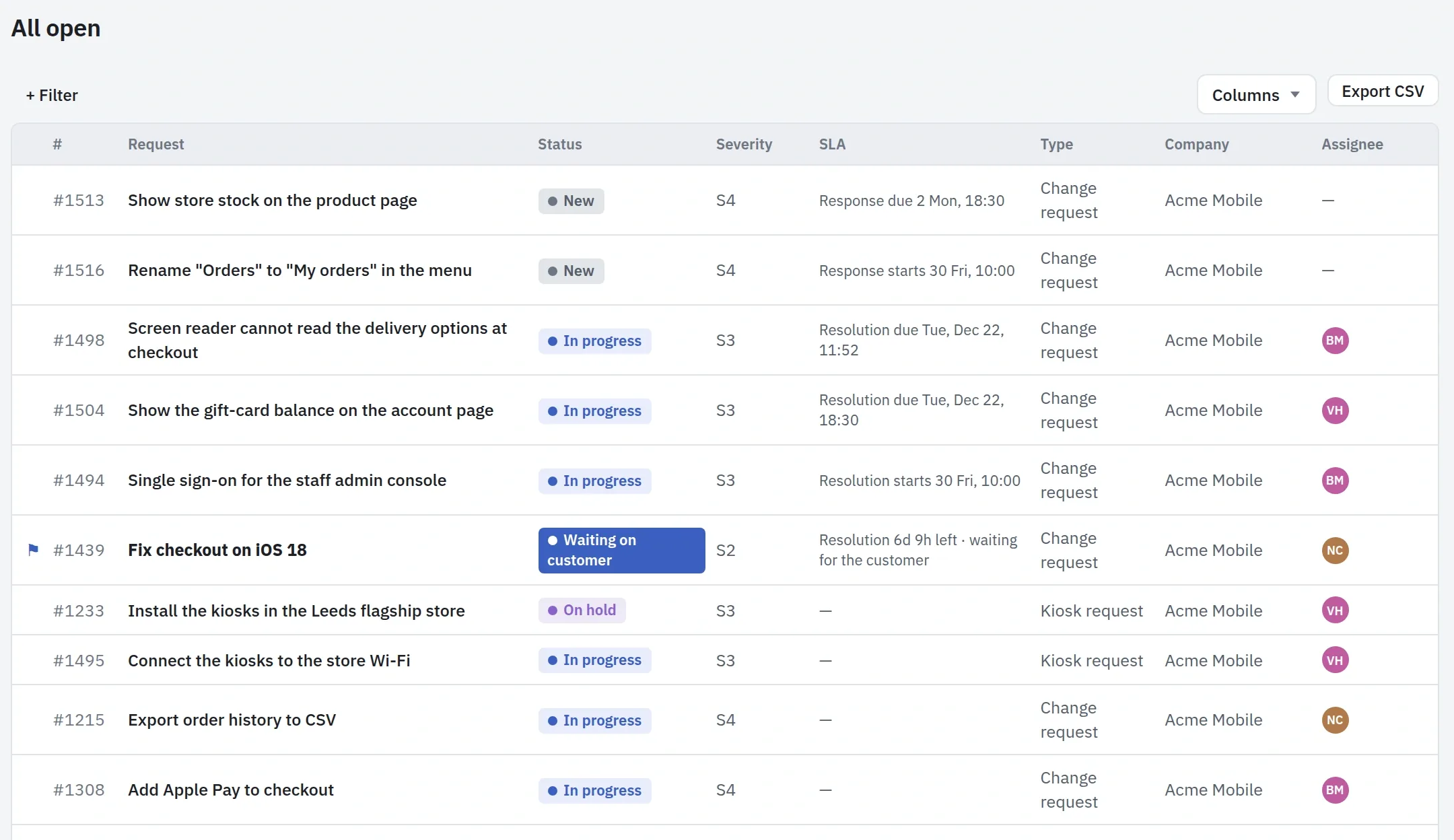
The Service Desk: Acme's open requests with their status, severity, SLA due time, type and assignee
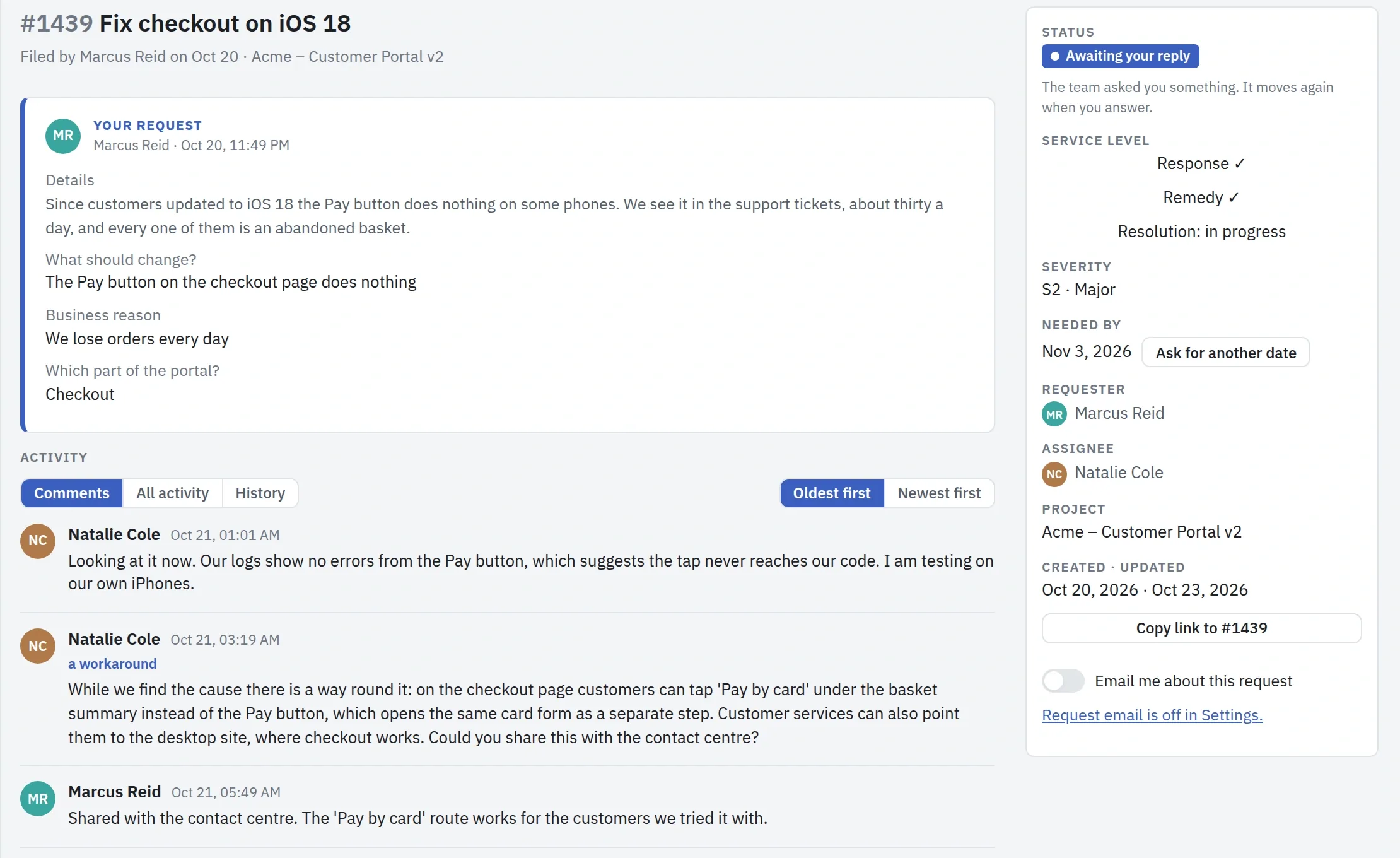
A request in Sarah's portal: the details, the conversation with the team, and the service level met so far

Next, Victor reports up.

Step 7 · Victor Hale, project manager

Reporting up, without writing a report.

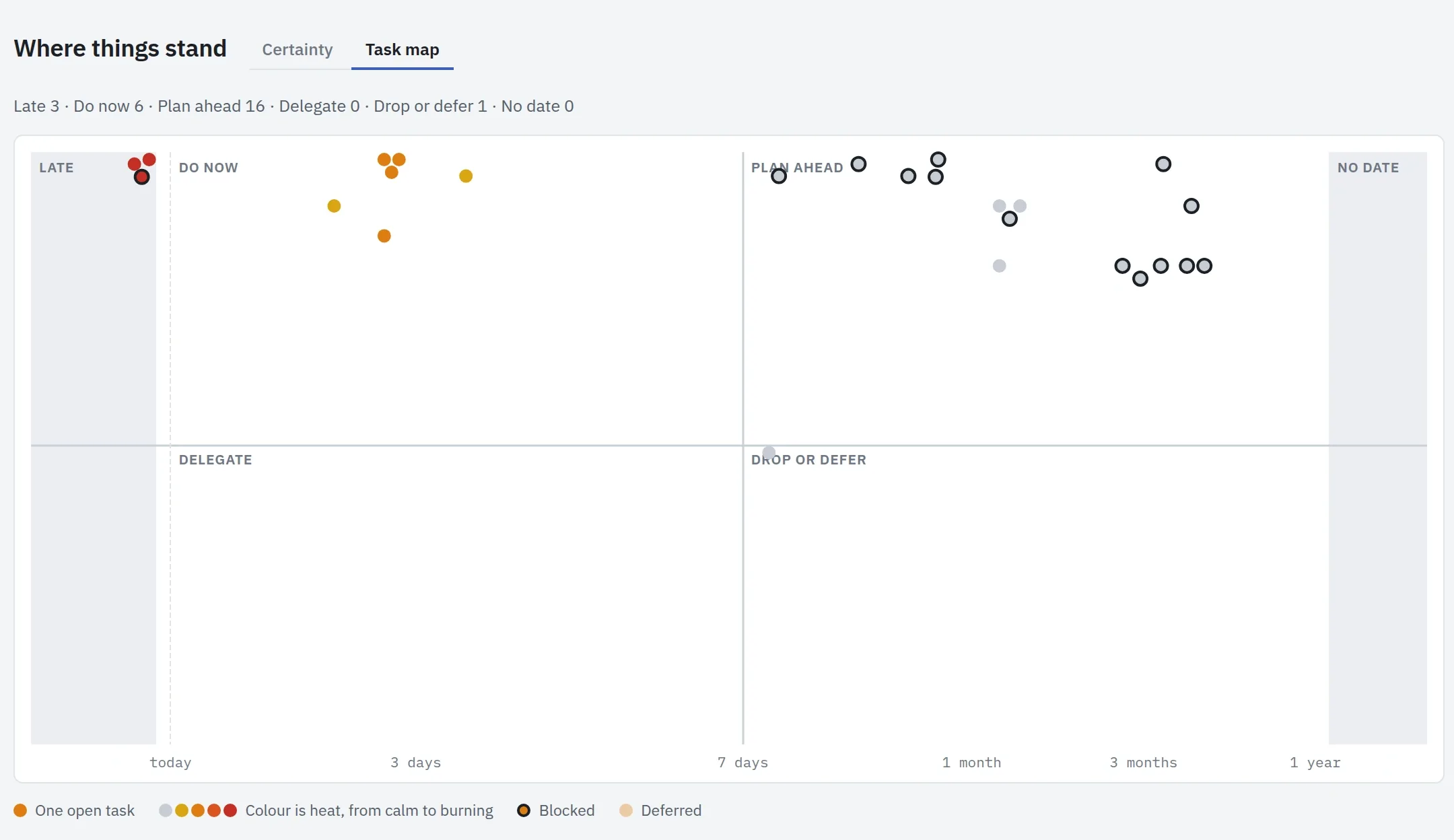
Victor's reports put themselves together from the board. The status report says where the project stands, the progress report shows the work done with the Burnup beside it, and the executive summary is drafted for him from the period's own figures. When Diana asks what is coming, the Task map shows every open task by its due date and priority, so a crunch is visible before it arrives.

He sends the status to Diana and to Acme on a schedule, so nobody waits for an email on Friday. Anything he needs elsewhere goes out as a PDF, an Excel sheet or a CSV file.

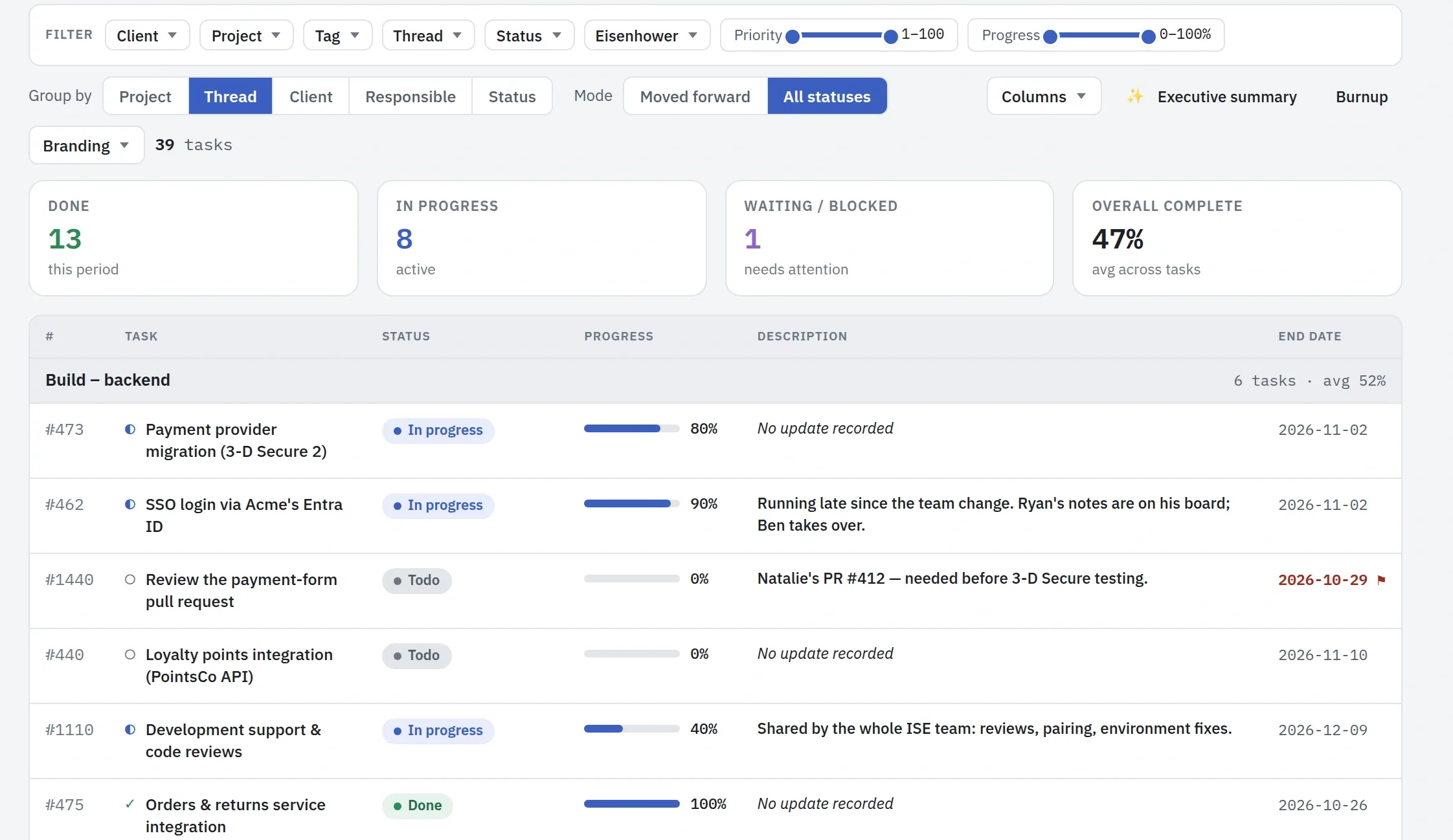
The progress report of Acme – Customer Portal v2 grouped by thread, with all statuses: four tiles, then the Build – backend thread with each task's status, progress bar, latest update and end date.
The Task map of Acme – Customer Portal v2: each open task as a dot, placed by due date from left to right and by priority from top to bottom, in the areas Late, Do now, Plan ahead, Delegate and Drop or defer.

Next, Diana looks at all the projects.

Step 8 · Diana Carter, director

All projects in one picture.

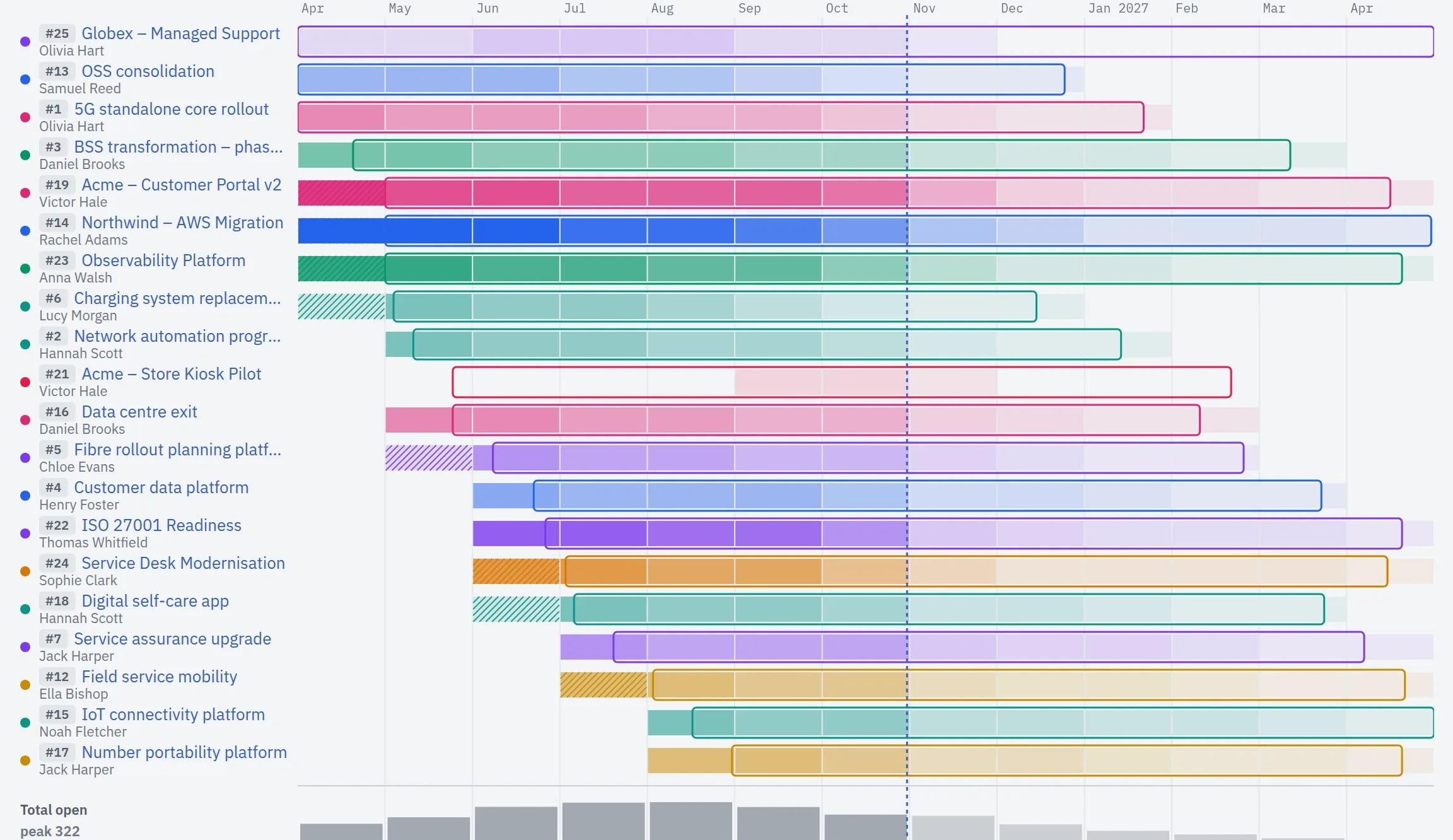
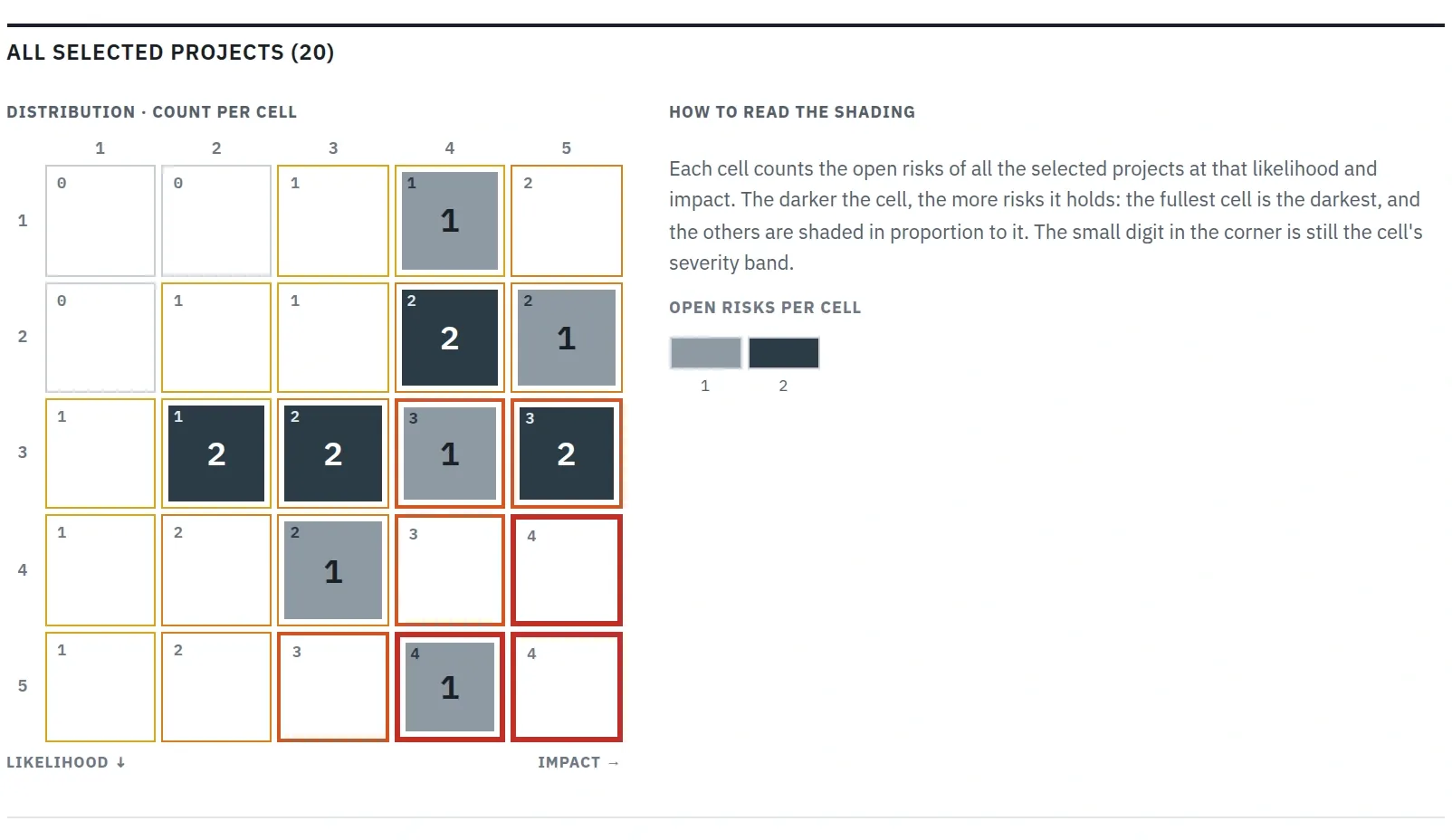
Diana runs many projects, and Acme's is one of them. Portfolio status shows the ones she chooses side by side: where each stands, and how much work is still open month by month. The combined risk matrix shows whether Acme's Black Friday risk is the worst in the company or one of many.

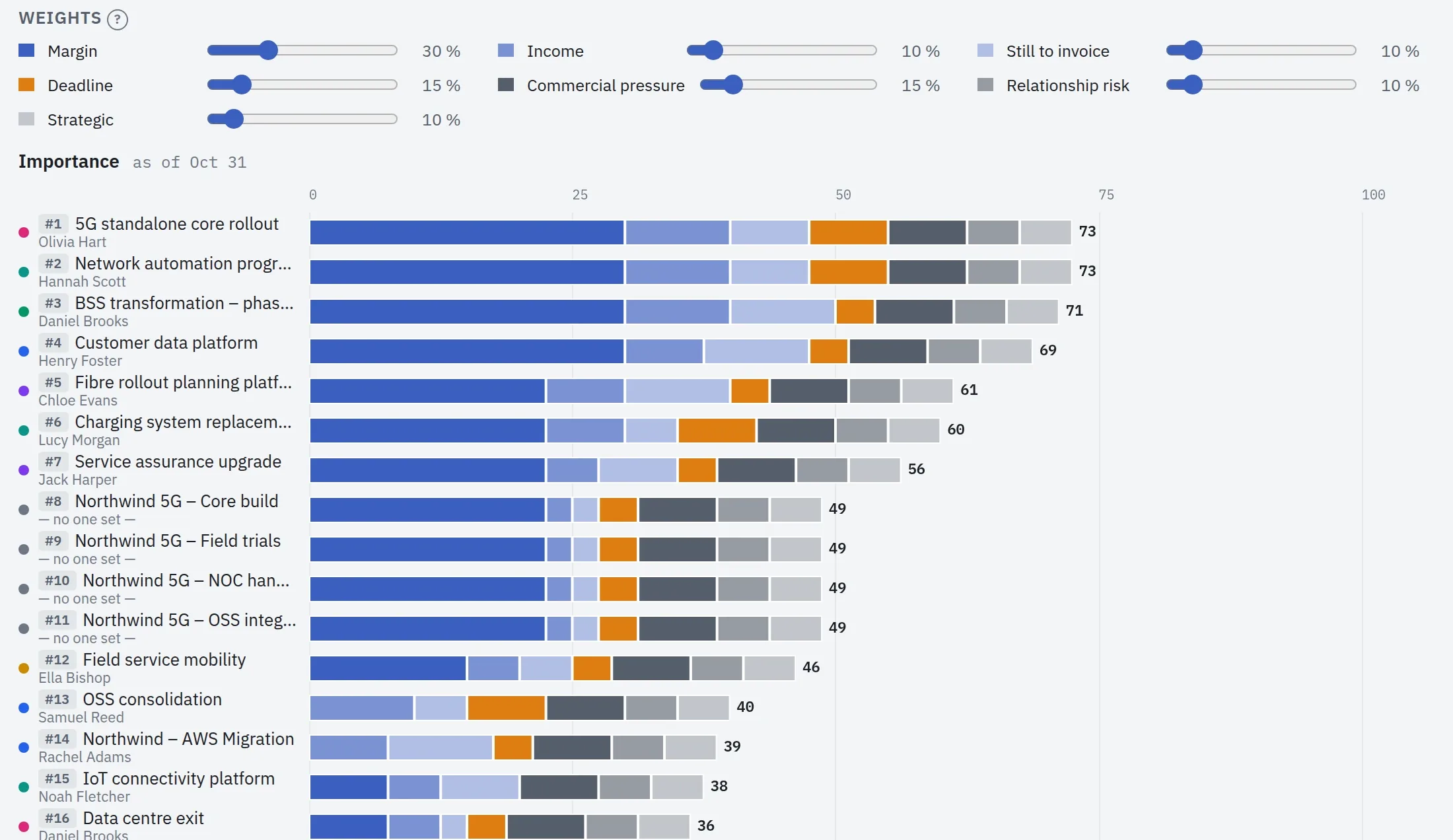
She ranks the projects by what matters most to the company.

The Portfolio status timeline over one year, April 2026 to April 2027: one row per project with its bar shaded by its open work, and the total open work along the bottom.
The Project importance page: the weight of each criterion, and the projects ranked by importance, each bar split into coloured parts for margin, income, still to invoice, deadline, commercial pressure, relationship risk and strategic value.
The last page of the Portfolio risks report for all 20 selected projects: one 5 by 5 matrix of likelihood and impact counting the open risks of every project in each cell, and how to read its shading.

Next, what the work earns and what it costs.

Step 9 · Diana Carter, director

What the work earns, and what it costs.

Diana's figures come from the work itself. Every hour tracked or booked is priced at a cost rate, set for the company, a team or a person, in any currency and converted into one reporting currency. Licences, travel and a share for risk go on as cost lines. Revenue comes from contracts: Acme Mobile has four, and a contract holds its value, the projects it pays for and a payment plan with an amount and a date for every invoice.

Financials sets revenue against cost from the past year into the months ahead, by customer, contract, product or period, and follows cost down to the project, the team and the person. Cost ahead is people's bookings at their rates, so the margin counts the work still to come as well as the work done. Contracts not yet signed can be added as pipeline, drawn apart and never counted as cover. Owners also see what the company pays for everyone's working week, so time no project carries shows as a gap.

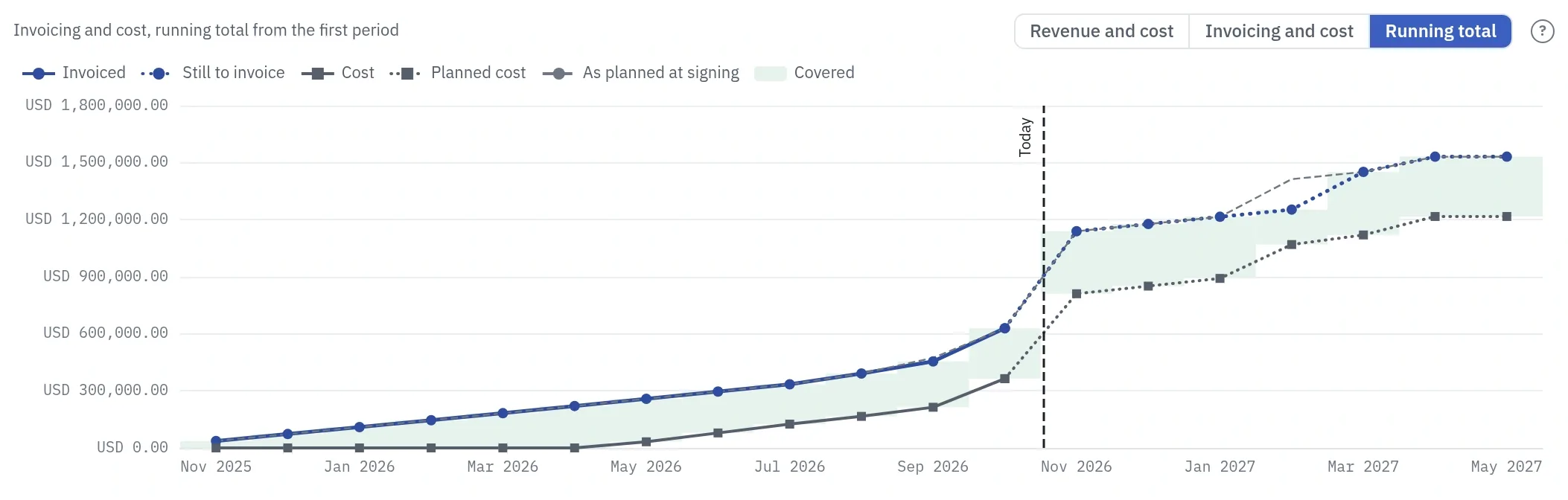
Invoicing and cost asks whether the invoices ahead will cover the cost ahead, and Running total adds both up over time: green where invoicing covers cost, red where it does not. Click a month and the Invoices list opens on what makes up its figure. For a single contract, Freeze plan keeps the plan as a baseline, and the Performance tab sets the actual cost against it and against the contract's value.

Plankwork is not your accounts. It plans and records invoices without issuing them or recording payment, and rent stays outside unless you enter it as a cost line. Without Financials in their profile, a person sees no money figure anywhere, in search, exports or an AI assistant.

Financials, Running total for Acme Mobile from November 2025 to May 2027: invoiced and still to invoice above cost and planned cost, the gap shaded green as covered, with a thin dashed line for invoicing as planned at signing and a vertical line at today

This is Running total for Acme Mobile. It shows invoicing and cost added up month by month, from a year back to six months ahead: by May 2027 about USD 1.5 million of invoicing against USD 1.2 million of cost, with invoicing above cost the whole way. The thin dashed line puts each invoice on the date it had when its contract was signed.

Last, the promise.

Step 10 · Diana Carter, director

The promise, kept.

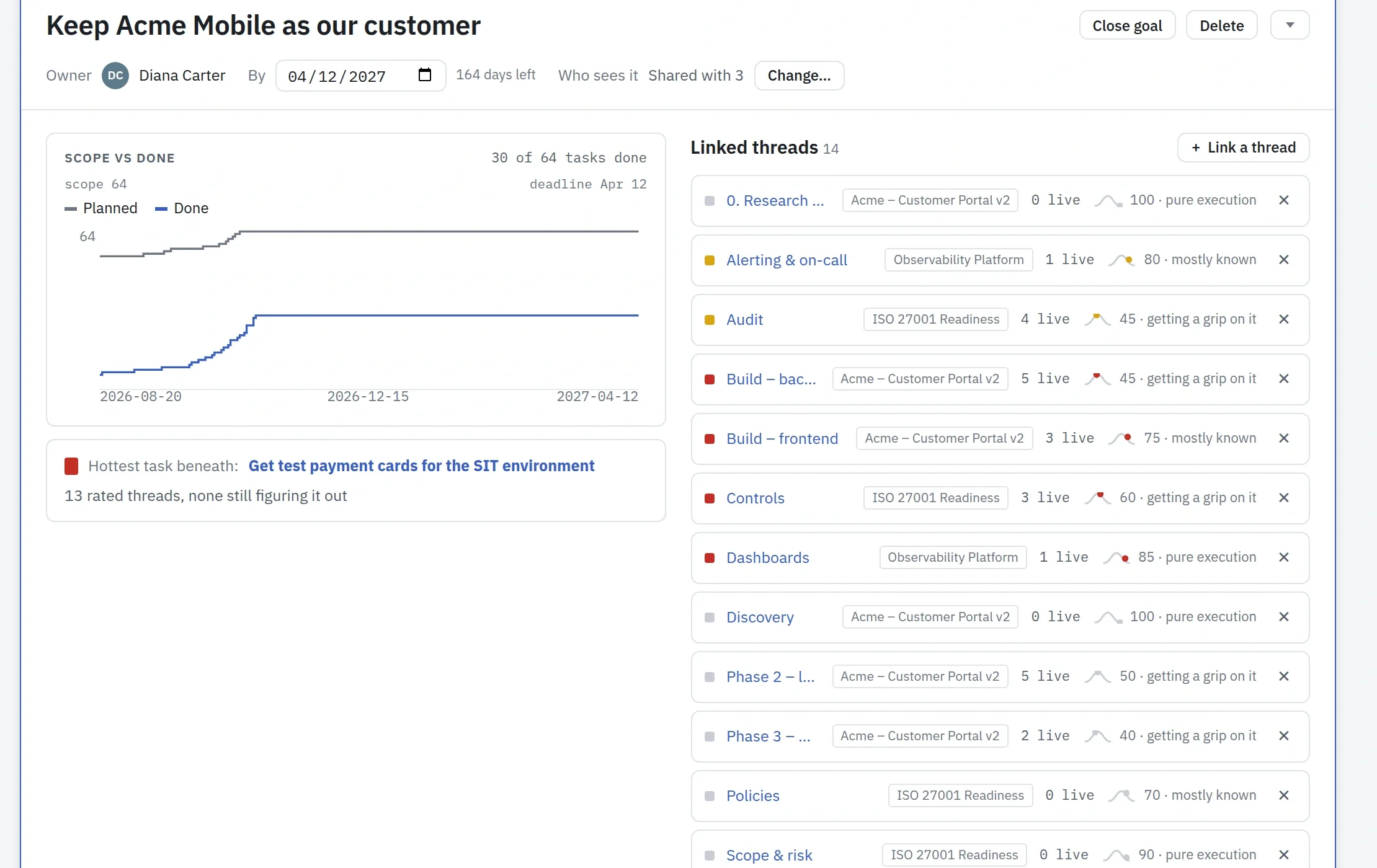
Diana opens the goal she set at the start: keep Acme Mobile as a customer. It joins work from three projects: the new portal, the incident alerting on the platform, and the ISO 27001 audit. In one place she sees the scope against what is done, the hottest task, and how sure the people doing each part are.

If a part had nobody working on it, or its work were done while the goal stayed open, the goal would say so. When the portal is live and the audit is passed, Diana signs off to Sarah at Acme, and the promise from the top of this page is kept.

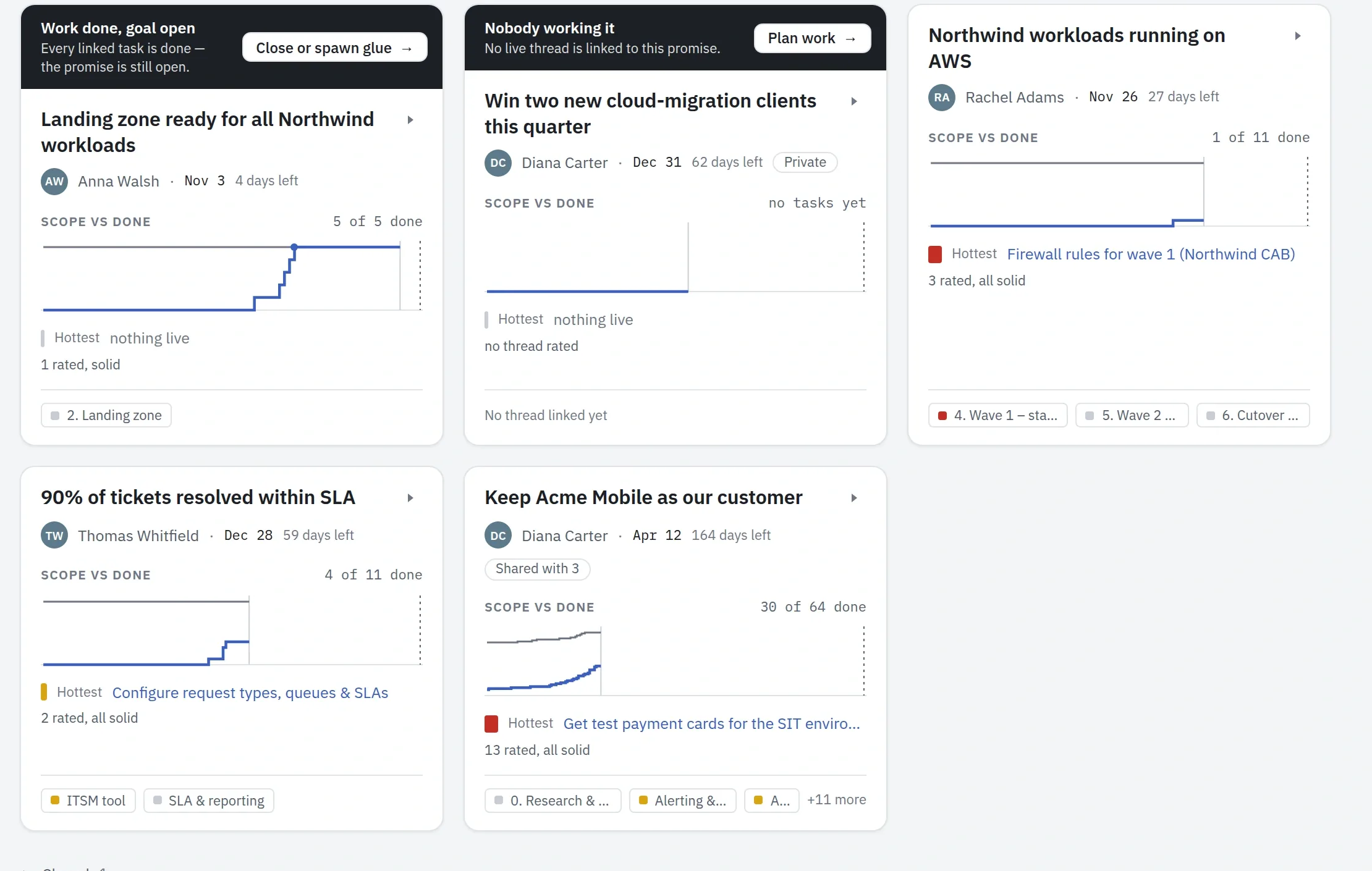
The Goals view: the company's promises as cards, with Keep Acme Mobile as our customer among them
The Keep Acme Mobile goal open: its owner and date, scope against done, and its linked threads from three projects

Three more things run under every step: your AI assistant, two reports on delays and the flow of work, and what your IT department needs.

Under every step

Run it from your AI assistant.

Everything on this page can be asked of an AI assistant: in the app through Board Chat, or from the assistant you already use, connected through MCP. It reads the same boards, plans and reports as you do, and nothing you are not allowed to see.

When Board Chat would change something, it shows the change on a card for you to confirm. Every change an assistant makes is recorded with the assistant and the model that made it.

How AI works in Plankwork →

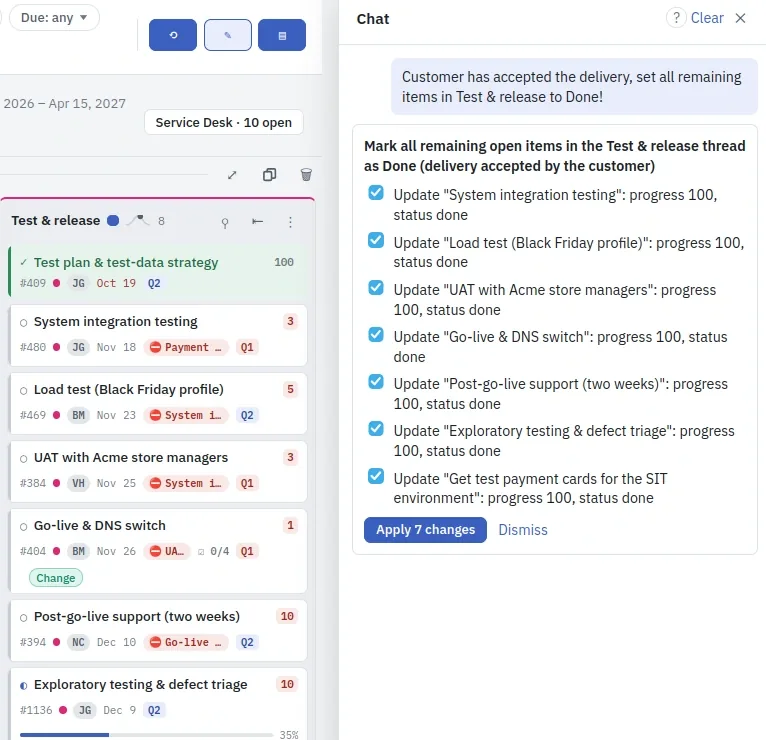
Board Chat beside the Acme board. Told that the customer accepted the delivery, it proposes seven changes on a card, each setting a Test & release task to done, with Apply 7 changes and Dismiss.
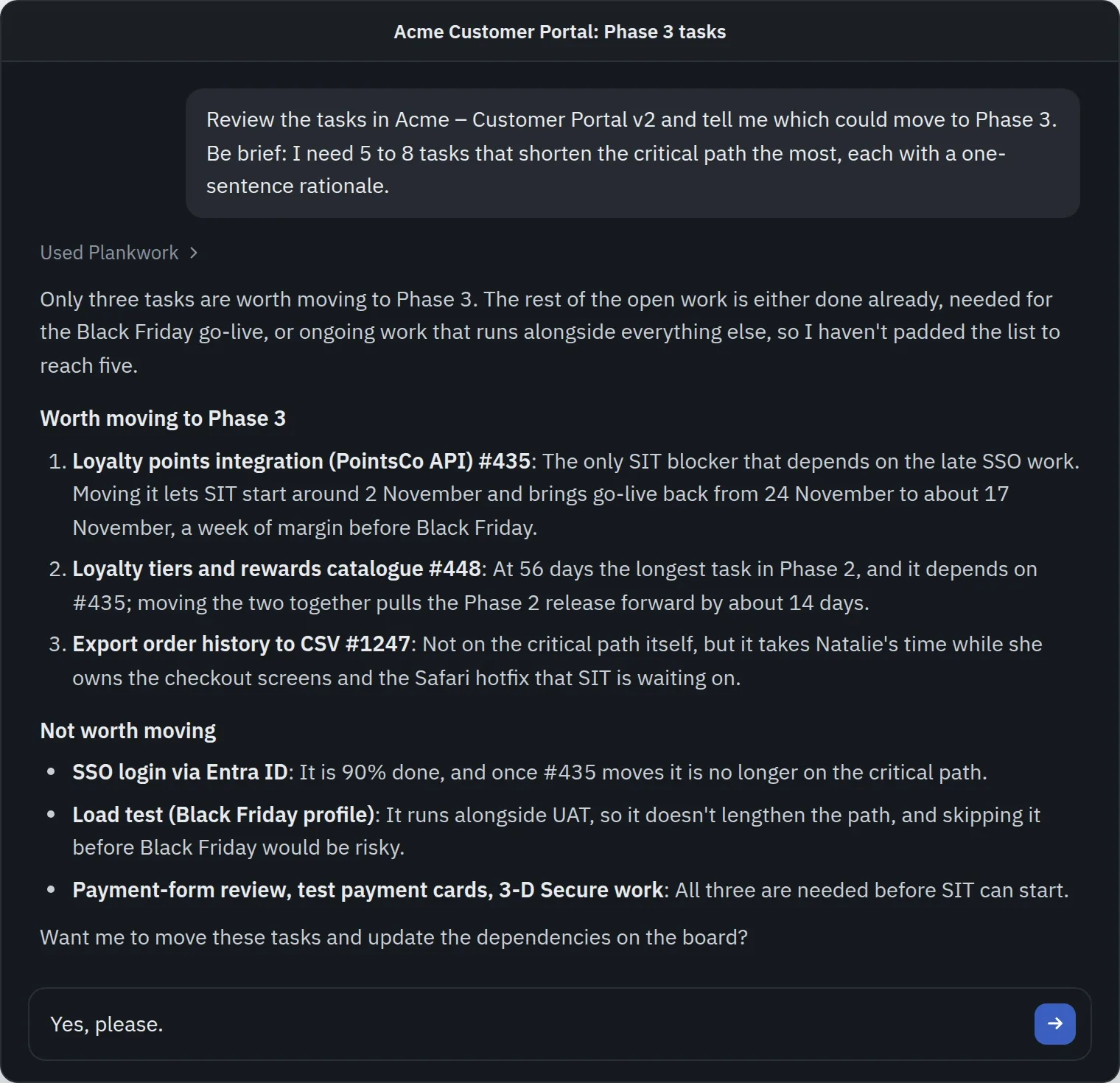
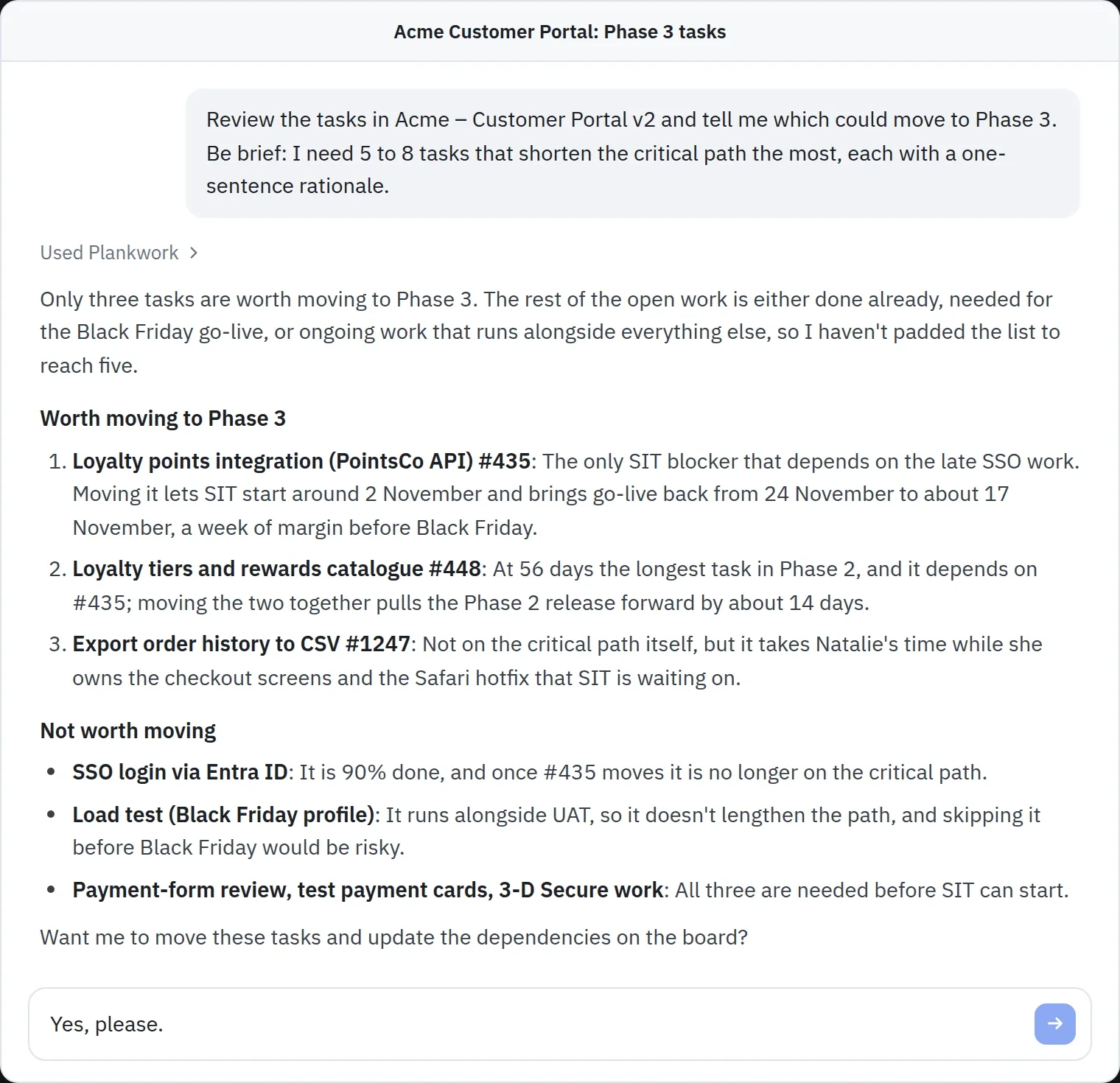
A chat with an AI assistant connected to Plankwork. Asked which Acme tasks could move to Phase 3 to shorten the critical path, it answers that only three are worth moving, each with its reason, lists the ones not worth moving, and asks whether to move them on the board.

Supporting tools

Where the days went, and whether the work keeps up.

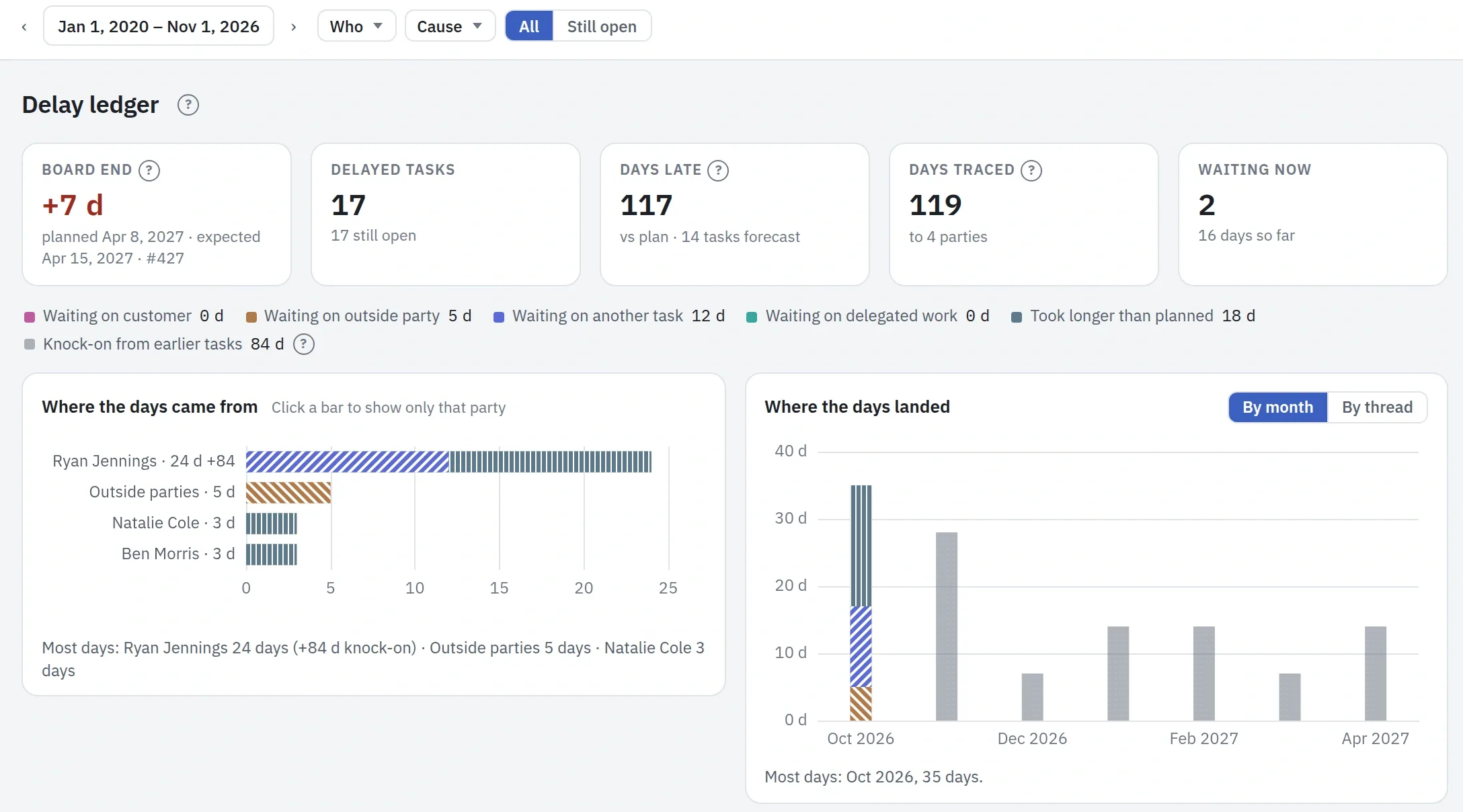
The Delay ledger traces every day of delay on a project to where it came from: the customer, an outside party, another task, delegated work, or a task that took longer than planned. A delay passed down a chain goes back to the task that started it and is shown apart as knock-on. The causes come from what the team records while it waits, so nobody fills in a form afterwards; days with no recorded wait show as the task taking longer than planned. Choose people or companies to see the days traced to them, and the first figure says how late the project will finish.

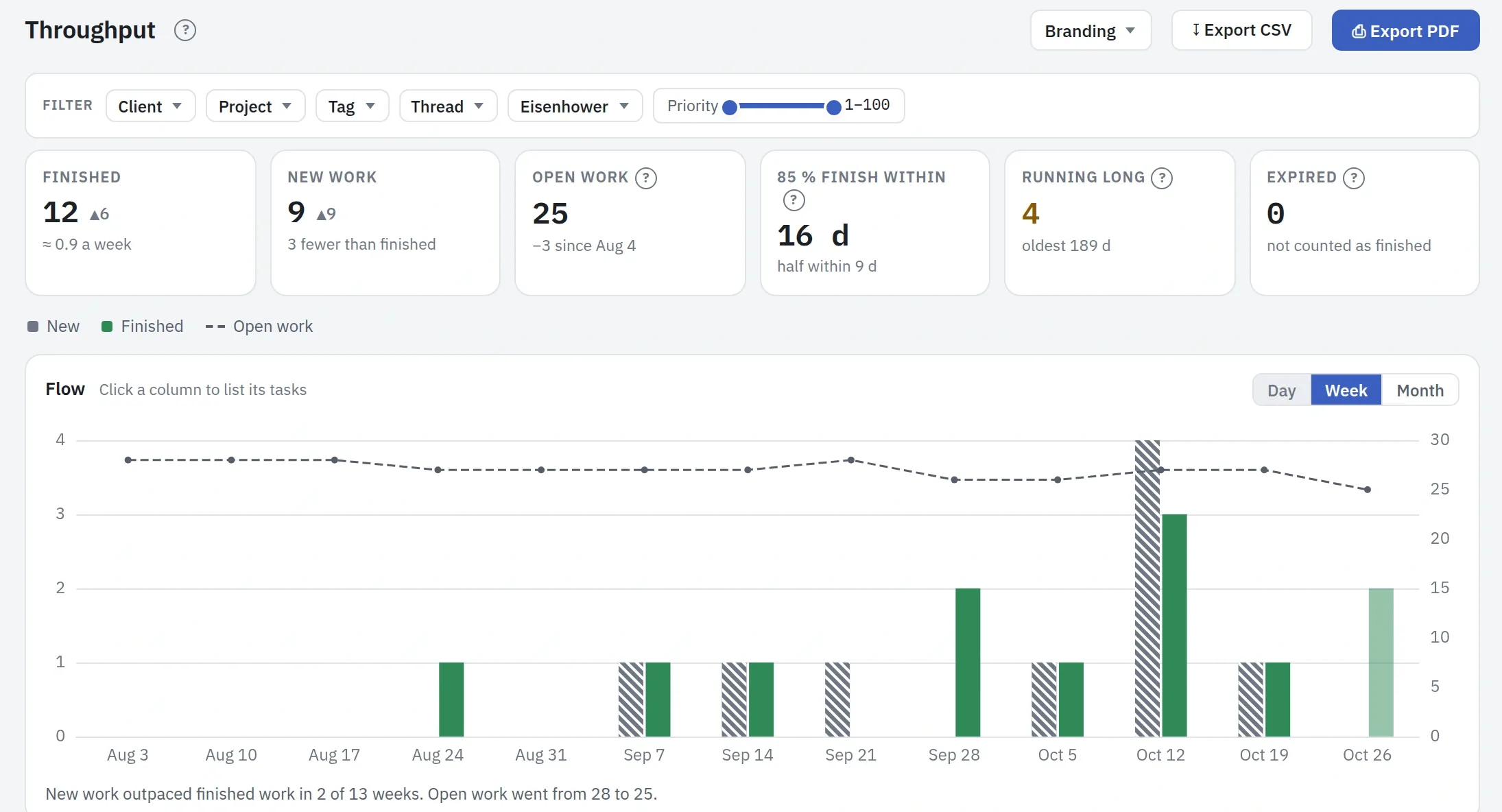
Throughput asks whether a project takes in more work than it finishes. Week by week it sets new tasks against finished ones, with the open work as a line, and says how long a task really takes: 85 % of them finish within so many days. Open tasks older than that are counted, so the stuck ones show. Portfolio throughput asks the same of every chosen project at once, each measured on its own tasks.

The Delay ledger of the Acme project: the board ends seven days late, 17 tasks are delayed, the days are split by cause, a chart shows where they came from and another shows the month each delay landed in
The Throughput report of the Acme project over thirteen weeks: 12 tasks finished, 9 new, 25 open, 85 % finished within 16 days, and a weekly chart of new against finished work with the open work as a line

Add-ons

For what not every company needs.

Some parts of Plankwork sit outside the plan, for the companies whose work calls for them. The first is the Service Desk: customer requests worked by a team, next to the project they belong to and timed against what you promised. Step 6 shows it in Acme's story, and the Add-ons page shows all of it.

See the add-ons →

Built for companies

Ready for your IT department and your auditors.

People sign in with the Google or Microsoft account they already have, and leavers are switched off by directory sync. Owners decide who sees which projects and which views, and every change on every project is kept with what it was before.

Your data stays yours: download all of it at any time, or close an account to have its personal data erased. The app speaks 29 languages, and every date shows in the reader’s own time zone.

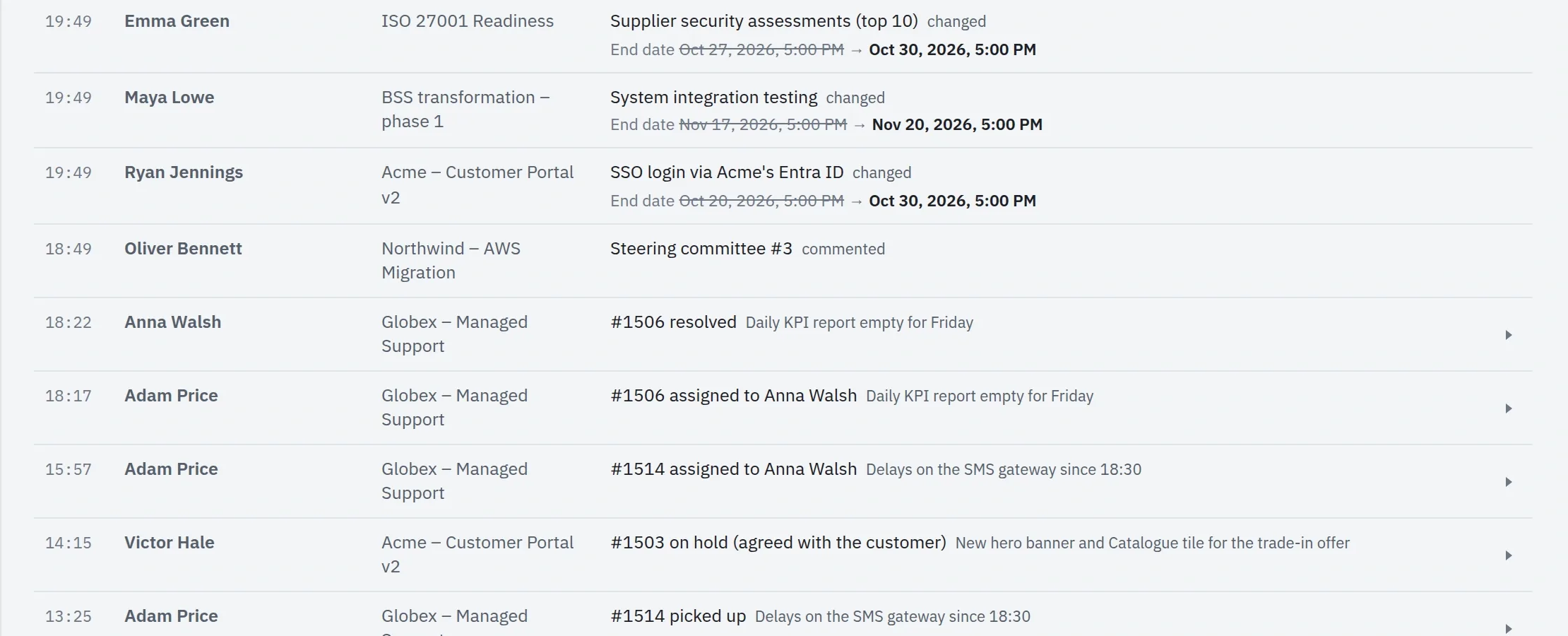
The owner audit log: each change with who made it, on which project, and the value before it

This is the audit log, which only owners see: who changed what on a project, and what it was before.

Every feature

The whole list in one place. Each name leads to the step that shows it.

One plan with every feature on this page, priced per person per month. Client accounts are free. The Service Desk and extra storage are add-ons.

See pricing →