The questions you ask on Monday morning.
Owner or board
For: founders · managing directors · board members
Monday morning, before the board meets. You do not need every project, only whether the company is on course.
Are we still making money?
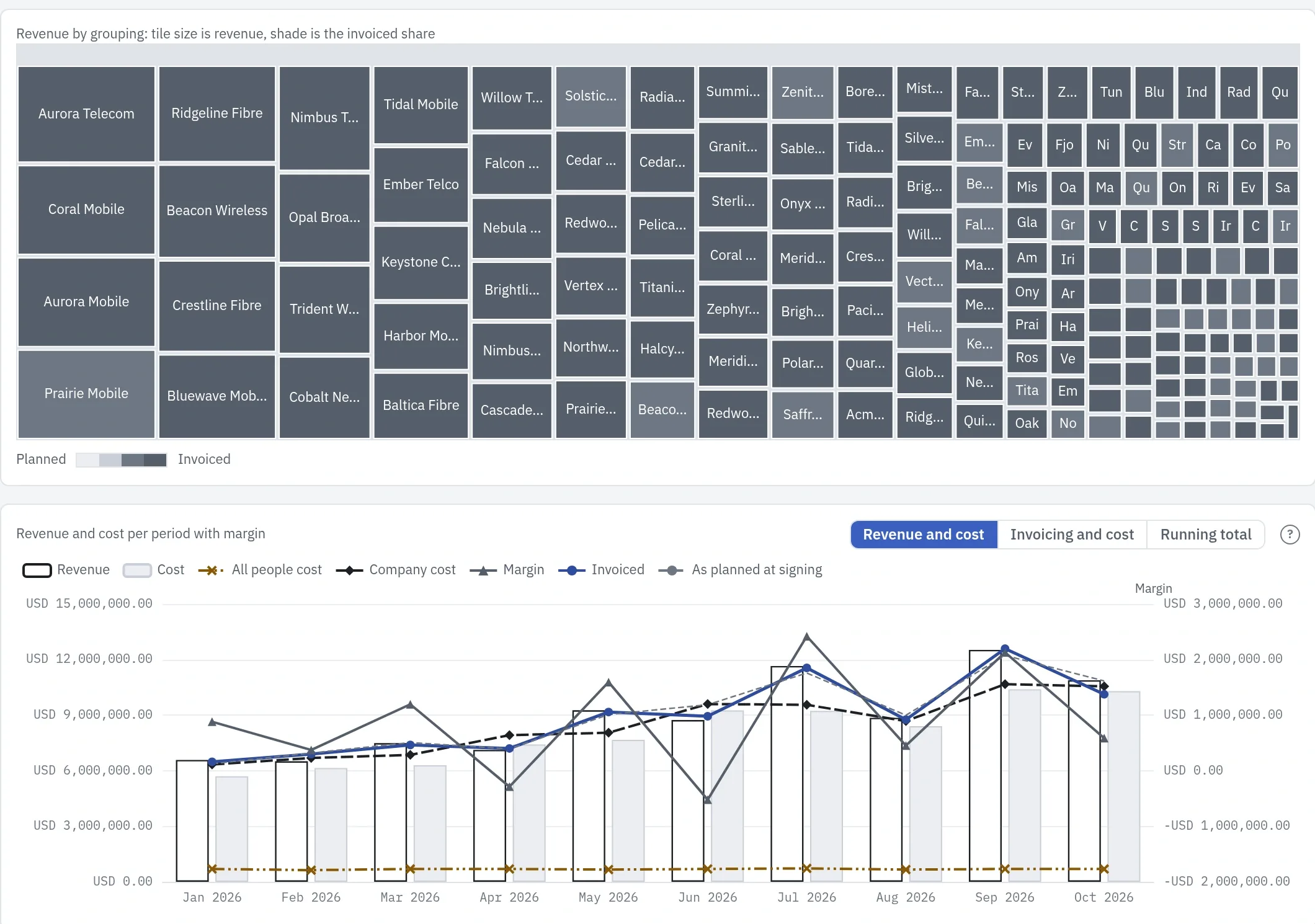
↑ All questionsFinancials sets contract revenue against cost: the hours people track at their rates, plus each project's other cost lines.
The tiles show which customers the revenue comes from, shaded by how much of it is already invoiced; the chart sets revenue against cost month by month, with the margin as a line. An Owner also sees what the company pays for its people: everyone's working week at their rates, whatever they worked on, so idle and internal time shows as the gap to project cost.
Rent and the rest of your accounts stay outside unless you enter them as cost lines.
Financials →Is our income heading the right way?
↑ All questionsFinancials runs from the past year into the coming months.
Revenue already invoiced stands beside the revenue still to invoice on signed contracts, and Include pipeline adds what the contracts not yet signed would bring, drawn apart from it.
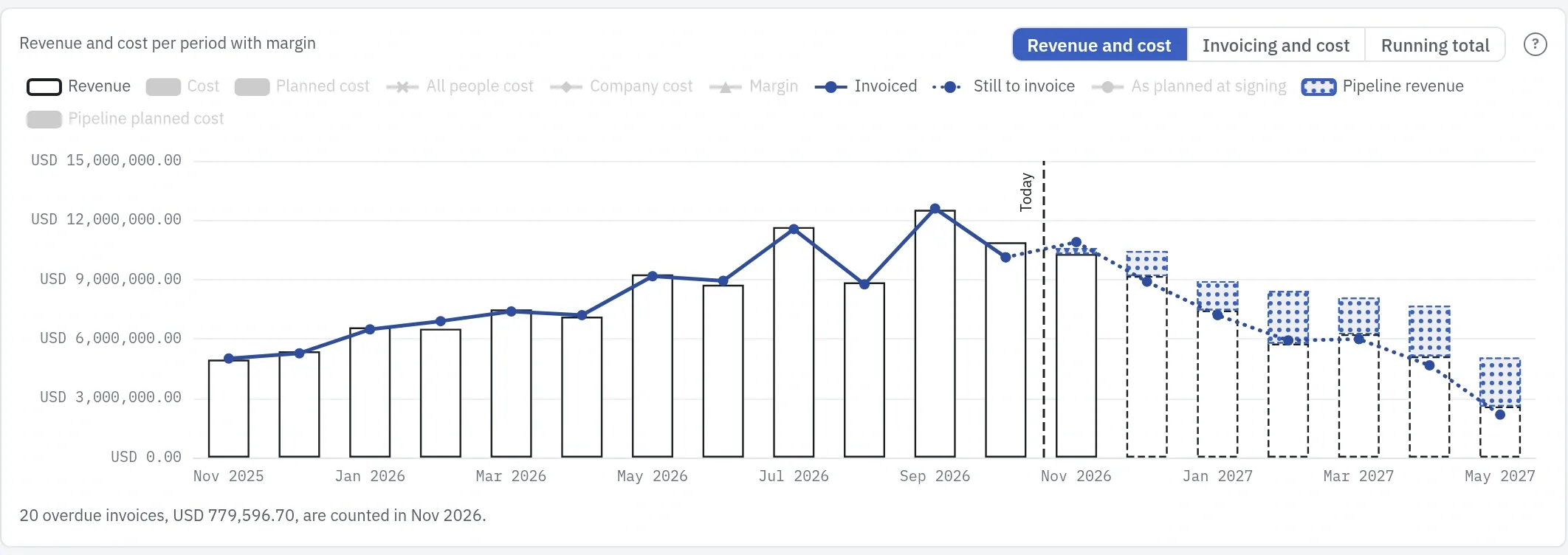
A slope down ahead is the gap the pipeline has to close; the pipeline counts at its full value, with no weighting by likelihood. Click a month to see the invoices behind it.
Financials and Pipeline →Are the strategic initiatives I ordered falling behind?
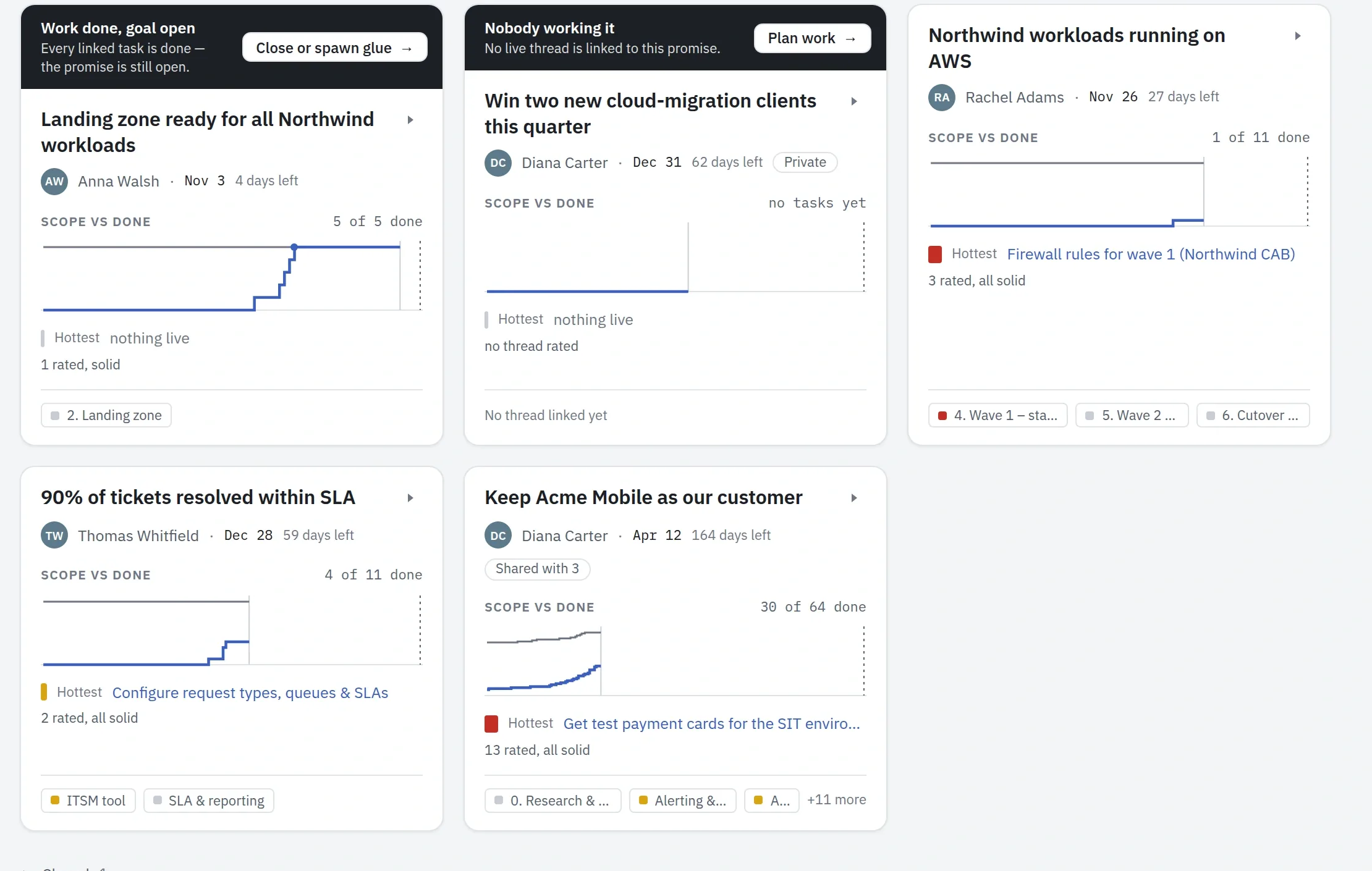
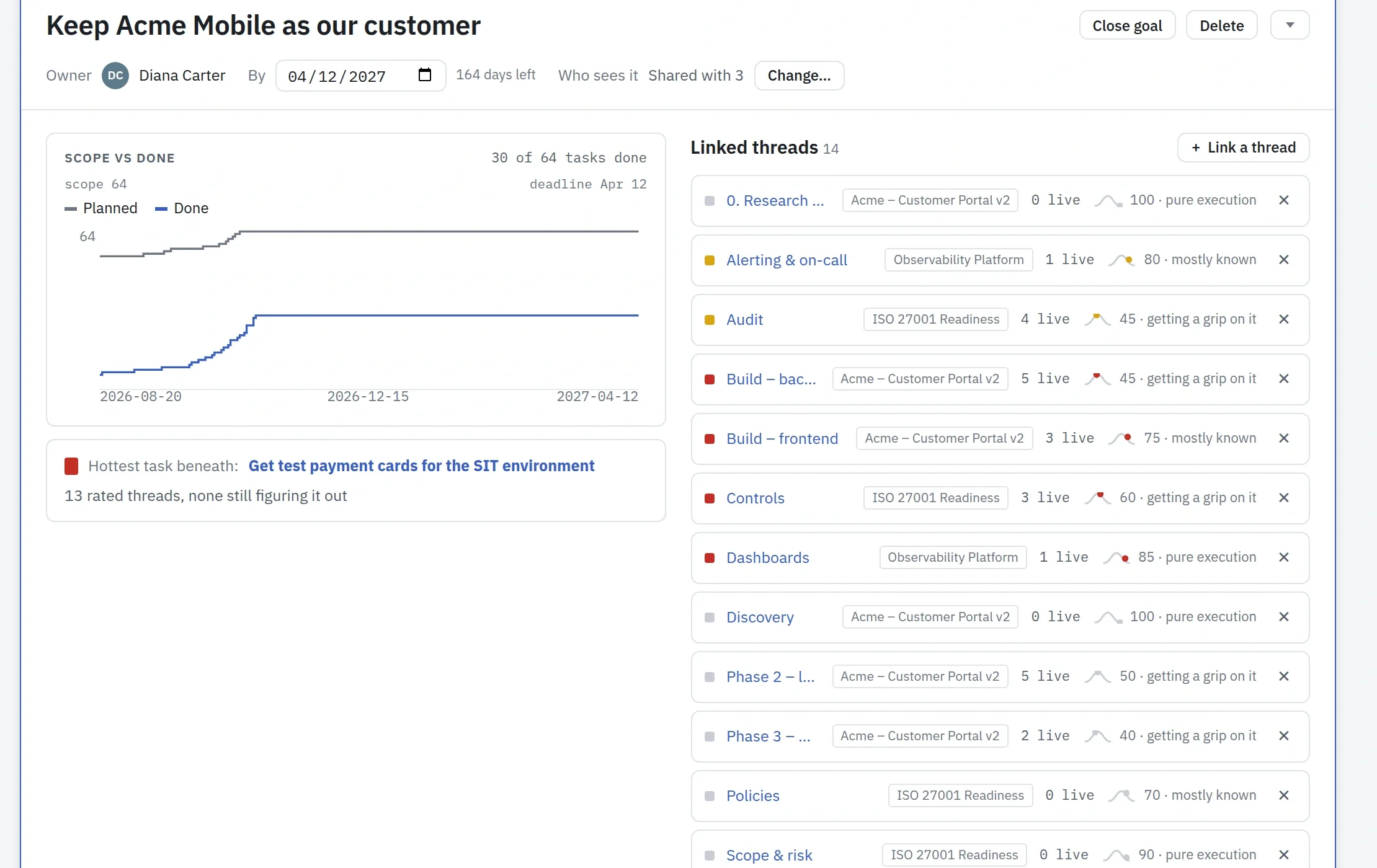
↑ All questionsEach goal shows its scope against the work done in the time left to its deadline, and its hottest task.
A goal nobody is working on says so, and so does one whose work is done while it stays open. An Owner sees every goal.
Is our headcount appropriate for the current workload?
↑ All questionsBreakdown shows each team week by week: the hours booked for its people against the hours they have.
The darker the week, the fuller it is; red is more than a full week.
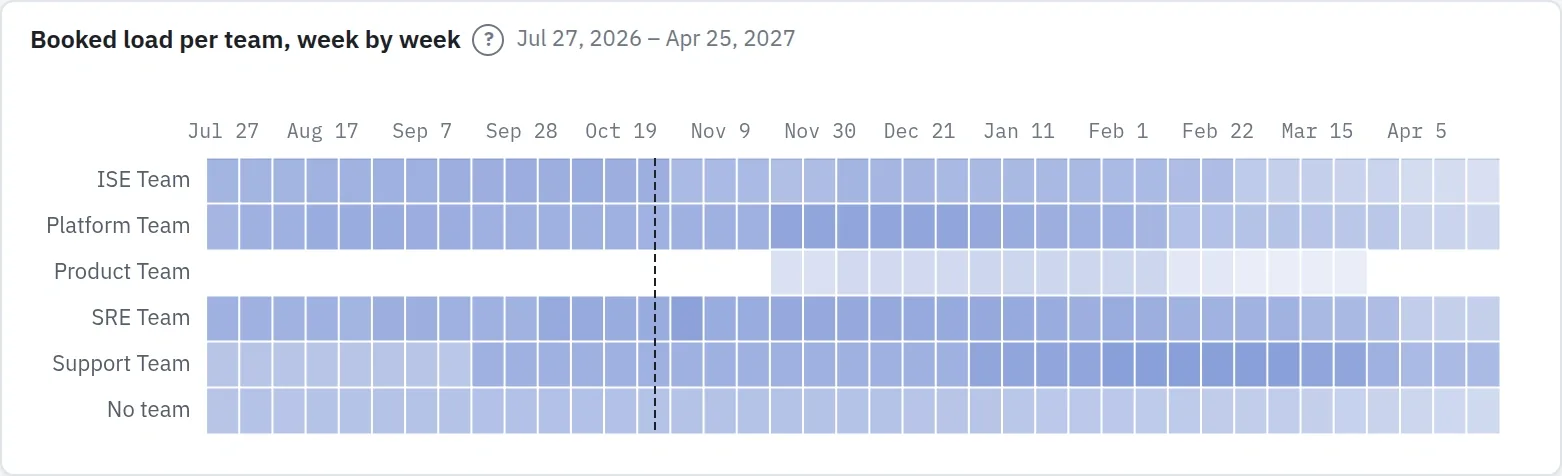
It counts bookings, the hours a week each person is planned on a project in Resources, so the answer is only as good as the bookings: work nobody booked does not show. Resources shows the same bookings person by person, with the reasons.
People's time, planned →What does our invoicing plan look like against the costs we have planned?
↑ All questionsInvoicing and cost sets the invoices still to come on signed contracts against the cost planned for the same months: people's bookings at their rates and the dated cost lines.
The gap is shaded green where invoicing covers cost and red where it does not; the pipeline is a line of its own and never counts as cover.
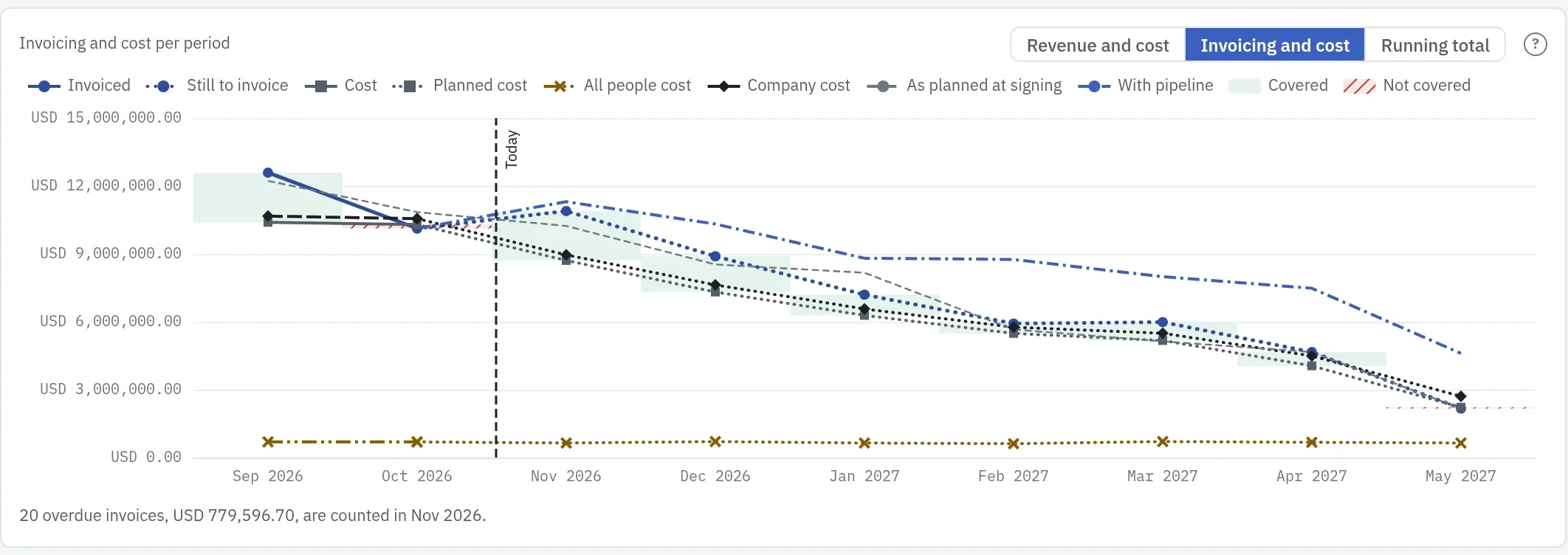
An Owner also sees the company's full people cost ahead, booked or not. Click a month to list its invoices. Plankwork plans invoices; it does not issue them.
Profitability →Director or program manager
For: heads of a PMO · program and portfolio managers · delivery and product directors
Monday morning. Pre-sales has three new projects starting next week, and last week's reports say the two largest projects are slipping. You need the answers before the meeting, not after someone builds a spreadsheet.
Are the goals behind our strategy still followed, and is confidence in each one holding up?
↑ All questionsEach goal lists the threads that carry it, across projects, with how sure the people doing each one are that it will land.
A hot thread with low confidence is flagged. Every change to a rating stays in the Activity log, with who made it and when, so you can see where confidence moved.
Does any thread need my attention this week, and has a risk come true that needs me?
↑ All questionsOn every board, late work turns red on its own, and Now lists what needs you, with the reason on each row.
Portfolio status puts the projects you choose in one report, and Portfolio risks puts their risks on one matrix of likelihood and impact. A risk marked as occurred stays at the top of its register and comes to its owner's Now until a task is raised for it.
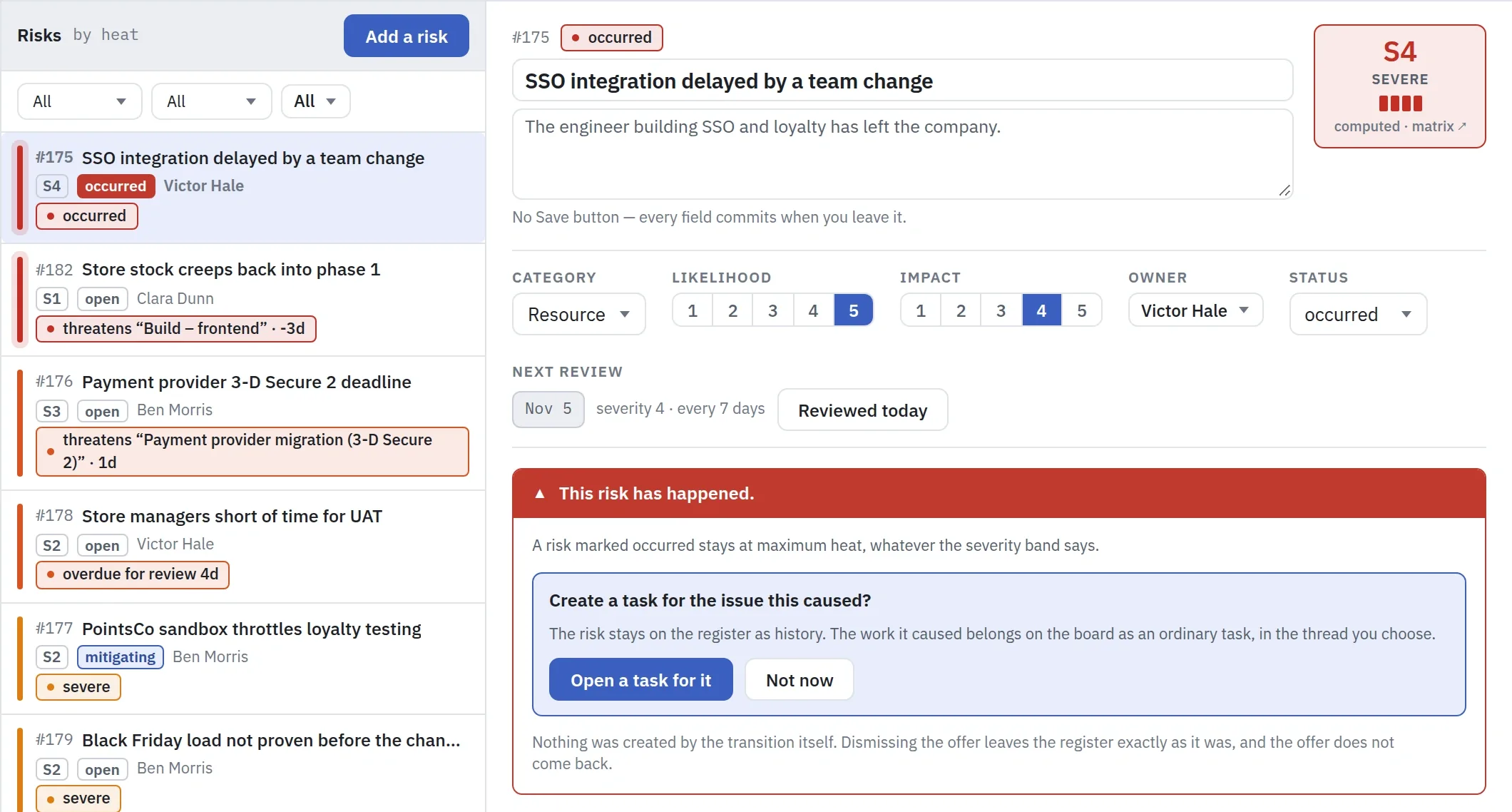
When such a risk reaches you is your company's policy: for example, every risk that comes true at or above a set severity goes to the Director. Plankwork does not send it on by itself; the project manager makes you the risk's owner. The mitigation strategy comes with it, as the risk's response, its note and its mitigation tasks.
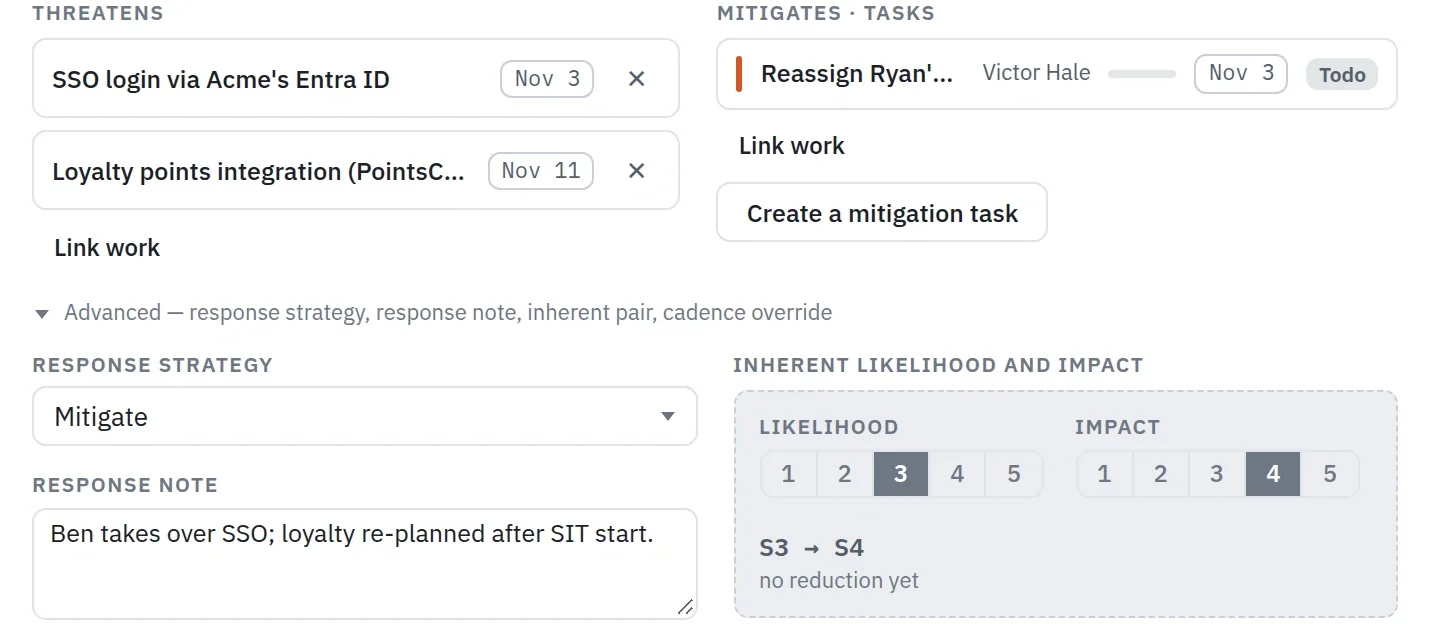
So does the cost: what the risk adds goes on the project as a cost line, and Financials and Breakdown report it.
What could stop it →How much is left in the pipeline: income still to sign, and work ahead for our people?
↑ All questionsPipeline sets the revenue still to be signed beside the revenue you have, month by month.
For the work, Resources shows what each team is booked for in the months ahead, with draft contracts as tentative, and Breakdown shows each project's bookings by team, with what is left.
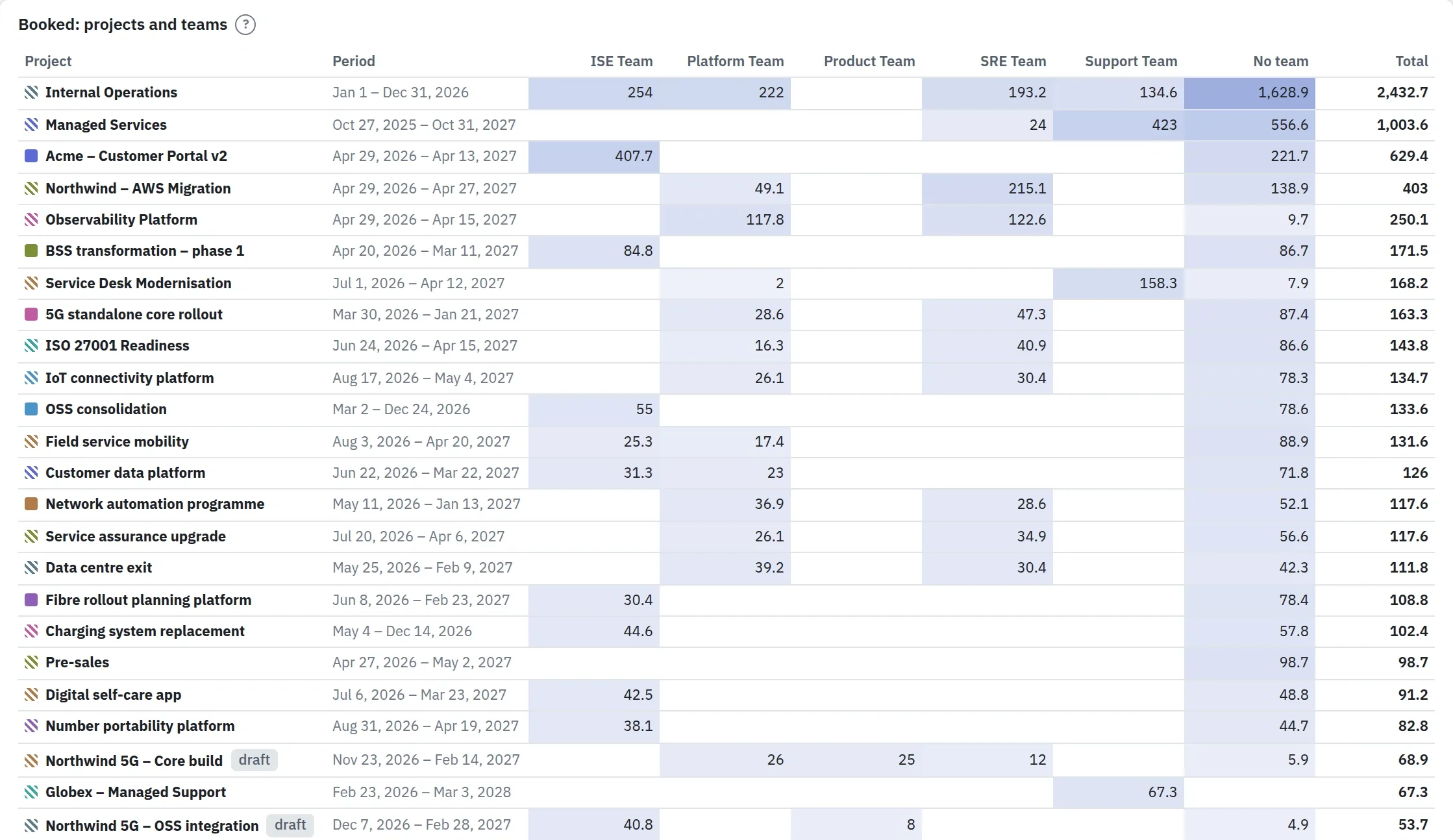
Is next quarter's work for our people secured?
↑ All questionsIt is secured where signed contracts cover what your people are planned to cost.
Contracts lists every customer contract with its value, its next milestone and its delivery date, so you see which signed work runs through the quarter and which ends before it.
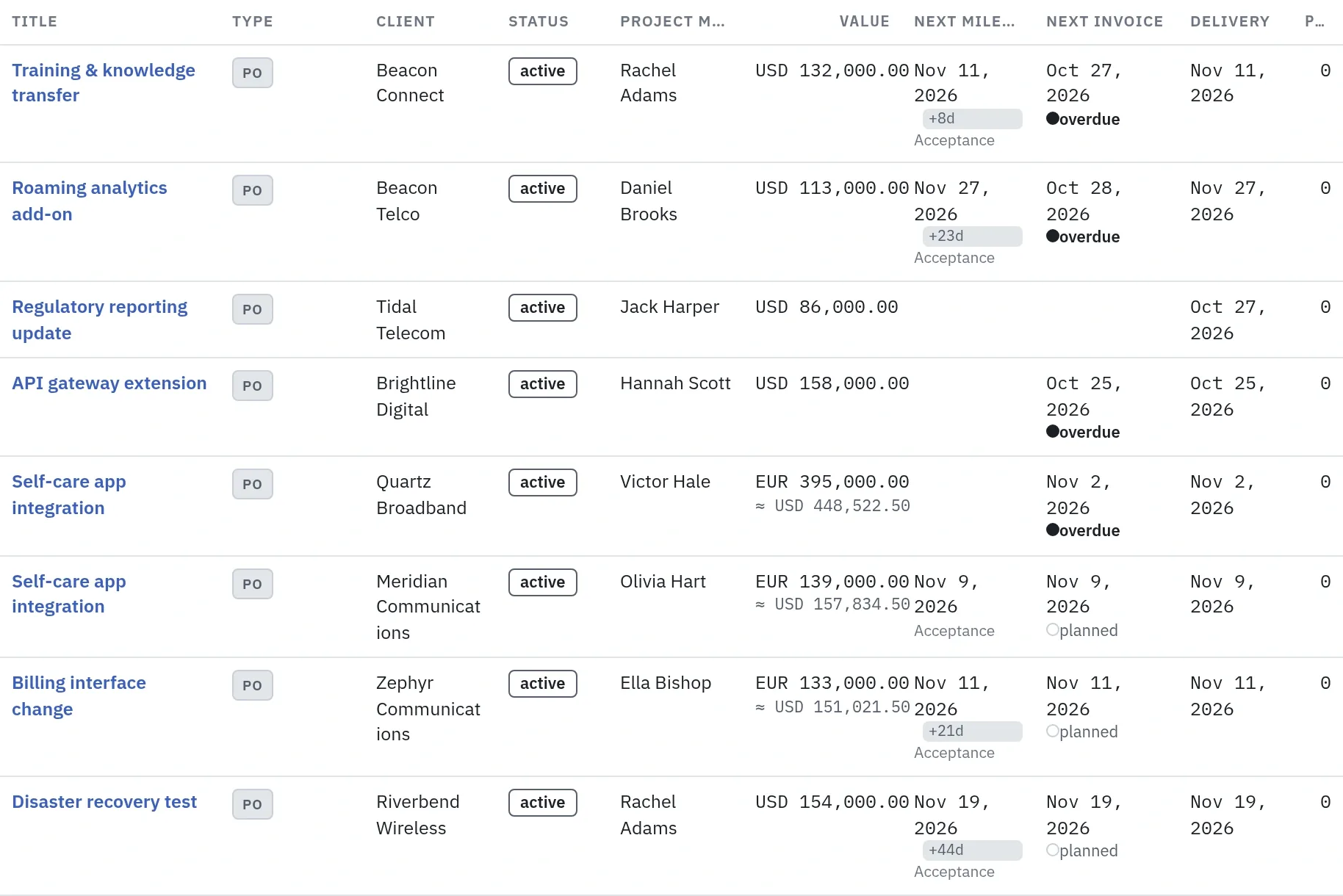
Financials then sets the figures side by side: in Invoicing and cost, the invoices still to come on signed contracts stand against the cost planned for the same months, which is people's bookings at their rates and the dated cost lines. Include pipeline adds the contracts not yet signed as a line of their own, so you see how much of the quarter still depends on a signature.
Do I need to secure people from other teams?
↑ All questionsYou see which team is short and which has room; asking for the people stays with you.
Resources groups people by team, with the hours each team is booked for against the hours it has, and marks the weeks over the limit. Breakdown shows which teams carry each project.
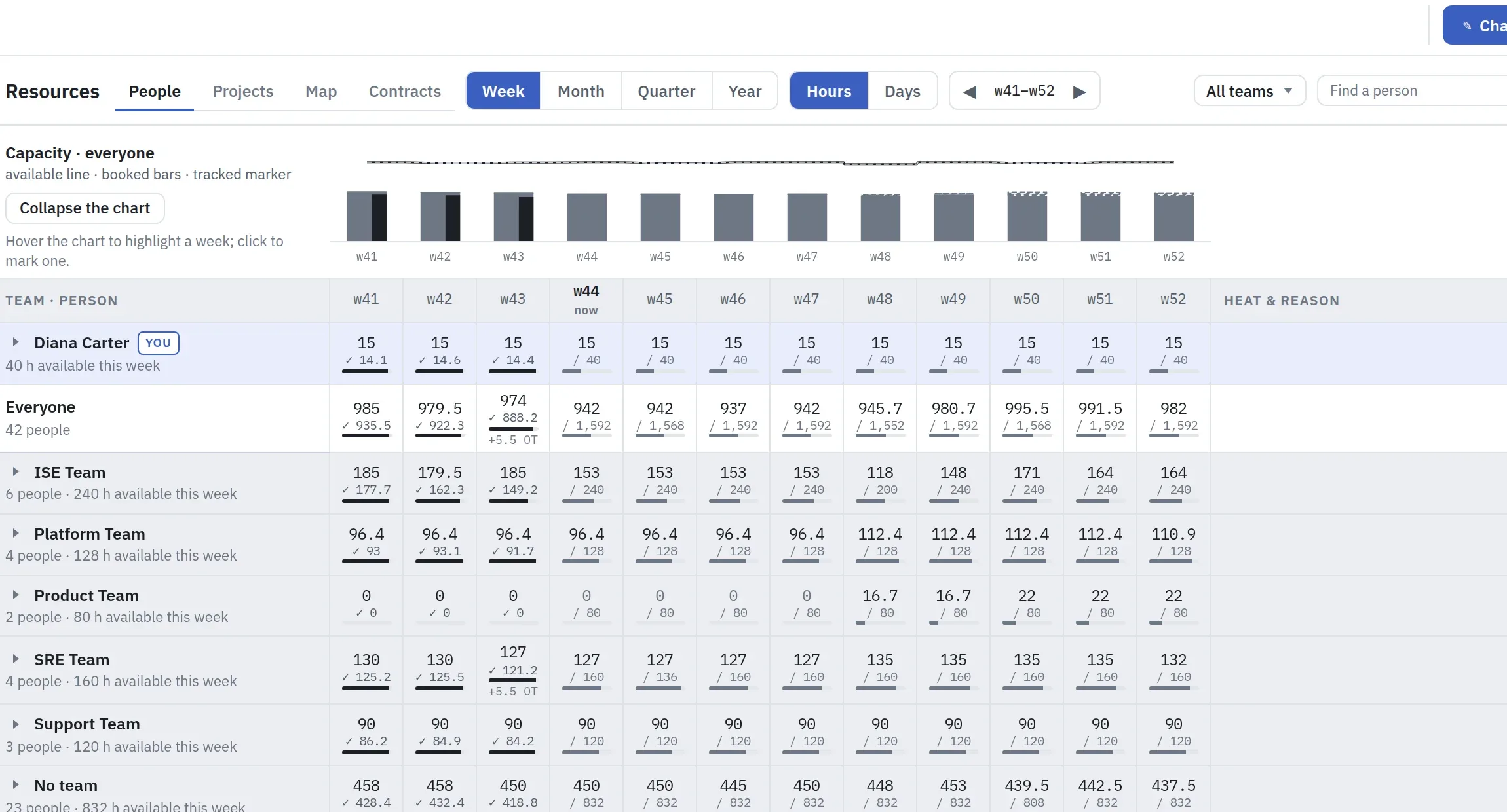
Three new projects next week, and the two big ones are slipping. Will it fit, or will we hit a spike?
↑ All questionsPut the new projects on a draft contract: their load shows as tentative beside everything already booked, and it counts toward overbooking, so you see the spike before you say yes.
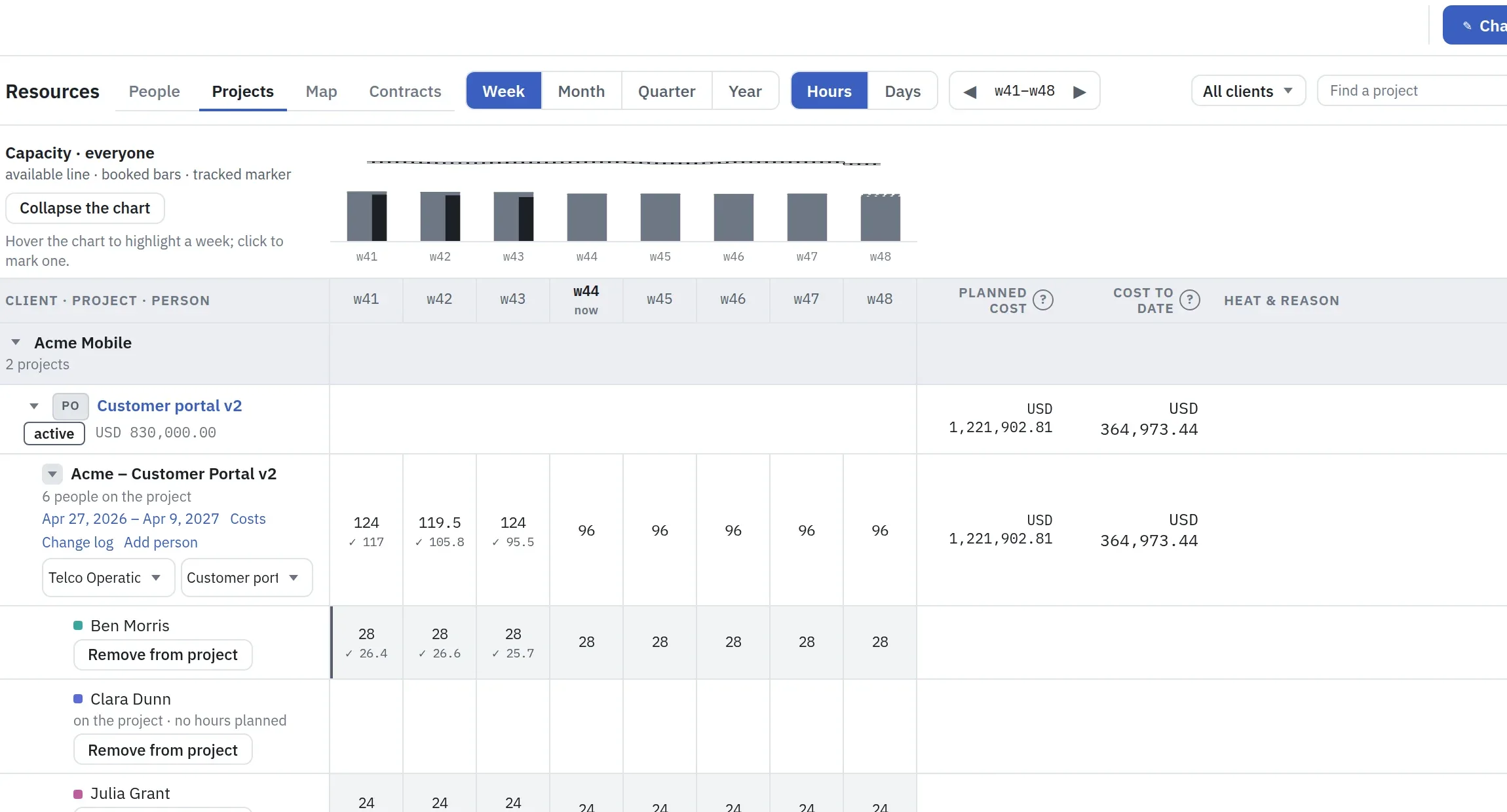
For a slipping project, move its bookings to the new dates; the preview warns "over capacity in N weeks" before anything is applied. Bookings do not follow a slipping plan by themselves. You decide the move.
People's time, planned →How are people holding up?
↑ All questionsPlankwork cannot measure wellbeing. It shows what usually comes first: overtime, weeks booked over 100%, people working without a booking, and leave in the plan.
Project manager
For: project managers · technical project managers · delivery managers
Monday morning. You run four projects, the steering group meets on Thursday, and you want to find the one that is drifting before the customer does.
Is communication running well?
↑ All questionsPlankwork shows the traffic. Its quality stays with the project manager.
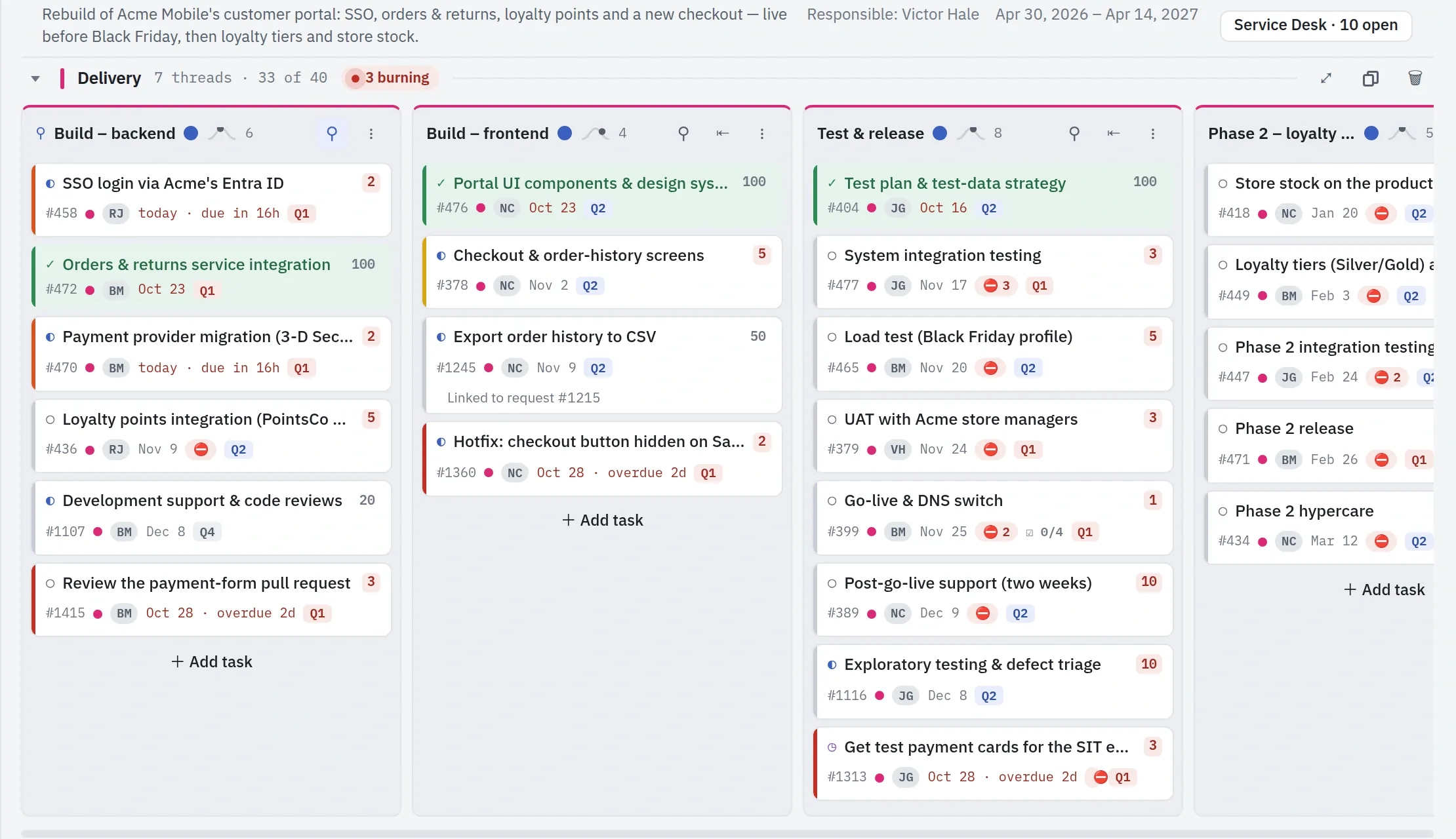
The board holds every task with its owner, status and date, Activity records who changed what, and the comments sit on each task.
Now lists what is waiting: delegations past their follow-up date and customer comments with no answer, each with its reason.
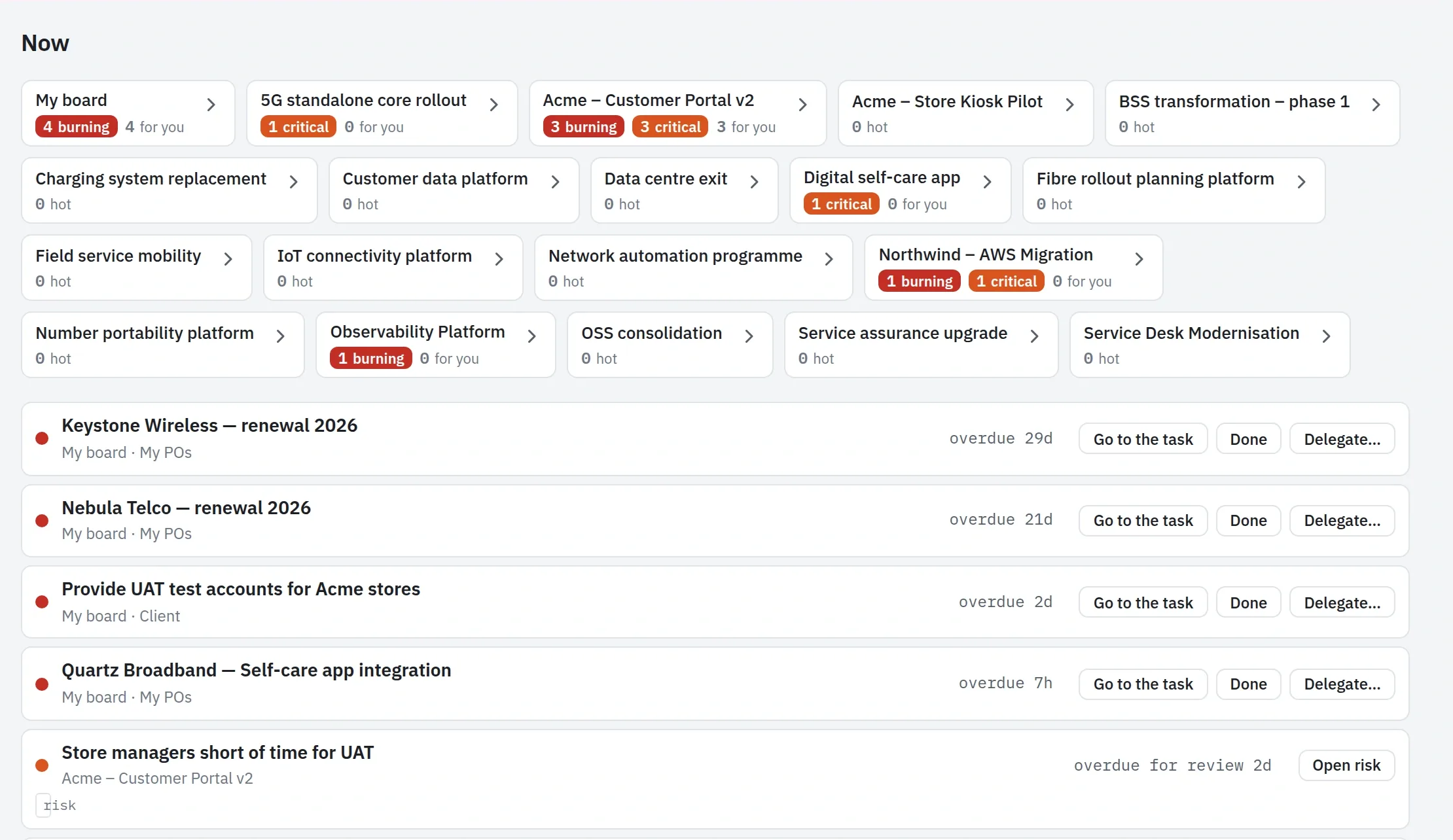
Someone has to read the traffic on the board and in the tickets, ask for what is missing and answer what is left waiting. Here all of it is in one place to do that from.
Every day →Is the work dispatched to the right people, and organised well?
↑ All questionsEvery task has one owner, and unassigned tasks come to Now. Two checks show whether that owner is the right one.
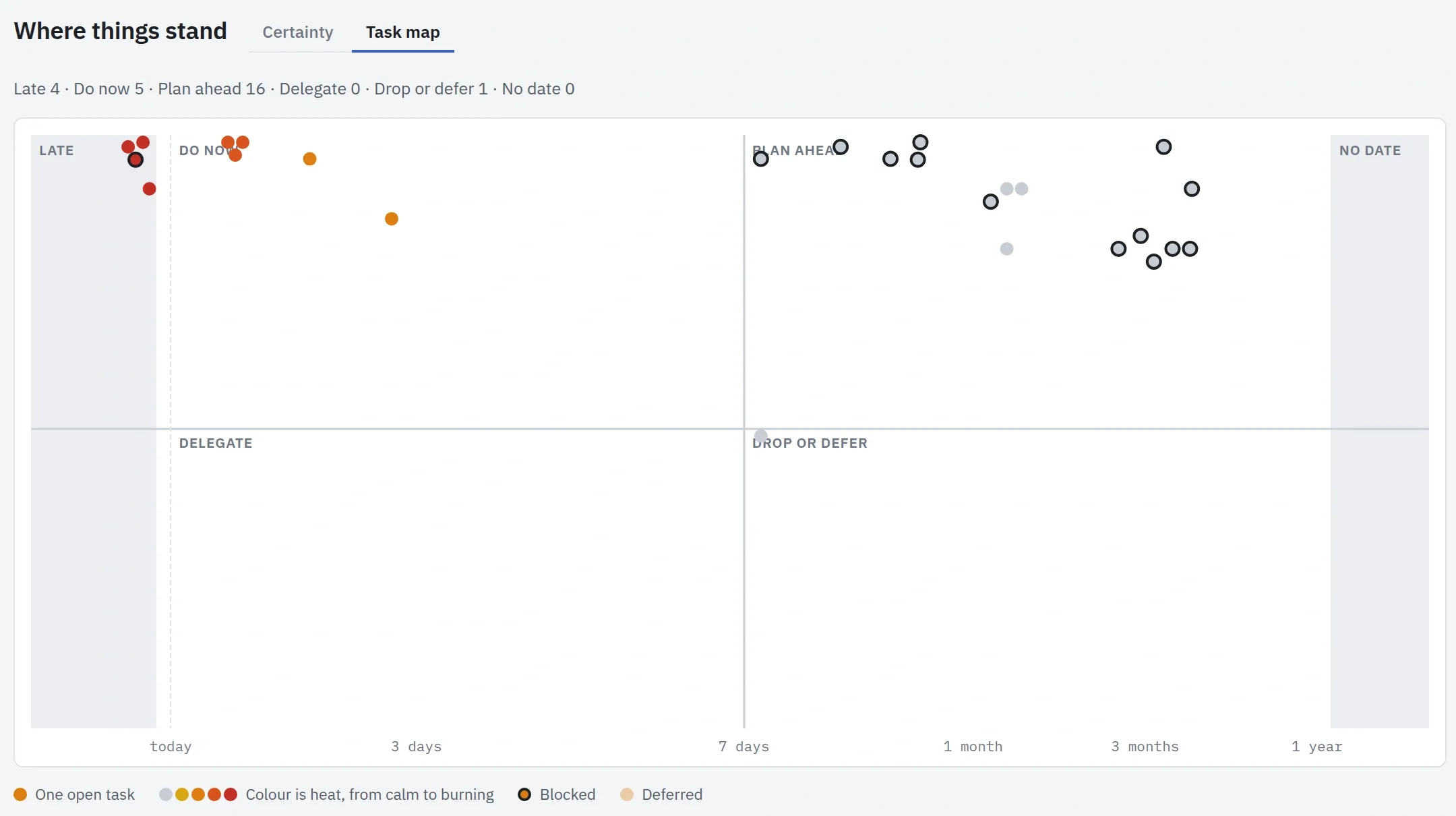
The Task map plots a board's open tasks by due date and priority and colours each by its heat, so the tasks in red are the ones burning: late, or close to it. Filter it by person to see who holds the red ones, and check that person's load in Resources.
Role fit looks at the other half: whether the work suits the person. Once a week your AI model compares what each person finished with their role description. A card that does not fit says so, can suggest a better role, and offers to delegate it. Role fit is off by default and needs the roles written in the Directory.
Task map →Will we hit the dates we promised?
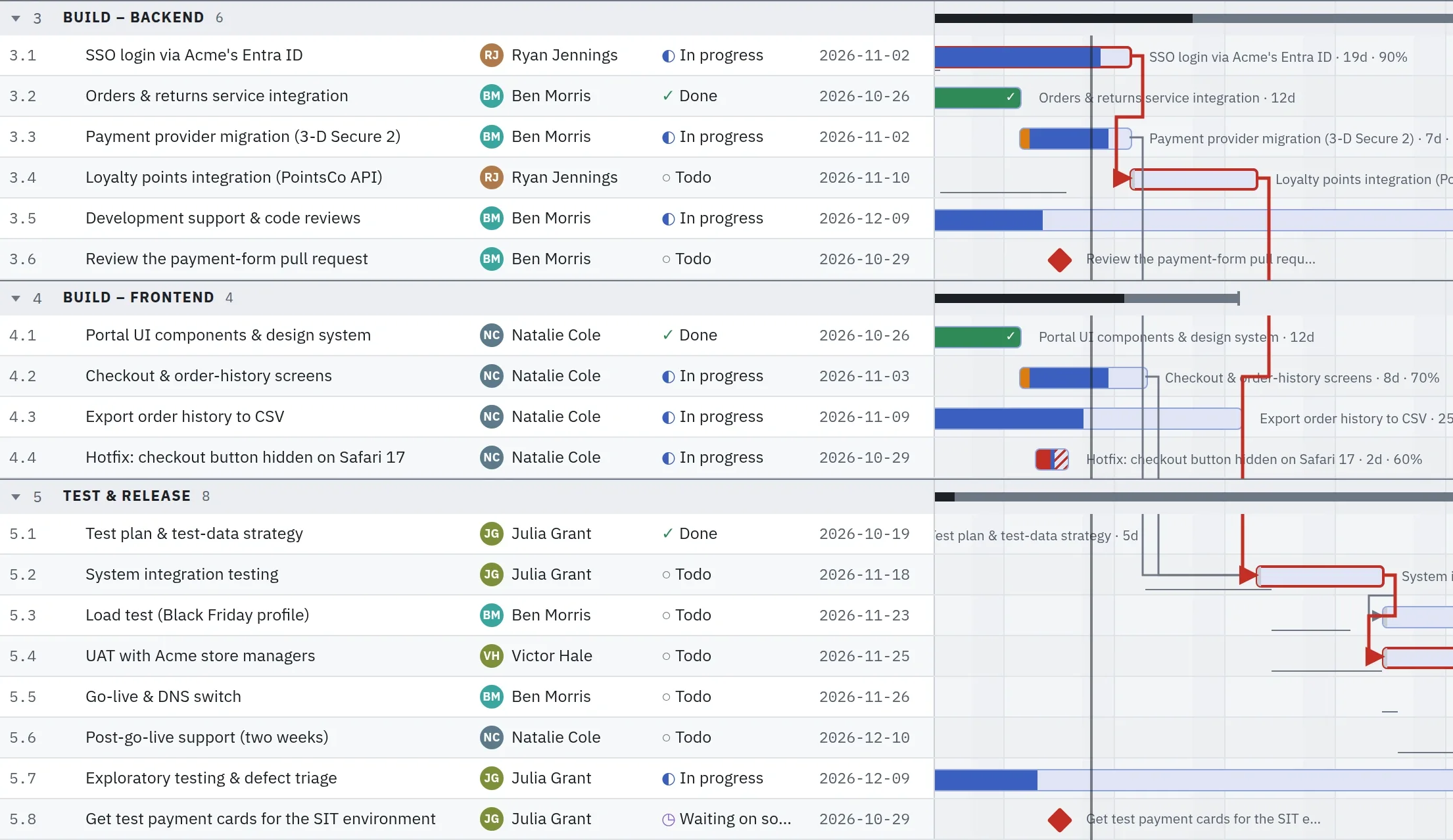
↑ All questionsThe critical path shows the chain that sets the end date, and the forecast shows when the work will really finish, from where it stands today.
The plan draws every thread on one timeline, with the milestones that matter to the customer.
What slipped since the baseline, and why?
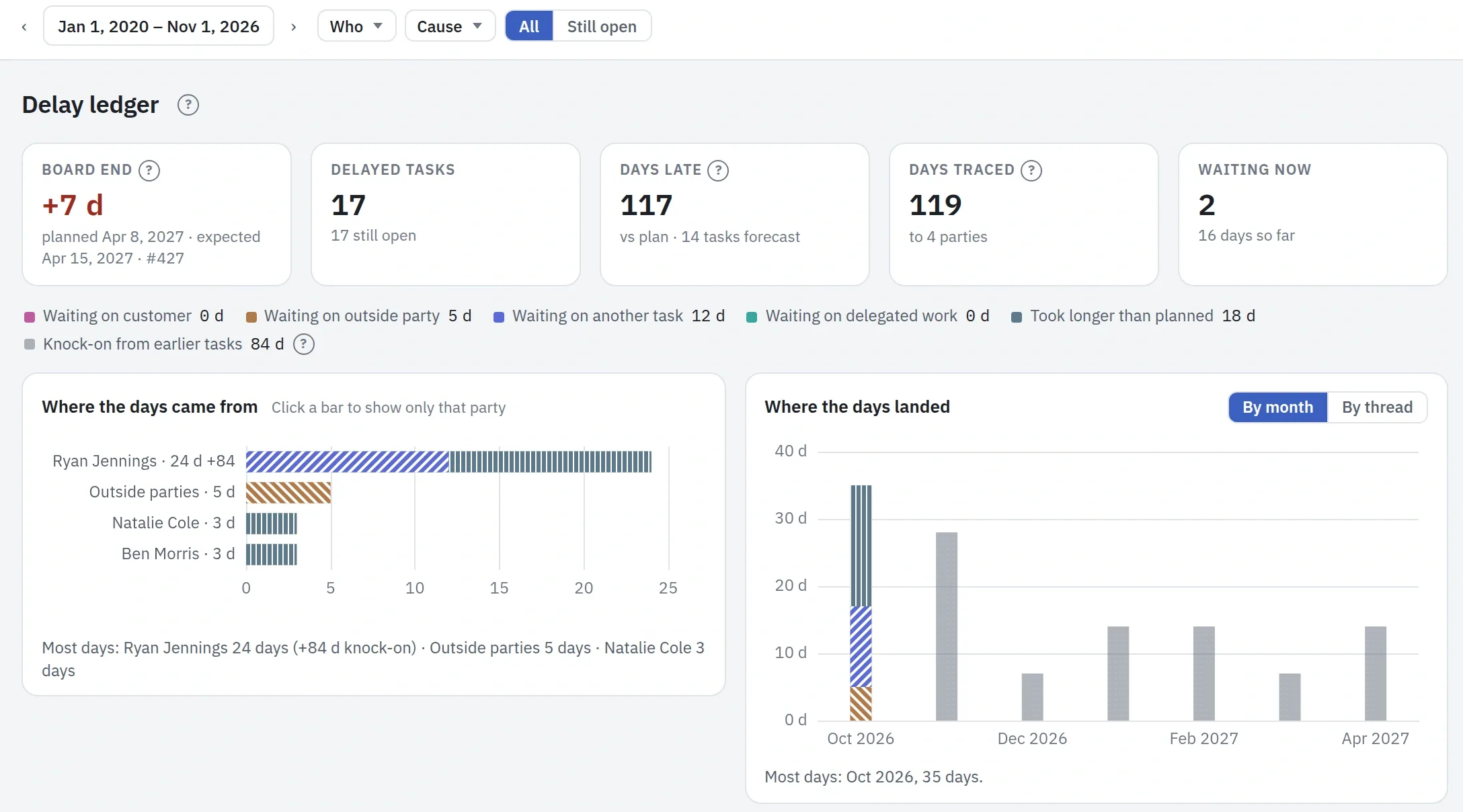
↑ All questionsWhat moved sets each task against the baseline you saved, and the Delay ledger traces every day of delay to where it came from.
The source is the customer, an outside party, another task, delegated work, or a task that took longer than planned. A delay passed down a chain is shown apart, as knock-on, so you can see what to unblock first.
Will a problem here delay my other projects, or someone else's?
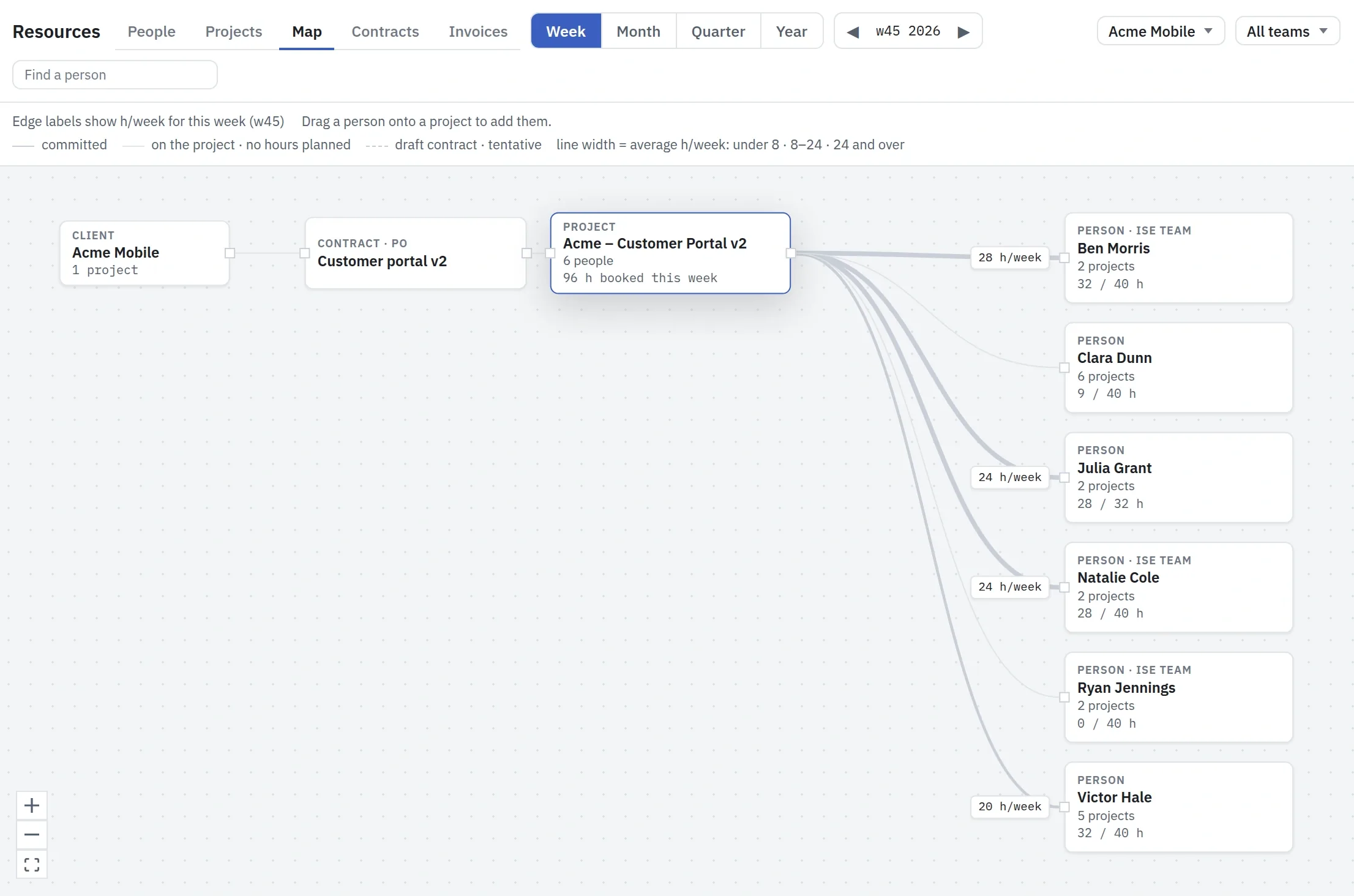
↑ All questionsProjects meet in their people. Plankwork draws no task links between projects: the delay travels when a problem here pushes this project's bookings forward, into weeks where the same people are already booked elsewhere, and their load spikes.
The Map shows where that can happen: the project's people, how many projects each one is on, and their booked hours against what they have this week.
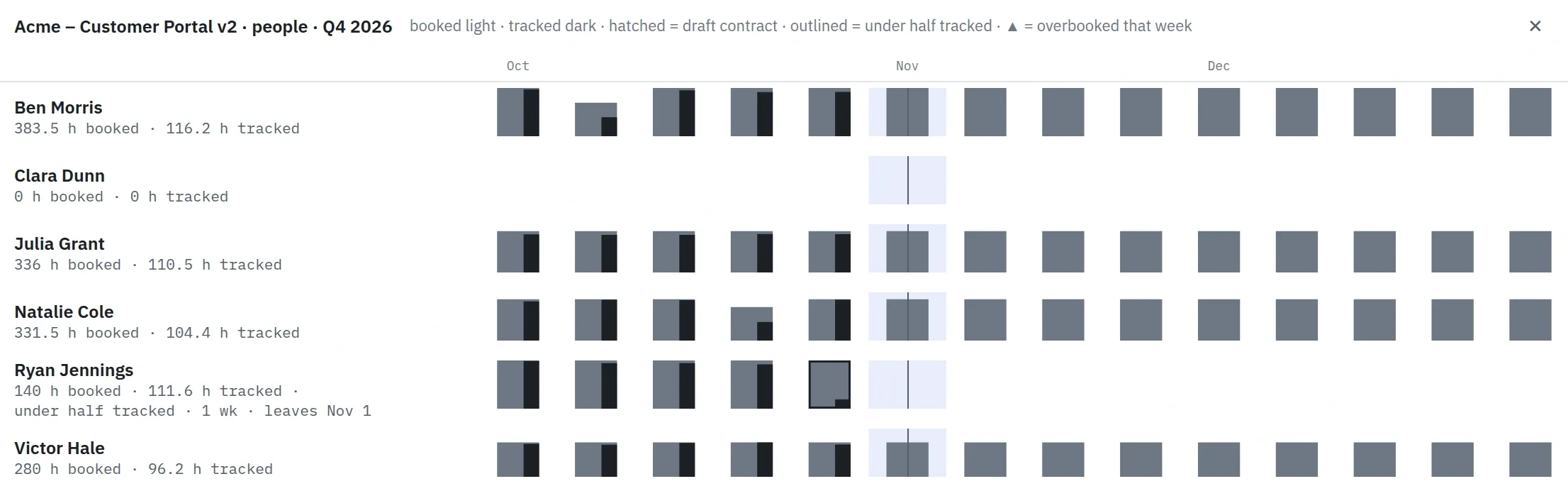
Under the Map, each person week by week, with a mark on an overbooked week. When you move the bookings to new dates, the preview warns "over capacity in N weeks" before anything is applied.
Inside the project, dependencies and the critical path show what a late task pushes back. To see other people's hours, a project manager needs Resources at Edit.
People's time, planned →Are fewer new tasks coming in than we finish?
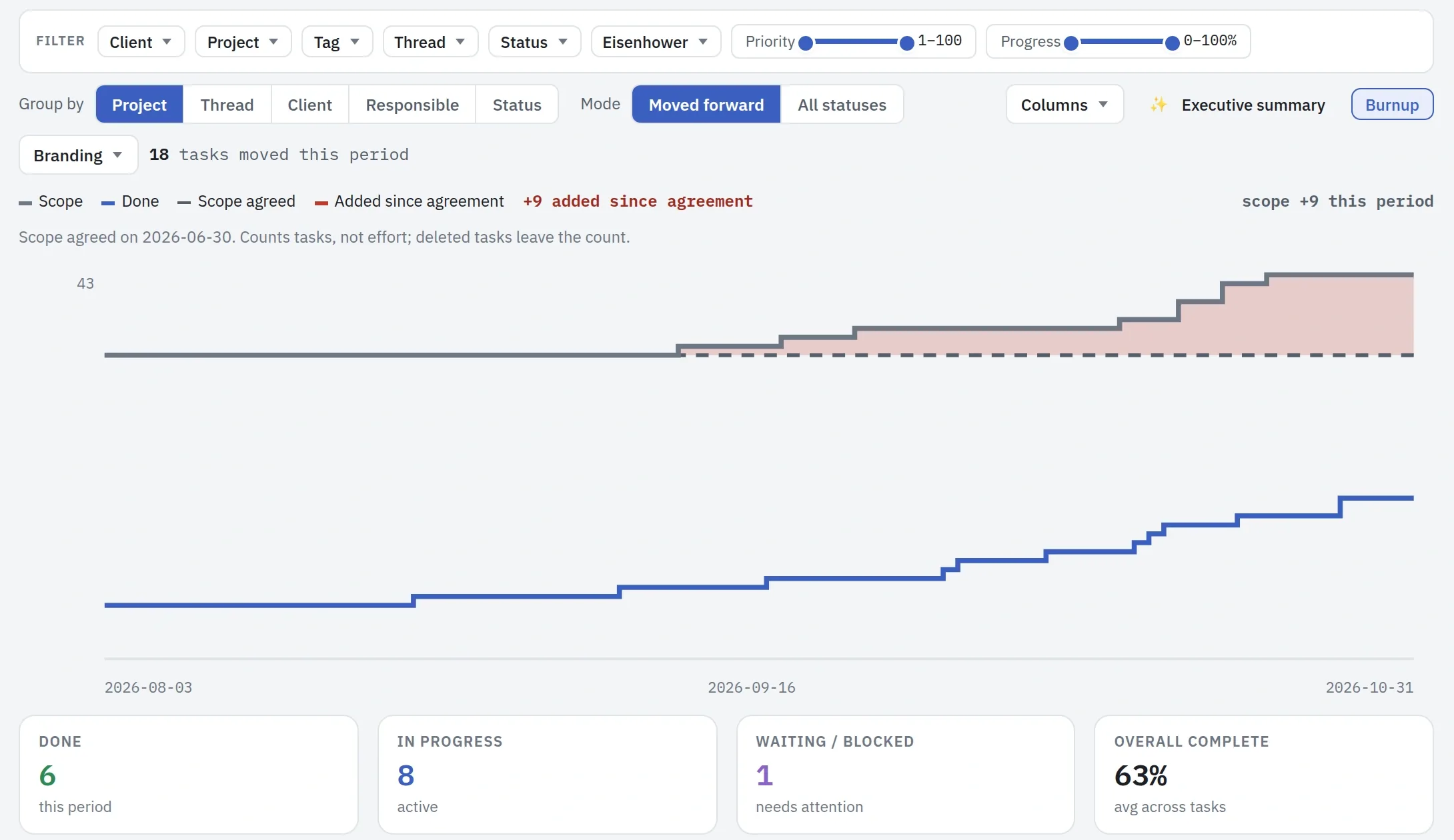
↑ All questionsThe Burnup draws the scope against the work done, and every task added after the scope was agreed shows in red.
Throughput counts new tasks against finished ones, week by week, and says how long a task really takes.
Are the people booked on my projects working on them as planned?
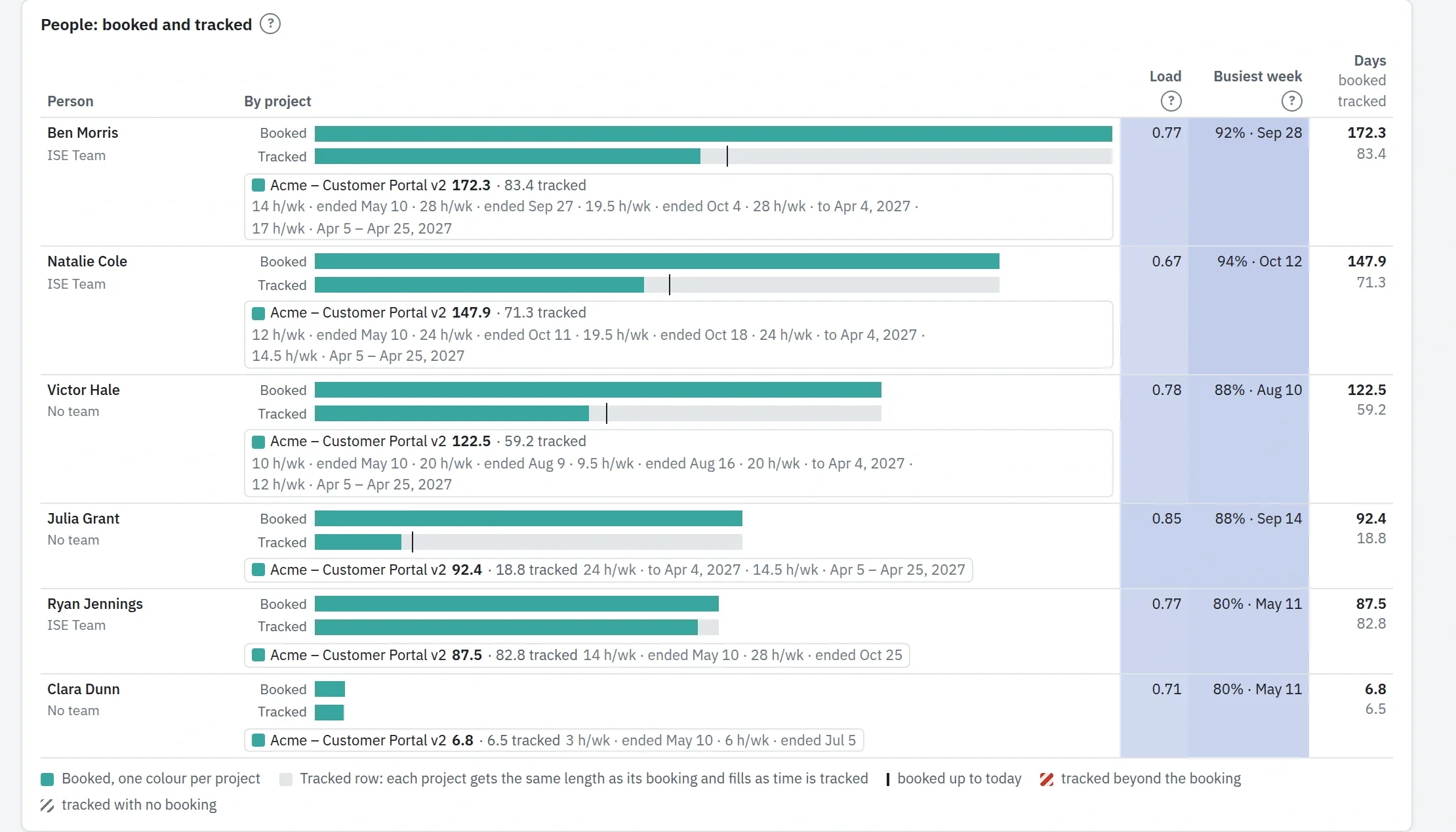
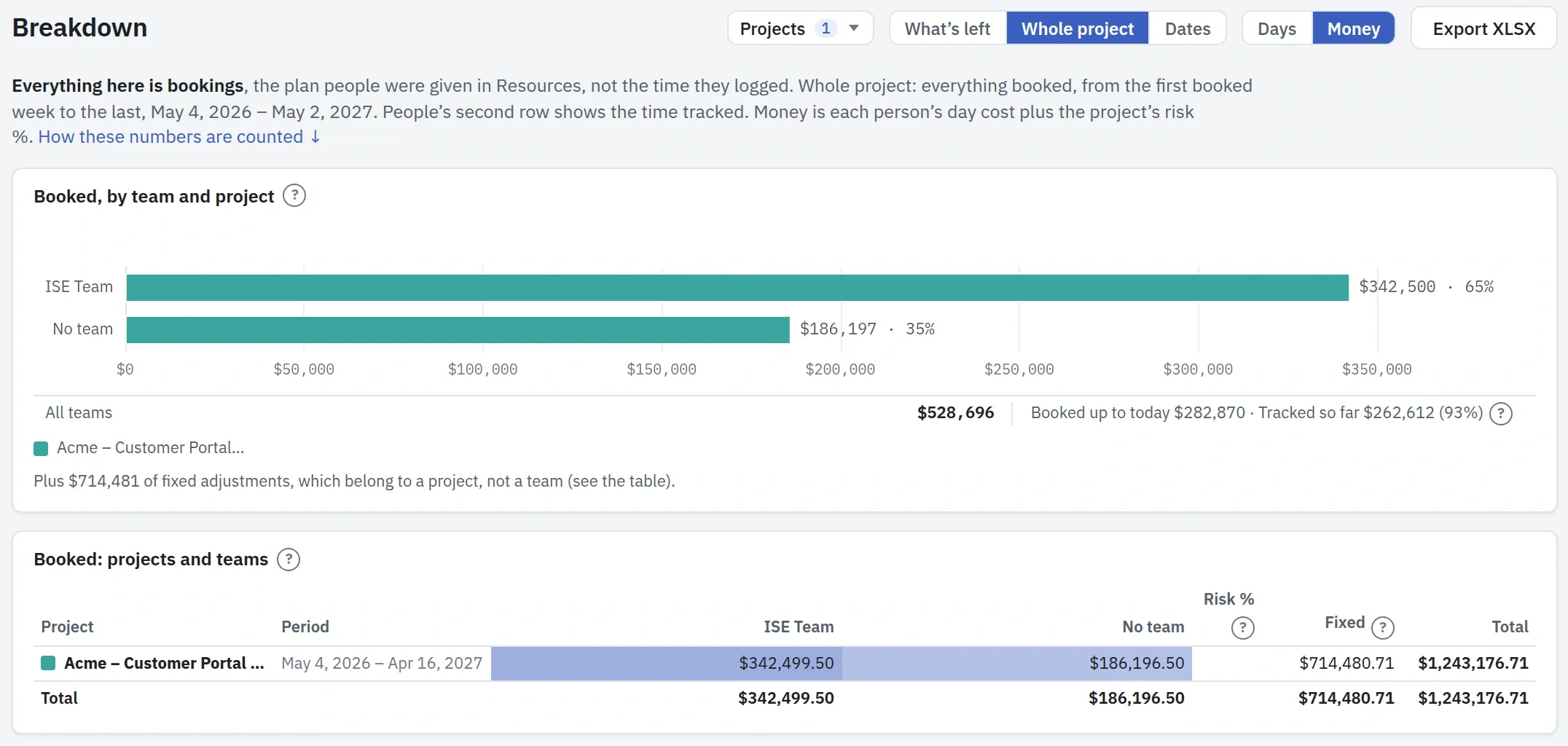
↑ All questionsEach person on the project shows the days booked against the days tracked so far.
Resources shows the same week by week, and flags work done without a booking.
How much of the budget is used, and what is left?
↑ All questionsOn the contract, Performance sets the money against the contract's value: cost to date, the planned cost still to come, the forecast at completion and the margin.
A project manager with Financials sees all of it, with everyone else's hours as one total.
Breakdown in money splits the project by team and person, with what was booked up to today and what has been tracked so far, and What's left counts the bookings still ahead. That split is an Owner's view: a project manager sees their own share.
Which risks are due for review, and is anyone working on them?
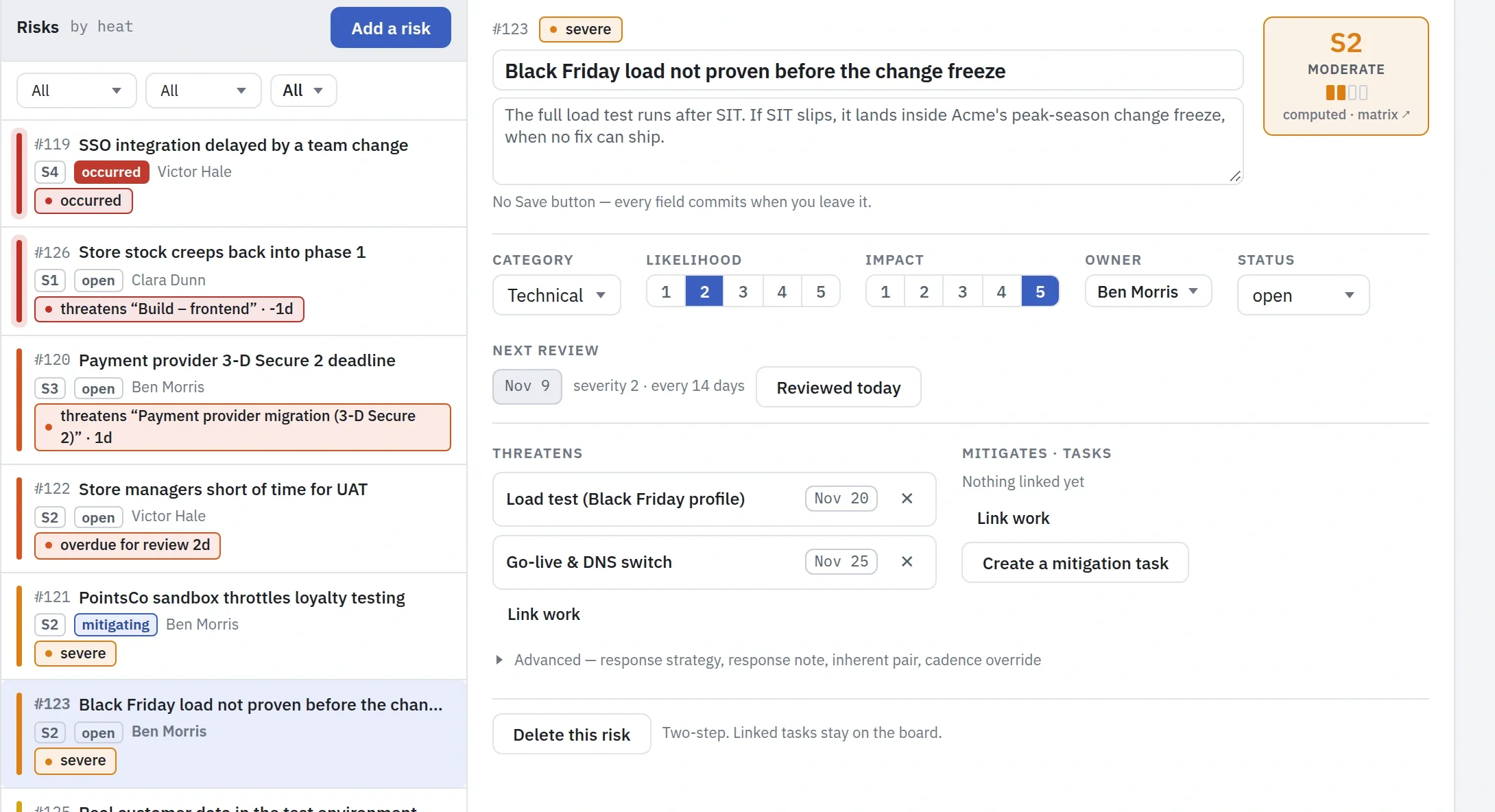
↑ All questionsEach risk has an owner and a review date, and the review comes to the owner's Now when it is due.
The work that reduces a risk is linked to it as mitigation tasks, and so are the tasks it threatens.
What do I show the steering group?
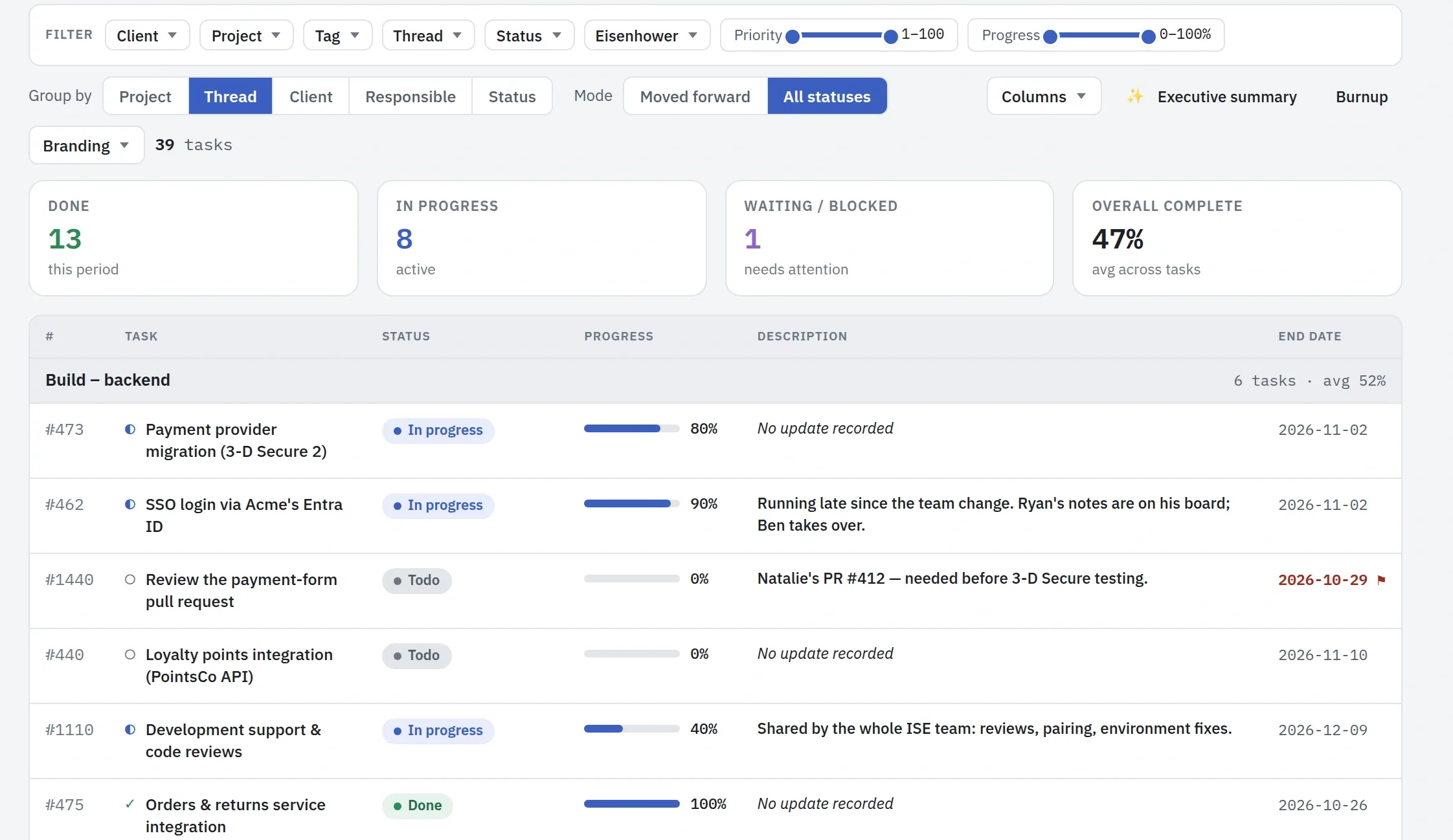
↑ All questionsThe Status, Plan and Progress reports are put together from the board, so nobody writes them by hand.
Present shows the plan full screen for the meeting, and a report goes out by email on a schedule, or as a PDF or an Excel sheet.
Engineer
For: software, integration, platform and operations engineers · testers, analysts and consultants
Monday morning. You want to know what is yours this week, without asking around. If you have to guess what done looks like, the work is not defined yet.
Is there new work for me?
↑ All questionsNow is your queue across every project: work handed to you, your tasks that are blocked, and your own tasks as their dates come closer, each with the reason it is there.
Activity shows what changed on a board since you last looked.
Every day →Where are the documents that set the objective, so I do not gold-plate?
↑ All questionsIn Files, beside the work: each project has its own folders, and a document attached to a task opens from the task.
Anyone with access to the project reads and writes its documents there. A task also takes several links to what is kept elsewhere, and the Progress report can show them as a column.
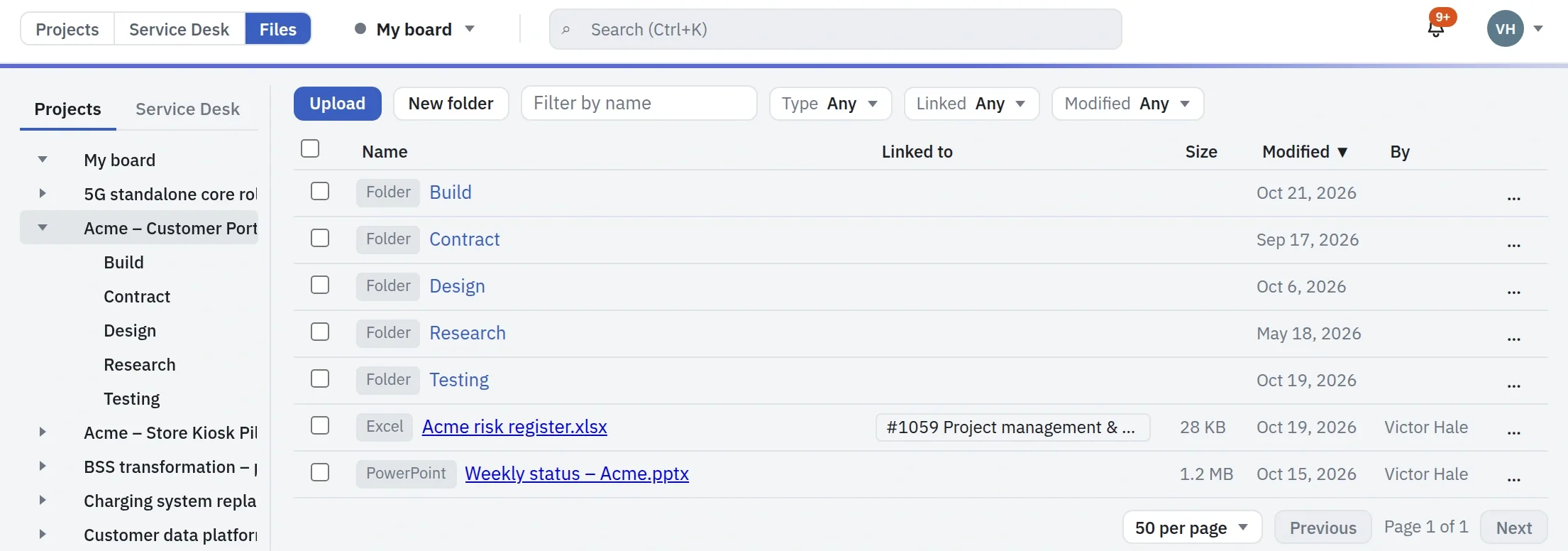
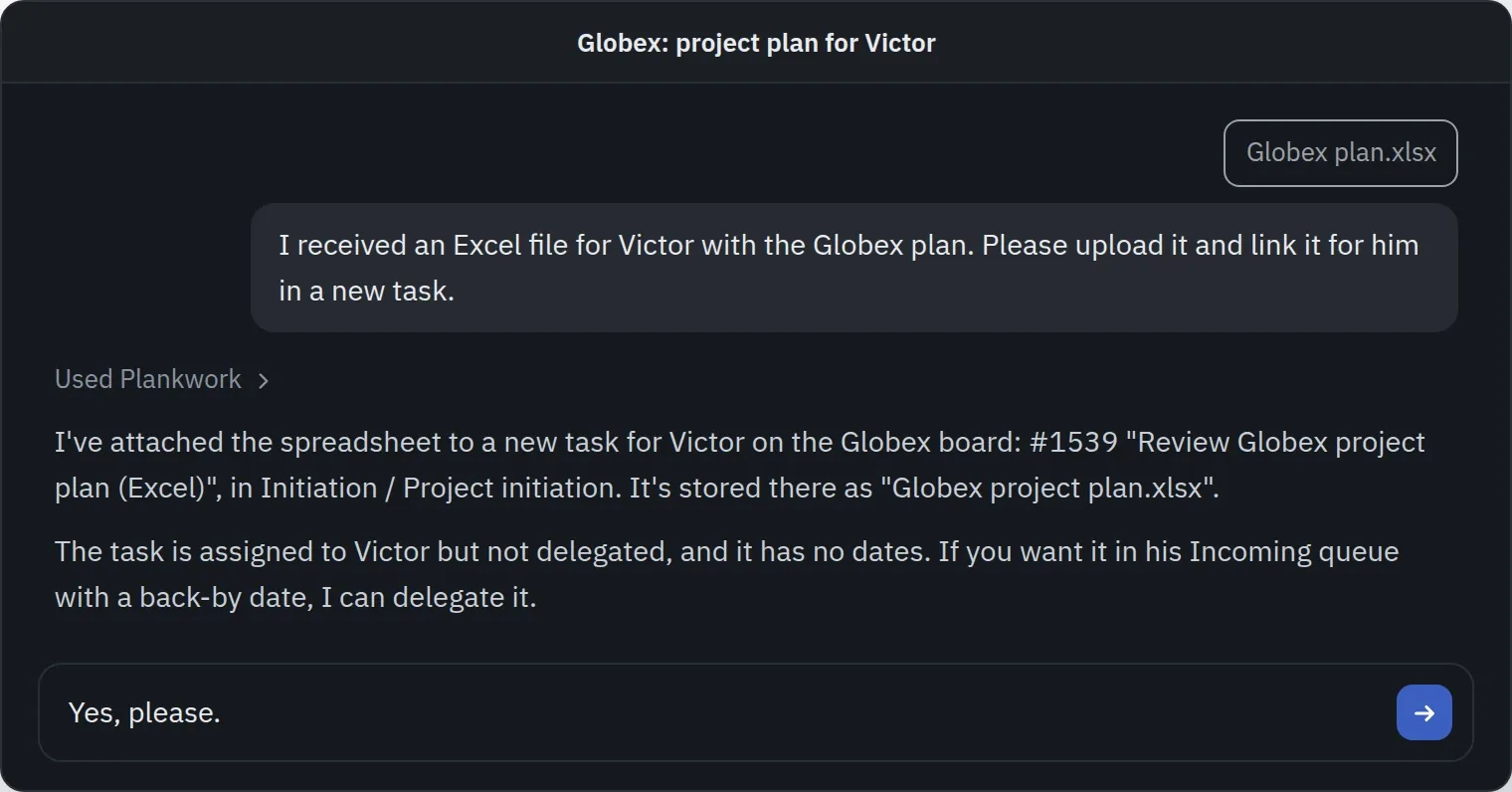
The same works through your AI assistant over MCP, within what you may do yourself: it attaches a file to a task, replaces a document with a newer version, or adds a link.
A customer attaches files to a request, and they land in Files under the Service Desk, by project and request. The team links one to a task so an engineer on the board can open it, and sends a document back by attaching it to a reply. A customer sees only the files on their requests, never a task's.
The estimate says how much work was planned, which is a fair limit on polish.
The project starts →Is my task defined, or am I guessing what the wish is?
↑ All questionsA task holds its detail down to the step: a description, a checklist, an estimate, a date, and everything said and changed on it.
The conversation stays on the task: ask in its comments, and the question and its answer stay with it, where the next person will find them. If the work was delegated to you, that is how you ask the person who delegated it.
A task made from a customer's request keeps the request linked, and the task's own links go straight to what sits elsewhere, such as the Jira issue or the GitLab merge request.
As always, the quality of the definition belongs to the person who delegates the work: Plankwork holds what they wrote, not what they meant.
The project starts →Is anyone waiting on me?
↑ All questionsOn the board, Blocked marks every task waiting on another, and the plan draws each dependency as an arrow, so a task of yours that holds others up shows there.
Work delegated to you shows in Now with its follow-up date.
The plan →IT manager
For: IT managers · security and compliance officers · IT administrators
Before the rollout. You sign off that Plankwork follows the company's access policy, and later you show the auditor how.
Can only the people our policy allows get in?
↑ All questionsCompany sign-in locks your domain to Google or Microsoft accounts, so nobody signs in with a password.
Directory sync adds and removes people from Google Workspace, or from Entra ID and Okta through SCIM. Only admins invite, two-step sign-in can be required for everyone, and a customer sees only what you share with them.
Security and compliance →Does it enforce our groups and permissions?
↑ All questionsGroups pushed from Entra ID or Okta reach the Directory once an admin chooses to use them, and their membership stays current.
Profiles set which views each group sees, Project access opens each project to everyone, to chosen groups or to named people, and an AI assistant sees only what its user may.
For companies →Is it compliant with our ISO 27001 policies?
↑ All questionsPlankwork does not hold an ISO 27001 certificate yet. Our process is already compatible with it, and we will pursue the certification in 2027.
Our compliance documentation already answers most of the topics, with the aim of passing the certification without issues. It covers business continuity, the software development lifecycle with quality assurance, data security, GDPR compliance and more. See Security and compliance for details.
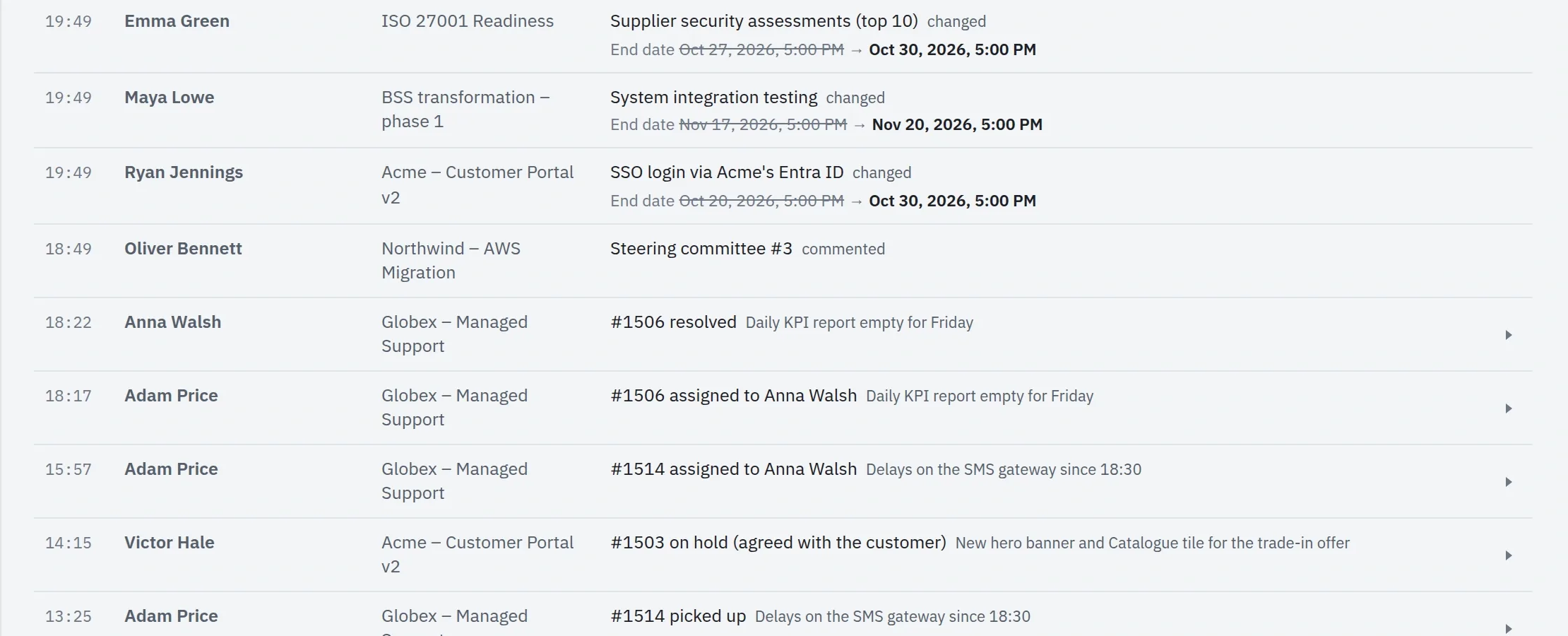
In the product, an auditor finds an audit log of every change with its prior value and copies of deleted tasks, an admin log of account changes, one rule for how long history is kept, a full data download, erasure on request, and a virus scan of every upload.
When someone leaves, is their access gone?
↑ All questionsDirectory sync switches the person off when your directory does, and the Admin log records it.
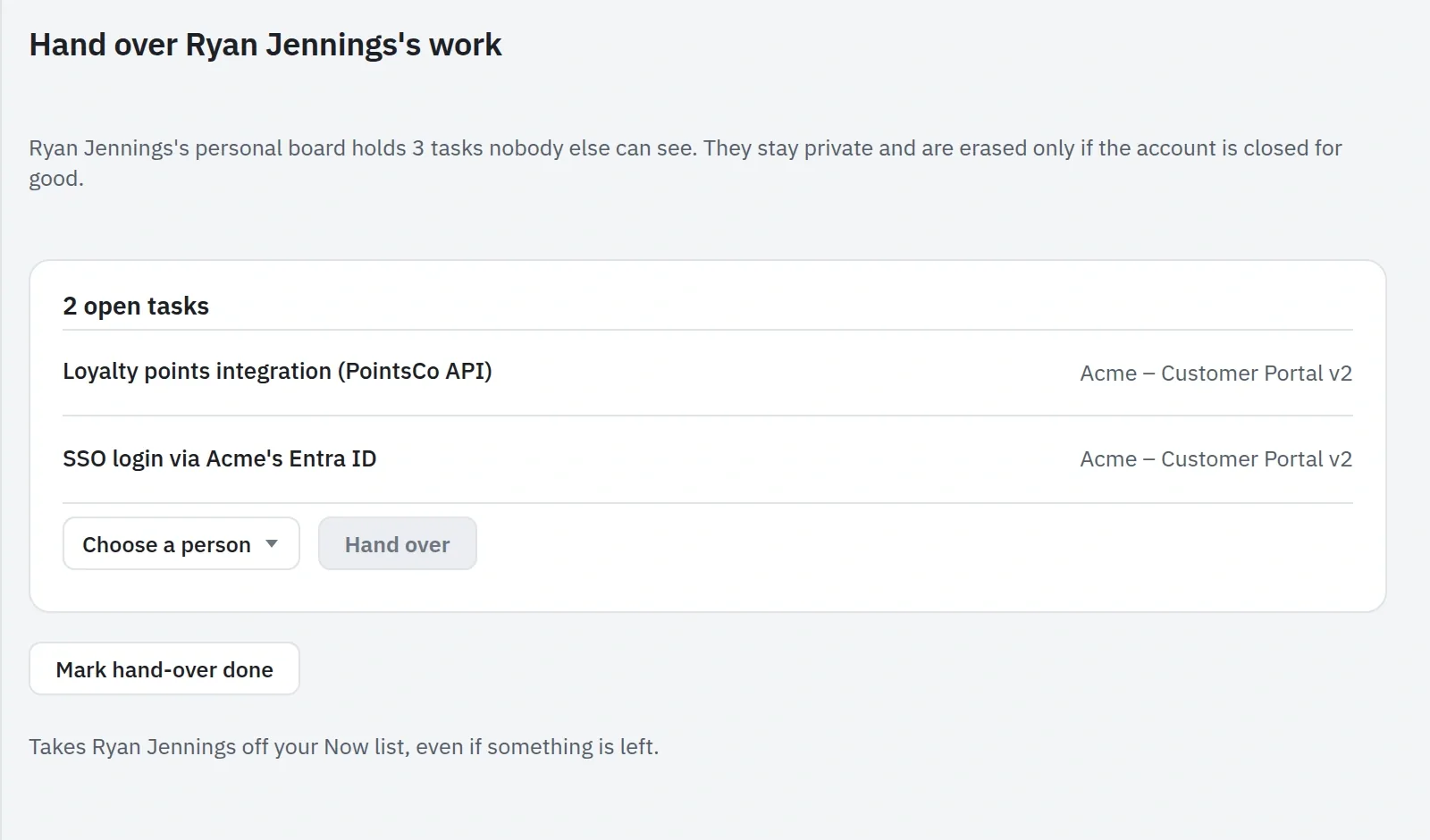
Their open tasks are handed to the right people from their row, so nothing they owned is left without an owner.
What can the AI assistant see, and who decides?
↑ All questionsAn assistant sees and changes only what the person using it may.
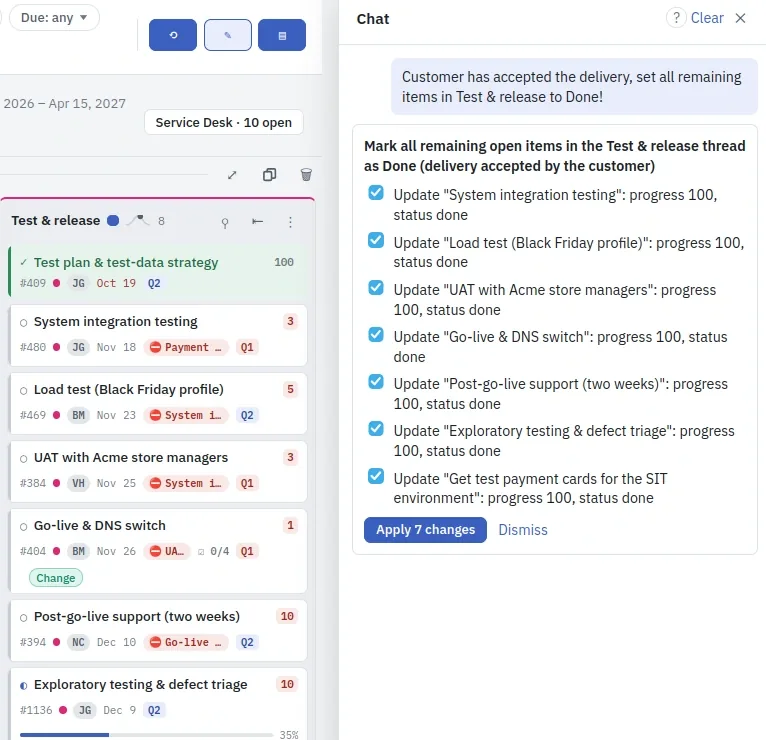
Only an Owner sets the model and can turn the assistant or AI clients off, and every change an assistant makes is recorded with the assistant and the model that made it.
Support team
For: first-line and second-line support engineers · support leads who sort the new requests
Monday morning at the support desk. Requests came in over the weekend, a customer is waiting for an answer, and the service levels you promised run whether anyone looks or not. Everything on this tab is the Service Desk, an add-on.
What came in, and who is taking it?
↑ All questionsThe Service Desk lists the open requests with their status, severity, service-level time, type, company and assignee.
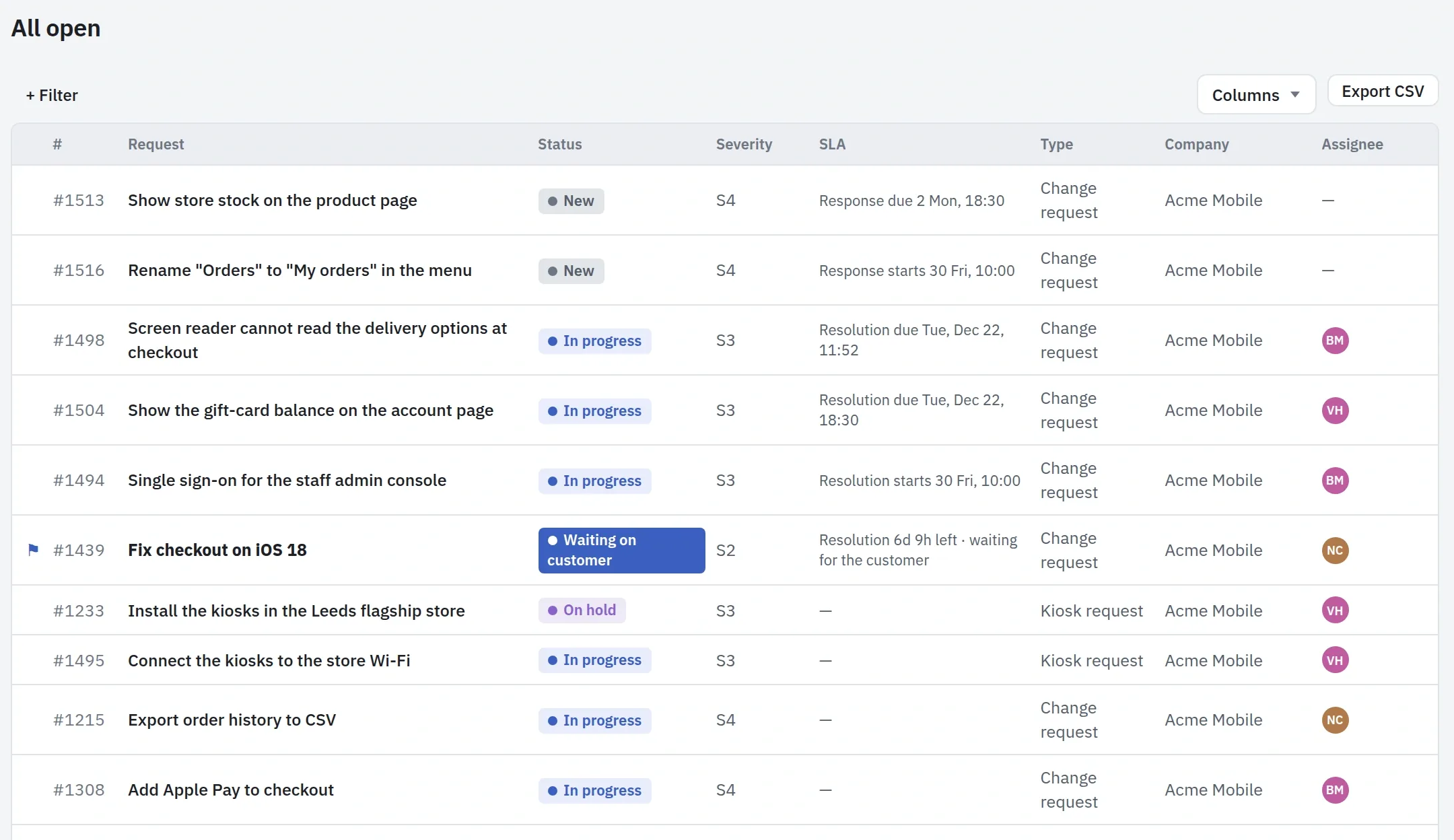
Queues narrow the list: Unassigned, Mine, At risk, Breached, Waiting on customer and On hold. Each project names a triage owner, who gets the new and unassigned requests and sees in Now how many are waiting.
Service Desk →Which request is about to miss its target?
↑ All questionsEach request runs the clocks of its SLA plan, for response, remedy and resolution, in the plan's working hours.
The At risk and Breached queues gather the requests near or past a target.
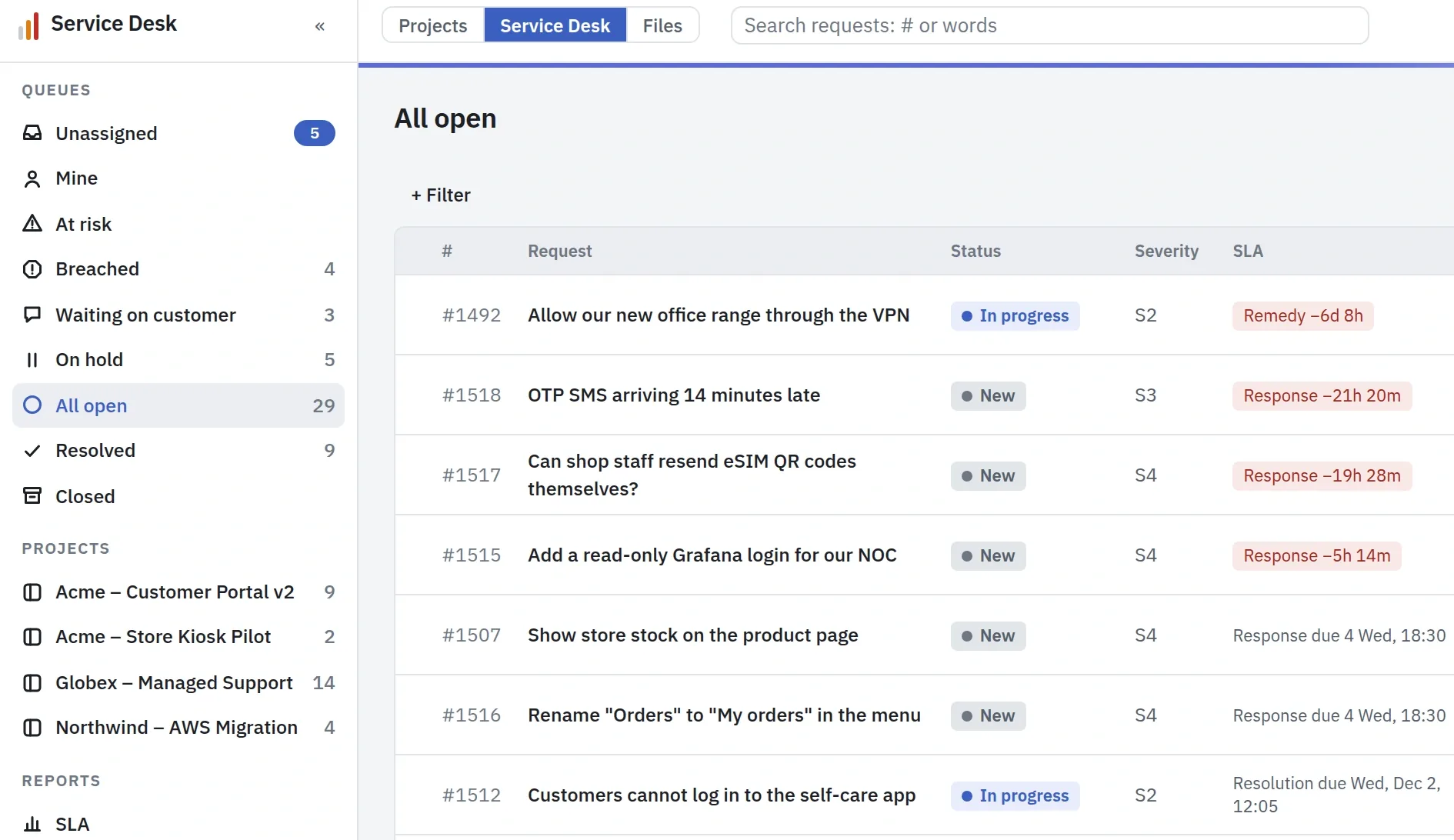
The request also comes to Now for whoever holds it, first as at risk, then as breached, and a breach is shown to the triage owner as well. You can be notified when it happens.
Service Desk →Has the customer answered?
↑ All questionsWhen a customer replies, the request comes to Now for its assignee, with the customer's name and when they wrote.
When you ask the customer something, the request waits as Waiting on customer and its service-level clock pauses until they answer. If no answer comes within the time your company sets, the request is cancelled.
Service Desk →It needs a fix in the product. How do I hand it to the engineers?
↑ All questionsCreate a task from the request on a thread of the project's board, or link a task that is already there.
The engineers work on it like any other task, and the request shows the task with its status. Internal notes on the request are for the Service Desk team only; the customer never sees them.
Creating and linking need access to the board. Without it, you see the linked task's number, title and status.
Service Desk →Is the time we spend on requests recorded?
↑ All questionsStart a timer on the request, or log the time afterwards.
The entry goes into your Time Tracker, marked as a request, under the request's project, so it counts in that project's hours and cost.
Service Desk →Did we keep the service levels this month?
↑ All questionsThe SLA report is worked out from the requests' own history, for any month, quarter or year.
It shows the share of each target met against the plan's goal, the trend month by month, and every breach with its timeline. It also shows how much of the time went to waiting for the customer or a supplier, and it downloads as a PDF.
The customer's lead sees their own months, met or missed, in the portal.
Service Desk →Customer
For: the customer's project manager · the people who file requests
Monday morning at your customer's office. Their manager reports on your project to their own management, and would rather not chase you for it.
Where does our project stand?
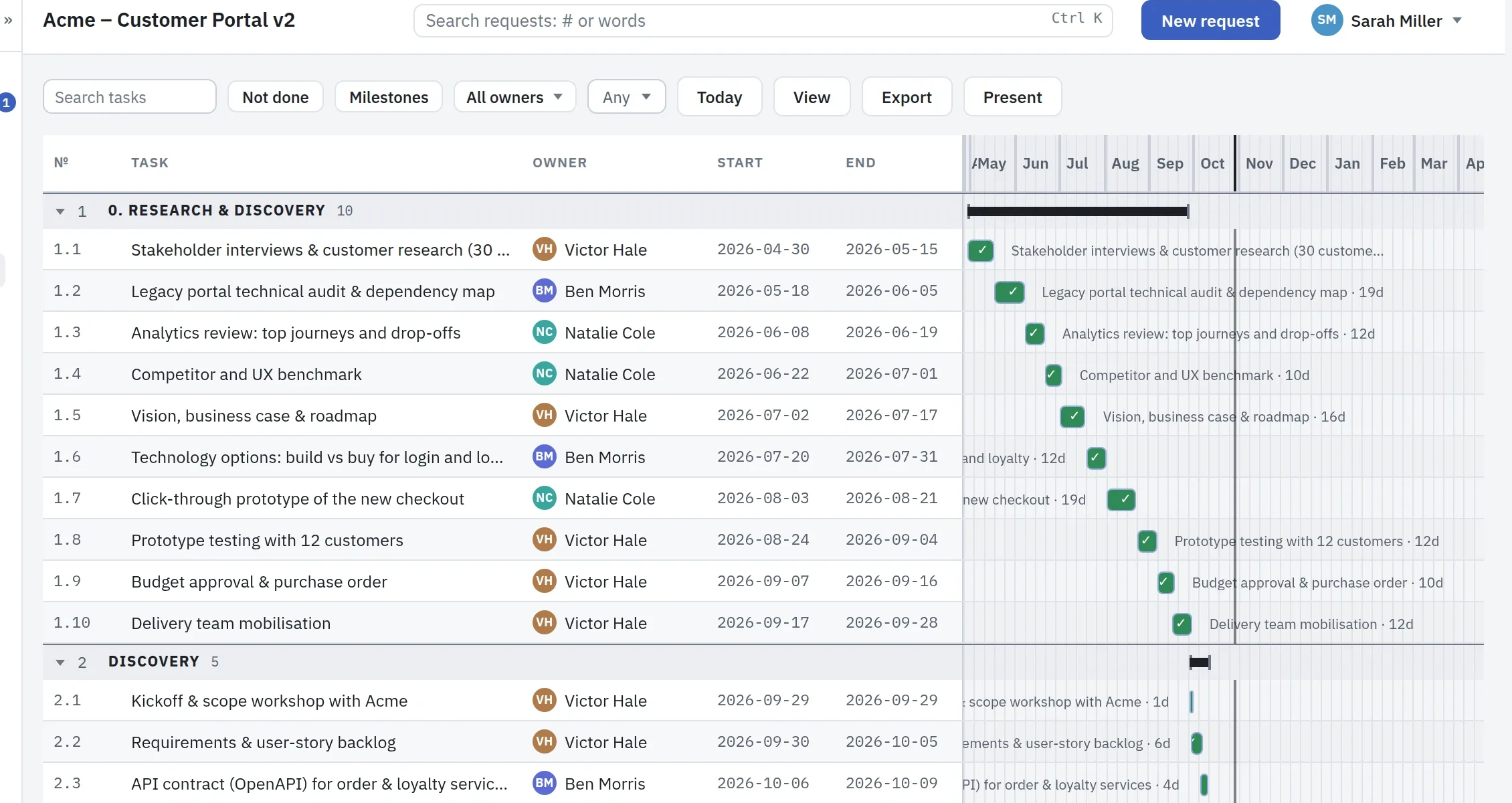
↑ All questionsYour customer signs in to their own portal and reads the same Status and Progress your team reads, for the threads you share.
Nothing else on your board reaches them, and their seat costs nothing.
Will it be delivered on the date we agreed?
↑ All questionsThe plan they see is drawn from the one your team works on: the baseline, the forecast end and the critical path, for the threads you share.
The customer →What was done this month?
↑ All questionsProgress lists the work done over any period, for the threads you share.
Tracked hours, estimates and internal notes stay with your team.
The customer →Has our request been seen, and when will it be fixed?
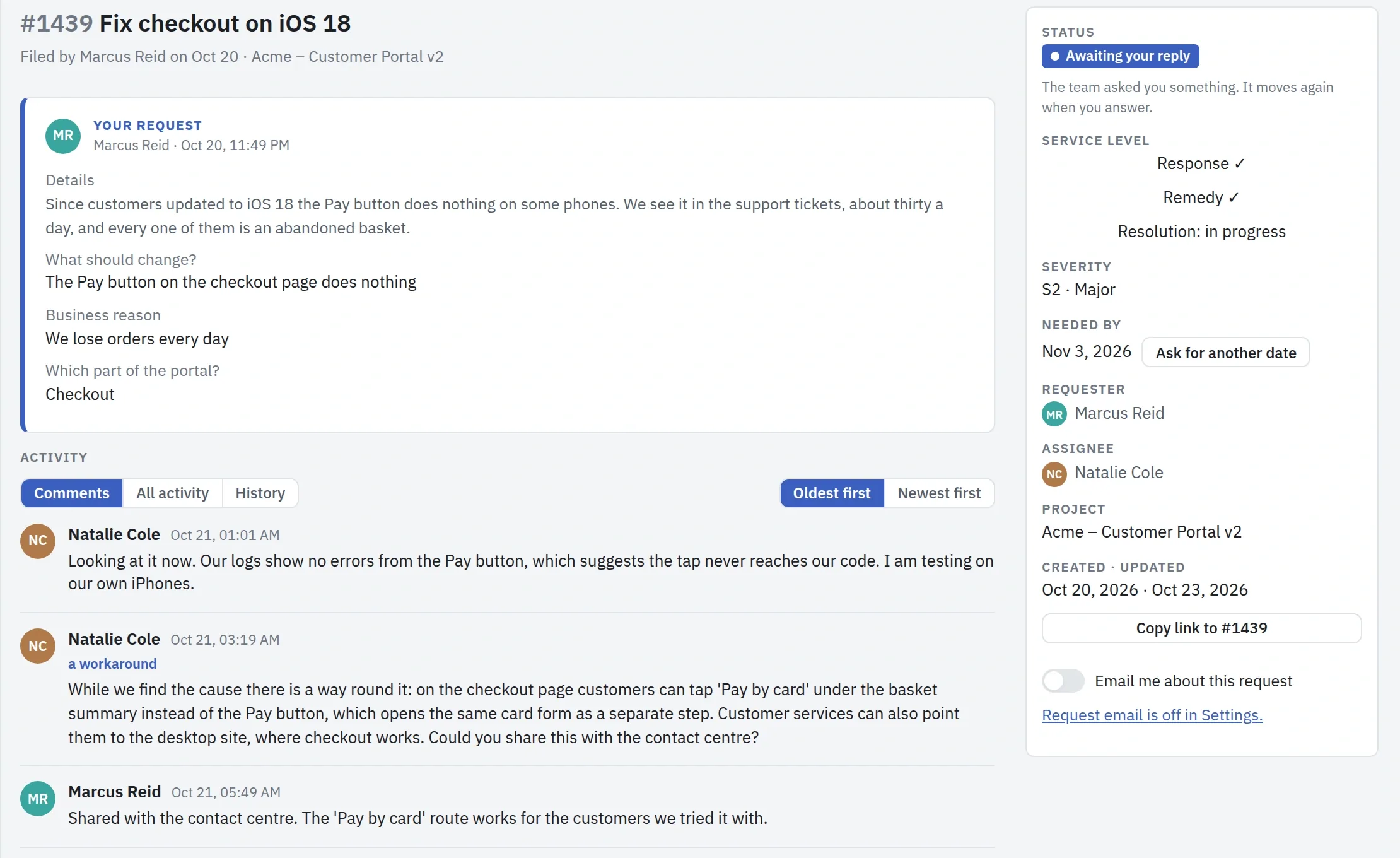
↑ All questionsEach request has its own page with the conversation, its history and a plain answer on when it is due.
The customer is emailed at each step of a request they follow.
Is the team waiting for something from us?
↑ All questionsA request that waits for the customer's answer is marked "Awaiting your reply" in their list.
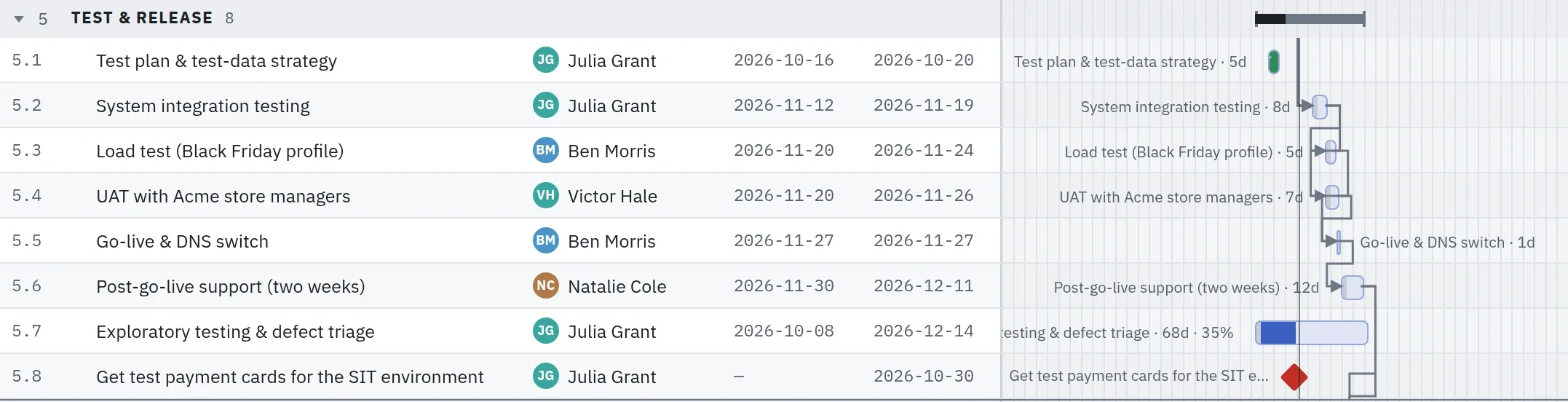
On the Timeline shared with them, each task shows its owner, its dates and the arrows to what waits on it, so a step that depends on them, such as acceptance testing with their people, shows where it sits in the plan. Notes the team keeps on what blocks a task stay with the team.
Did they keep the service levels we pay for?
↑ All questionsEach month the customer's lead sees which targets were met and which were missed, on each project, from the requests themselves.
Service Desk →